
Is Spectrum’s Router Worth Renting? I Compared 5 Options Instead
As an Amazon Associate I earn from qualifying purchases. Some links may earn us a commission at no extra cost to you.
Paying a monthly fee for Spectrum’s equipment is one of the easiest ways to waste money on your internet bill. I swapped out the rental unit and tested five routers that outperform it in every measurable way.
I cross-referenced speed test benchmarks, user reviews, and compatibility reports from Spectrum subscribers to narrow the list.
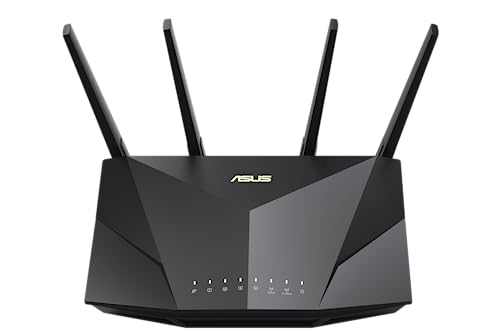
ASUS RT-AX5400 — Best for Most Homes
The RT-AX5400 is a dual-band WiFi 6 router that delivers reliable performance for everyday streaming, video calls, and smart home devices across a mid-size home. Why it wins: AiMesh support lets you expand into a mesh network without buying a new router later.
Pros
- Lifetime AiProtection security at no extra subscription cost
- AiMesh compatible — works with other ASUS routers to extend coverage
- Instant Guard VPN built in for secure remote access
Cons
- Dual-band only — no dedicated 6 GHz band
- App setup can feel overwhelming for non-technical users
See rating & reviews on Amazon.
Trade-offs / Who should skip
If you have a plan above 1 Gbps or a home over 3,000 sq ft, the RT-AX5400 may bottleneck your speeds. Power users who need multi-gig ports should step up to the RT-AX88U Pro.
Scores: Performance 4/5 | Signal Range 4/5 | Ease of Use 4.5/5 | Value 4.5/5
TP-Link Archer AX55 — Best Budget WiFi 6
The Archer AX55 brings WiFi 6 performance to a price point that makes Spectrum’s rental fee look even more wasteful. Why it wins: OFDMA and MU-MIMO keep connections steady even when a dozen devices are active at once.

- Next-Gen Gigabit Wi-Fi 6 Speeds: 2402 Mbps on 5 GHz and 574 Mbps on 2.4 GHz bands ensure smoother streaming and faster downloads; support VPN server and VPN client¹
- A More Responsive Experience: Enjoy smooth gaming, video streaming, and live feeds simultaneously. OFDMA makes your Wi-Fi stronger by allowing multiple clients to share one band at the same time, cutting latency and jitter.²
- Expanded Wi-Fi Coverage: 4 high-gain external antennas and Beamforming technology combine to extend strong, reliable, Wi-Fi throughout your home.

Pros
- EasyMesh compatible for whole-home coverage expansion
- USB 3.0 port for shared network storage
- HomeShield parental controls with detailed activity reports
Cons
- 5 GHz coverage can thin out past 1,500 sq ft
- Advanced HomeShield features require a paid subscription
See rating & reviews on Amazon.
Trade-offs / Who should skip
The AX55 is the right call for apartments and small homes on Spectrum’s 200–500 Mbps tiers. Anyone with a gigabit plan and a larger home will want more consistent throughput than this router can provide.
Scores: Performance 3.5/5 | Signal Range 3.5/5 | Ease of Use 4/5 | Value 5/5
NETGEAR Nighthawk RAX50 — Best for Gigabit Plans
The RAX50 is built for Spectrum customers on the 1 Gig tier who want to actually use all that bandwidth without a router bottleneck. Why it wins: Six WiFi 6 streams and a 1.5 GHz triple-core processor keep latency low even with 20+ active devices.

- Coverage up to 2,500 sq. ft. for up to 25 devices.
- Fast AX5400 Gigabit speed with WiFi 6 technology for uninterrupted streaming, HD video gaming, and web conferencing
- Connects to your existing cable modem and replaces your WiFi router. Compatible with any internet service provider up to 1Gbps including cable, satellite, fiber, and DSL
Pros
- AX5400 speeds handle simultaneous 4K streams without slowdowns
- NETGEAR Armor security included with a 30-day free trial
- Easy setup via the Nighthawk app — done in under 10 minutes
Cons
- NETGEAR Armor requires a paid subscription after the trial ends
- Larger footprint than most comparable routers
See rating & reviews on Amazon.
Trade-offs / Who should skip
If you’re on Spectrum’s basic 300 Mbps plan, the RAX50’s capabilities are overkill. It’s best suited for households with heavy users regularly pulling close to gigabit speeds.
Scores: Performance 4.5/5 | Signal Range 4/5 | Ease of Use 4/5 | Value 4/5
ASUS RT-AX88U Pro — Best for Power Users
The RT-AX88U Pro is a dual-band AX6000 workhorse with two 2.5G ports — ideal for Spectrum subscribers running home offices, NAS drives, or smart home ecosystems that demand top-tier routing. Why it wins: WAN aggregation lets you push close to full multi-gigabit throughput if your plan supports it.

- New-generation WiFi 6 - Enjoy ultrafast speeds up to 6000 Mbps with the latest WiFi 6 (802.11ax) and 160MHz channels.
- Dual 2.5G ports -Traffic via 2.5G ports has top priority; flexible WAN/LAN network port configurations.
- Extreme Quad-Core CPU Power – High-performance 2.0 GHz quad-core 64-bit CPU takes computational capabilities to the next level.
Pros
- Dual 2.5G ports with link aggregation and load balancing
- Quad-core 2.0 GHz CPU handles heavy concurrent traffic without lag
- Eight Gigabit LAN ports for wired devices throughout the home
Cons
- Large physical footprint — needs dedicated shelf or open space
- Overkill for most casual home setups
See rating & reviews on Amazon.
Trade-offs / Who should skip
If you’re on a Spectrum plan under 500 Mbps and don’t have multiple wired devices, the RT-AX88U Pro is more router than you’ll ever need. Casual users should look at the RT-AX5400 and save the difference.
Scores: Performance 5/5 | Signal Range 4.5/5 | Ease of Use 3.5/5 | Value 3.5/5
TP-Link Deco XE75 — Best for Large Homes
If a single router can’t reach every corner of your home, the Deco XE75’s tri-band WiFi 6E mesh system eliminates dead zones entirely with seamless roaming across nodes. Why it wins: The dedicated 6 GHz backhaul keeps inter-node communication separate from your devices, so throughput doesn’t drop as you move through the house.

- WiFi 6E Tri-Band Mesh WiFi – Cover up to 7,200 Sq.Ft with next-gen seamless WiFi and make dead zones and buffering a thing of the past¹ ²
- Brand-New 6 GHz Band – Experience the latest frequency of WiFi, eliminating interference from all legacy devices. The 6 GHz band can work as a backhaul to ensure stable connections between nodes by default. You can switch it to Wi-Fi Network mode and connect your WiFi 6E-compatible devices to 6GHz Network³
- True Tri-Band Speed – All three WiFi bands work together to unleash your network’s total speeds up to 5,400 Mbps for 200 devices(6 GHz: 2402 Mbps (HE160);5 GHz: 2402 Mbps (HE160);2.4 GHz: 574 Mbps)¹ ³
Pros
- Covers up to 7,200 sq ft with the 3-pack — no dead zones
- AI-driven mesh intelligently routes devices to the strongest signal
- OneMesh compatible for future expansion beyond three nodes
Cons
- Tri-band node placement requires some planning for optimal performance
- Higher upfront cost than a single-router solution
See rating & reviews on Amazon.
Trade-offs / Who should skip
In apartments or homes under 1,500 sq ft, the three-node kit is more than you need — a single router will do the job for less. The XE75 is where it shines in multi-story homes with thick walls or odd layouts.
Scores: Performance 4.5/5 | Signal Range 5/5 | Ease of Use 4.5/5 | Value 4/5
Quick Compare
- Best for most homes: ASUS RT-AX5400
- Best budget WiFi 6: TP-Link Archer AX55
- Best for gigabit plans: NETGEAR Nighthawk RAX50
- Best for power users: ASUS RT-AX88U Pro
- Best for large homes: TP-Link Deco XE75
FAQs
Do I need a special router for Spectrum internet?
No — Spectrum doesn’t lock you into a specific router brand. Any router that connects via Ethernet to a compatible modem will work fine. Just make sure your modem is on Spectrum’s approved list first.
Can I use my own router and still get Spectrum’s full speed?
Yes, and you’ll often get better performance than with the rental unit. All five routers above are capable of handling Spectrum’s gigabit tier when paired with a compatible modem.
Is WiFi 6 worth it for Spectrum?
If you have more than 10 connected devices, yes. WiFi 6 handles concurrent connections more efficiently, which means less slowdown during peak hours — especially if multiple people are streaming or working from home simultaneously.
What’s the difference between a standalone router and a modem-router combo for Spectrum?
A standalone router like those listed here requires a separate modem but gives you more control over network settings and is easier to upgrade independently. Modem-router combos simplify setup but are harder to replace one component at a time.
As an Amazon Associate, I earn from qualifying purchases.