
Best WiFi Extenders for Faster Internet and Better Coverage
As an Amazon Associate I earn from qualifying purchases. Some links may earn us a commission at no extra cost to you.
Slow downloads, buffering videos, and unreliable connections can make certain rooms in your home frustrating to use. The best WiFi extender can improve wireless coverage without requiring an entirely new networking system.
Best WiFi Extenders at a Glance
- Best overall: TP-Link RE715X
- Best budget: TP-Link RE315
- Best premium WiFi 7 extender: TP-Link RE653BE
- Best for ASUS routers: ASUS RP-AX58
- Best for multiple wired devices: NETGEAR EAX20
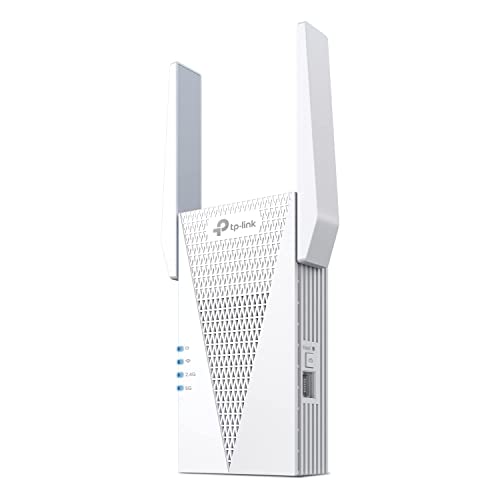
1. TP-Link RE715X — Best Overall WiFi Extender
The TP-Link RE715X offers an excellent balance of wireless speed, coverage, and everyday usability.
Why it wins: Its AX3000 dual-band WiFi 6 technology makes it a versatile option for streaming, working from home, and connecting multiple devices.
It supports theoretical wireless speeds of up to 2,402 Mbps on the 5 GHz band and 574 Mbps on the 2.4 GHz band.
The built-in Gigabit Ethernet port also provides a convenient connection for smart TVs, desktop computers, and gaming consoles.

Pros
- Fast AX3000 WiFi 6 connectivity.
- Gigabit Ethernet port.
- Compatible mesh networking support.
- Easy installation through the Tether app.
Cons
- External antennas increase its footprint.
- No dedicated wireless backhaul.
- No 6 GHz connectivity.
Customer feedback: See rating & reviews on Amazon.
Who Should Skip It?
I would recommend a dedicated mesh WiFi system instead for larger homes with multiple dead zones.
Households with high-end WiFi 7 routers may also benefit from a more advanced extender.
My Scores
- Performance: 4.8/5
- Throughput: 4.7/5
- Ease of use: 4.8/5
- Value: 4.7/5
2. TP-Link RE315 — Best Budget WiFi Extender
The TP-Link RE315 is my favorite budget-friendly option for improving coverage in bedrooms, kitchens, and smaller apartments.
Why it wins: It provides essential dual-band connectivity without unnecessary premium features.
Its AC1200 WiFi technology supports theoretical wireless speeds of up to 867 Mbps on 5 GHz and 300 Mbps on 2.4 GHz.
For everyday browsing, video calls, smart home devices, and casual streaming, it offers a practical alternative to more expensive networking equipment.

Pros
- Excellent entry-level value.
- Simple plug-in installation.
- Dual-band wireless connectivity.
- Built-in Ethernet port.
Cons
- Older WiFi 5 technology.
- Ethernet limited to 100 Mbps.
- Limited capacity for demanding networks.
Customer feedback: See rating & reviews on Amazon.
Who Should Skip It?
I wouldn’t choose this model for maximizing gigabit internet speeds, competitive gaming, or frequent large file transfers.
A WiFi 6 extender is a better investment for households with demanding bandwidth requirements.
My Scores
- Performance: 3.7/5
- Throughput: 3.3/5
- Ease of use: 4.7/5
- Value: 4.9/5
3. TP-Link RE653BE — Best Premium WiFi 7 Extender
The TP-Link RE653BE is my premium choice for households that need advanced wireless performance and greater network capacity.
Why it wins: Its BE10000 tri-band WiFi 7 technology supports the 2.4 GHz, 5 GHz, and 6 GHz frequency bands, providing additional wireless capacity for compatible devices.
Multi-Link Operation allows compatible equipment to communicate across multiple wireless links, while the 2.5 Gigabit Ethernet port makes it attractive for multi-gigabit home networks.
I particularly recommend this model for households already using a WiFi 7 router.

Pros
- Advanced tri-band WiFi 7 connectivity.
- 2.5 Gigabit Ethernet port.
- Multi-Link Operation support.
- EasyMesh compatibility.
Cons
- Bulky plug-in design.
- Excessive for basic internet plans.
- Maximum performance requires compatible equipment.
Customer feedback: See rating & reviews on Amazon.
Who Should Skip It?
I would choose a more affordable WiFi 6 extender for households with modest internet requirements or predominantly older wireless devices.
The additional 6 GHz band is also less effective at penetrating thick walls.
My Scores
- Performance: 4.9/5
- Throughput: 4.9/5
- Ease of use: 4.5/5
- Value: 4.0/5
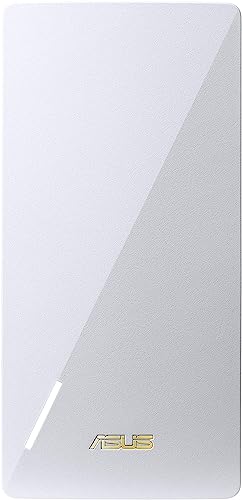
4. ASUS RP-AX58 — Best for ASUS Routers
The ASUS RP-AX58 is my preferred option for households already using a compatible ASUS AiMesh router.
Why it wins: Its AiMesh integration allows compatible networking devices to operate together as a coordinated wireless network.
With AX3000 WiFi 6 connectivity, 160 MHz channel support, and Gigabit Ethernet, it offers plenty of flexibility for everyday home networking.
Its integrated antenna design also makes it visually less intrusive than many extenders with large external antennas.
Pros
- ASUS AiMesh compatibility.
- Fast dual-band WiFi 6 connectivity.
- Integrated antenna design.
- Gigabit Ethernet port.
Cons
- No dedicated wireless backhaul.
- No 6 GHz frequency band.
- AiMesh requires compatible ASUS equipment.
Customer feedback: See rating & reviews on Amazon.
Who Should Skip It?
Although it can operate as a conventional range extender, I would prioritize the TP-Link RE715X for general-purpose WiFi extension unless ASUS AiMesh integration is important.
My Scores
- Performance: 4.6/5
- Throughput: 4.6/5
- Ease of use: 4.5/5
- Value: 4.3/5
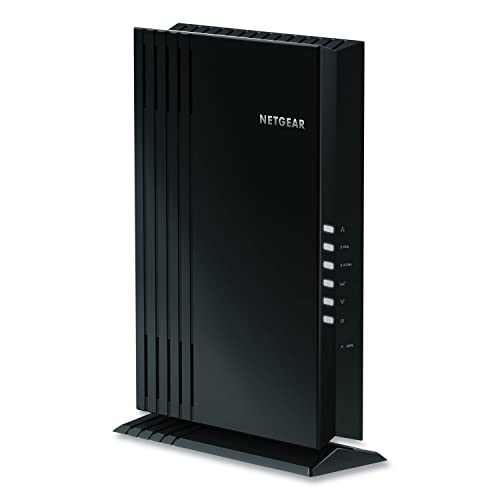
5. NETGEAR EAX20 — Best for Multiple Wired Devices
The NETGEAR EAX20 is my preferred choice for connecting multiple wired devices while extending wireless coverage.
Why it wins: Unlike many plug-in WiFi extenders that feature only one Ethernet port, the EAX20 includes four Gigabit Ethernet ports.
This makes it particularly useful for home offices, gaming setups, and entertainment centers where several devices need wired connections.
Its AX1800 dual-band WiFi 6 technology supports combined theoretical wireless speeds of approximately 1,800 Mbps. Smart roaming functionality also helps compatible devices transition between coverage areas.
Pros
- Dual-band WiFi 6 connectivity.
- Four Gigabit Ethernet ports.
- Smart roaming support.
- Compatible with most standard routers.
Cons
- Larger desktop design.
- No dedicated wireless backhaul.
- Older WiFi 6 hardware.
Customer feedback: See rating & reviews on Amazon.
Who Should Skip It?
I would choose a compact plug-in extender if space is limited or multiple Ethernet ports are unnecessary.
Because this is an older model, I also recommend checking its current firmware support before purchasing. I couldn’t verify a definitive future support period.
My Scores
- Performance: 4.3/5
- Throughput: 4.2/5
- Ease of use: 4.4/5
- Value: 4.3/5
Quick Comparison: Which WiFi Extender Is Right for You?
Each of these five WiFi extenders addresses a slightly different networking problem.
- TP-Link RE715X: Best combination of WiFi 6 performance, compatibility, and value.
- TP-Link RE315: Best for affordable coverage and everyday internet use.
- TP-Link RE653BE: Best for premium WiFi 7 networks and demanding applications.
- ASUS RP-AX58: Best for households with compatible ASUS AiMesh routers.
- NETGEAR EAX20: Best for home offices and entertainment centers with multiple wired devices.
For most households, I consider the RE715X the safest starting point.
How to Choose the Best WiFi Extender
Buying the most powerful WiFi extender doesn’t automatically guarantee a better internet connection. I recommend considering the following factors before deciding which model is right for your home.
1. Match Your Existing Router
Your existing router should influence which extender you buy.
- WiFi 5: TP-Link RE315 for basic connectivity.
- WiFi 6: TP-Link RE715X for balanced performance.
- WiFi 7: TP-Link RE653BE for advanced networking.
- ASUS AiMesh: ASUS RP-AX58 for compatible mesh integration.
- Multiple wired devices: NETGEAR EAX20 for additional Ethernet ports.
Newer extenders generally support older wireless standards, but purchasing advanced hardware doesn’t automatically upgrade your router’s capabilities.
2. Prioritize Real-World Internet Speeds
Advertised wireless speeds can be misleading. An AX3000 extender doesn’t guarantee 3,000 Mbps download speeds.
Manufacturers combine theoretical wireless link rates across frequency bands to establish these classifications.
Actual performance depends on several factors:
- Your internet plan.
- Router capabilities.
- Distance between networking devices.
- Wireless interference.
- Wall thickness and construction materials.
- Number of connected devices.
I recommend prioritizing practical throughput and connection stability rather than purchasing solely based on advertised speeds.
3. Choose the Right Location
Installing an extender directly inside a WiFi dead zone is one of the most common mistakes.
A WiFi extender needs a sufficiently strong connection to the existing router before it can successfully extend that connection elsewhere.
I recommend positioning it approximately halfway between your router and the area with weak reception, provided the extender can still receive a strong signal.
Avoid placing it behind large appliances, inside cabinets, or near substantial metal objects.
A well-positioned midrange extender can outperform a premium model installed in the wrong location.
4. Look for Ethernet Connectivity
An Ethernet port is particularly useful for gaming consoles, desktop computers, and smart TVs.
I prefer models with Gigabit Ethernet connectivity because they avoid the limitations of older 100 Mbps ports.
If multiple devices require Ethernet connections, the NETGEAR EAX20 stands out with its four Gigabit Ethernet ports.
For advanced multi-gigabit networking, the TP-Link RE653BE provides a faster 2.5 Gigabit Ethernet connection.
However, connecting a device to an extender with Ethernet doesn’t eliminate the limitations of the extender’s wireless connection to the router.
5. Consider Mesh Compatibility
A mesh-compatible extender can provide a more convenient networking experience when paired with compatible equipment.
Instead of manually switching between separate wireless networks, compatible mesh systems can help devices transition between coverage areas.
The TP-Link RE715X and RE653BE offer mesh compatibility, while the ASUS RP-AX58 is particularly attractive for existing AiMesh users.
If several rooms experience connection problems, I would consider a dedicated mesh WiFi system rather than purchasing multiple conventional extenders.
6. Don’t Overpay for Features You Won’t Use
Not every household needs WiFi 7.
For basic browsing, social media, and occasional streaming, an affordable extender such as the TP-Link RE315 may be sufficient.
I would prioritize WiFi 6 for busier households, while WiFi 7 makes more sense for demanding users with compatible equipment and faster internet plans.
The best extender is the one that solves your coverage problem without introducing unnecessary expenses.
Common WiFi Extender Mistakes to Avoid
Even a high-quality WiFi extender can disappoint when installed incorrectly.
Installing It Too Far From the Router
An extender cannot reliably retransmit a signal that it barely receives.
Always check the signal strength at the intended installation location before settling on a permanent position.
Expecting Faster Internet Than Your Plan Provides
A WiFi extender can improve coverage and recover performance lost because of weak reception, but it cannot increase the maximum speed supplied by your internet provider.
Using Too Many Extenders
Connecting multiple wireless repeaters in a chain can introduce additional latency and reduce available bandwidth.
For extensive coverage problems, I recommend mesh networking or wired access points instead.
Ignoring Router Compatibility
While most conventional extenders work with standard routers, advanced features such as mesh integration and Multi-Link Operation require compatible hardware.
Check these requirements before purchasing a premium model.
Frequently Asked Questions
What Is the Best WiFi Extender Overall?
The TP-Link RE715X is my top recommendation for most households. It combines fast WiFi 6 connectivity, straightforward installation, Gigabit Ethernet, and practical networking features.
It is particularly suitable for streaming, working from home, and improving coverage in individual rooms.
Do WiFi Extenders Really Work?
Yes, WiFi extenders can improve wireless coverage in areas with weak reception.
Their effectiveness depends heavily on placement, the strength of the existing router signal, and the physical layout of your home.
A properly positioned extender can make a noticeable difference in rooms that previously experienced unreliable connectivity.
Do WiFi Extenders Reduce Internet Speed?
Wireless extenders can reduce available throughput because they need to receive and retransmit network traffic.
Tri-band connectivity and wired access point configurations may help minimize this limitation.
I recommend placing the extender where it can maintain a strong connection to the main router.
What Is the Best WiFi Extender for Gaming?
The TP-Link RE653BE is my premium recommendation for wireless gaming, particularly with compatible WiFi 7 equipment.
The NETGEAR EAX20 is another option if several gaming devices require Ethernet connections.
However, a direct wired connection to the main router remains my preferred choice for minimizing latency and improving connection consistency.
What Is the Best Cheap WiFi Extender?
The TP-Link RE315 is my budget recommendation.
Its dual-band AC1200 connectivity is suitable for everyday browsing, casual streaming, and connecting smart home devices in areas with weak wireless reception.
What Is the Best WiFi Extender With Ethernet Ports?
The NETGEAR EAX20 is my preferred option for connecting multiple wired devices because it includes four Gigabit Ethernet ports.
For a single multi-gigabit Ethernet connection, I recommend considering the TP-Link RE653BE.
Can a WiFi Extender Work Through Walls?
Yes, but thick concrete, brick, and metal structures can significantly weaken wireless signals.
The 2.4 GHz frequency band generally penetrates obstacles better than 5 GHz or 6 GHz, although it typically offers less bandwidth.
Placement is especially important in homes with thick interior walls.
Do WiFi Extenders Work With Any Router?
Most conventional WiFi extenders work with standard wireless routers.
However, advanced features such as AiMesh, EasyMesh, and Multi-Link Operation require compatible networking equipment.
I recommend checking compatibility before purchasing.
Is a WiFi Extender Better Than Mesh WiFi?
A WiFi extender is generally a more economical solution for one or two weak coverage areas.
Mesh WiFi is usually better suited to larger homes with multiple dead zones and devices that frequently move between rooms.
If the existing router performs well throughout most of your home, a single extender may be all you need.
Should I Leave My WiFi Extender On All the Time?
Yes, WiFi extenders are designed for continuous operation under normal operating conditions.
Keeping the extender powered allows connected devices to maintain network access without requiring repeated setup.
I also recommend installing available firmware updates to maintain security and compatibility.
Can I Use Two WiFi Extenders in the Same House?
Yes, multiple WiFi extenders can operate within the same home.
However, I recommend connecting each extender directly to the main router whenever possible rather than creating a chain of repeaters.
For larger properties, a mesh WiFi system may offer a more reliable long-term solution.
Final Verdict: Which WiFi Extender Should You Buy?
The TP-Link RE715X is my pick for the best WiFi extender overall because it offers a practical balance of performance, compatibility, and value without requiring an expensive networking upgrade.
For budget-conscious buyers, I recommend the TP-Link RE315. For maximum wireless performance, the TP-Link RE653BE is the more advanced choice.
The ASUS RP-AX58 makes the most sense for compatible ASUS routers, while the NETGEAR EAX20 is particularly useful for connecting multiple wired devices.
If you’re unsure which model to choose, I would start with the TP-Link RE715X. It offers the features most households need without the complexity of more advanced networking equipment.
As an Amazon Associate I earn from qualifying purchases. Some links may earn us a commission at no extra cost to you.
As an Amazon Associate, I earn from qualifying purchases.