
Best Wi-Fi USB Dongles for Desktop PCs and Laptops
As an Amazon Associate, I earn from qualifying purchases. Some links may earn us a commission at no extra cost to you.
A good USB Wi-Fi adapter comes down to Wi-Fi generation + band support (Wi-Fi 6 vs 6E vs 7) and whether the adapter has enough antenna size for your distance from the router.
Top picks
NETGEAR Nighthawk A9000 (Wi-Fi 7) — Best overall if the PC supports it
Best pick for pushing newer routers/mesh systems, especially if 6 GHz performance matters and the PC is compatible.
Why it wins: top-tier Wi-Fi generation (primary metric) for speed and future-proofing.
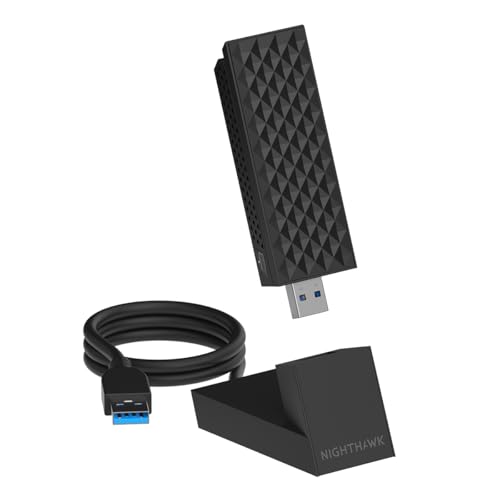
- Requires PC with Windows 11 and above (WiFi 7 features & 6GHz require Windows 11). Not compatible with Windows 10 or lower, or MAC.
- Boost the WiFi performance of your PC with the latest Tri-Band WiFi 7 technology. The A9000 selects the best band (2.4GHz, 5GHz, or 6GHz) for your PC, ensuring the strongest signal and fastest performance, even in congested environments
- Faster, more reliable speeds of up to 6.5 Gbps for ultimate 4K/8K streaming, smooth video conferencing, online gaming, and more on your PC

Pros
-
Wi-Fi 7 tri-band capability (including 6 GHz)
-
Strong upgrade for high-speed internet plans
-
Great for busy networks (many devices)
Cons
-
Needs compatible OS/driver support
-
Overkill for basic browsing
Trade-offs / who should skip
-
Skip if the router is Wi-Fi 5/6 only—Wi-Fi 6 can be enough.
Scores: Performance 5/5 • Wi-Fi generation/bands 5/5 • Ease of use 4/5 • Value 3/5
NETGEAR Nighthawk A8000 (Wi-Fi 6E) — Best for 6 GHz upgrades
A strong choice for jumping to 6 GHz without paying for Wi-Fi 7.
Why it wins: reliable Wi-Fi 6E (6 GHz) support for less interference in many homes.

- Access the exclusive WiFi 6E band for superior HD video conferencing, gaming, and streaming. Simply plug dongle into desktop or laptop. No network card or ISP plan required
- Fast AXE3000 WiFi speed, up to 3Gbps, 2.5x faster than WiFi 5
- Find the strongest WiFi signal and best coverage with the flippable antenna
Pros
-
Adds 6 GHz band with a compatible router
-
Great for gaming/streaming stability near the router
-
Good step-up from Wi-Fi 5 adapters
Cons
-
Benefits shrink if the router doesn’t support 6E
-
Placement matters more than people expect
Trade-offs / who should skip
-
If the router is Wi-Fi 6 (not 6E), a solid Wi-Fi 6 adapter is the better value.
Scores: Performance 4/5 • Wi-Fi generation/bands 5/5 • Ease of use 4/5 • Value 4/5
ASUS USB-AX56 (Wi-Fi 6) — Best Wi-Fi 6 performance without 6 GHz
A smart pick for most Wi-Fi 6 routers where 6 GHz isn’t needed.
Why it wins: strong Wi-Fi 6 capability in a mainstream adapter.

- Instant upgrade to WiFi 6 – Boost your PC to 802.11ax standard via USB with speeds up to 1800 Mbps..OS Support : Windows 10, Windows 11
- Ultra-high efficiency – Enable faster transmission in high density environments with OFDMA, MU-MIMO and BSS Coloring.
- Amplified signal – External antenna and cradle ensures powerful WiFi signal.
Pros
-
Great match for Wi-Fi 6 routers
-
Solid everyday stability for downloads and video calls
-
Good “set it and forget it” upgrade
Cons
-
No 6 GHz band
-
Driver/OS support must be checked
Trade-offs / who should skip
-
If the router is Wi-Fi 6E/7 and 6 GHz is important, choose A8000/A9000 instead.
Scores: Performance 4/5 • Wi-Fi generation/bands 4/5 • Ease of use 4/5 • Value 4/5
TP-Link Archer TX20U Plus (Wi-Fi 6) — Best for range in larger rooms
A great option when the PC is farther from the router and a bigger antenna setup helps.
Why it wins: better real-world reception than tiny nano adapters.

- 𝐏𝐥𝐞𝐚𝐬𝐞 𝐮𝐬𝐞 𝐔𝐒𝐁 𝟑.𝟎 𝐩𝐨𝐫𝐭 𝐭𝐨 𝐞𝐧𝐬𝐮𝐫𝐞 𝐨𝐩𝐭𝐢𝐦𝐚𝐥 𝐩𝐞𝐫𝐟𝐨𝐫𝐦𝐚𝐧𝐜𝐞.
- 𝐋𝐢𝐠𝐡𝐭𝐧𝐢𝐧𝐠-𝐅𝐚𝐬𝐭 𝐖𝐢𝐅𝐢 𝟔 𝐀𝐝𝐚𝐩𝐭𝐞𝐫 -Experience faster speeds with less network congestion compared to previous generation Wi-Fi 5. AX1800 wireless speeds to meet all your gaming, downloading, and streaming needs
- 𝐃𝐮𝐚𝐥 𝐁𝐚𝐧𝐝 𝐖𝐢𝐅𝐢 𝐀𝐝𝐚𝐩𝐭𝐞𝐫 - 2.4GHz and 5GHz bands for flexible connectivity (up to 1201 Mbps on 5GHz and up to 574 Mbps on 2.4GHz)
Pros
-
Better range than most “nano” dongles
-
Strong Wi-Fi 6 upgrade for desktops
-
Helpful for rooms with weaker signal
Cons
-
Larger footprint on a desk
-
Still depends on router placement
Trade-offs / who should skip
-
If portability is the priority, choose a nano adapter instead.
Scores: Performance 4/5 • Wi-Fi generation/bands 4/5 • Ease of use 4/5 • Value 5/5
TP-Link Archer T3U Plus (Wi-Fi 5) — Best budget upgrade for older PCs/routers
Best for basic upgrades from very old Wi-Fi adapters (or if the router is older).
Why it wins: good budget performance without paying for Wi-Fi 6/6E/7.
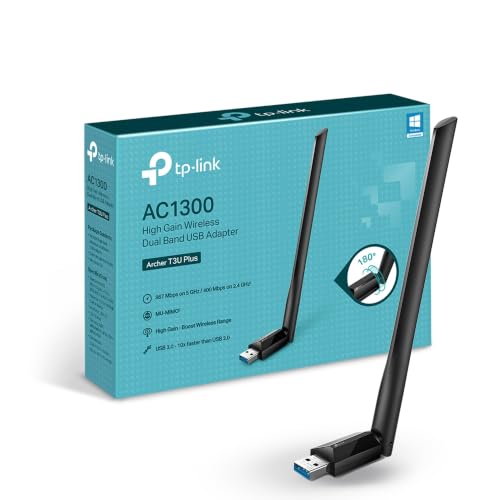
- 𝐅𝐚𝐬𝐭 𝐖𝐢𝐅𝐢 𝐀𝐝𝐚𝐩𝐭𝐞𝐫 𝐟𝐨𝐫 𝐃𝐞𝐬𝐤𝐭𝐨𝐩 𝐏𝐂: AC1300 dual-band WiFi ensures your device will run at fast speeds (867 Mbps on the 5 GHz band or 400 Mbps on the 2.4 GHz band)
- 𝐔𝐩𝐠𝐫𝐚𝐝𝐞 𝐘𝐨𝐮𝐫 𝐂𝐨𝐦𝐩𝐮𝐭𝐞𝐫'𝐬 𝐖𝐢-𝐅𝐢 - All USB WiFi adapters are designed to add or upgrade your computer’s Wi-Fi. Actual speeds cannot exceed the connecting router’s maximum speed.
- 𝐌𝐔-𝐌𝐈𝐌𝐎 𝐓𝐞𝐜𝐡𝐧𝐨𝐥𝐨𝐠𝐲: Improves the throughput and efficiency of the whole network with MU-MIMO technology.
Pros
-
Affordable upgrade path
-
Great for browsing, schoolwork, streaming
-
More capable than many built-in older Wi-Fi chips
Cons
-
No Wi-Fi 6/6E/7 features
-
Not ideal for crowded networks
Trade-offs / who should skip
-
If the router is Wi-Fi 6+, it’s worth stepping up to a Wi-Fi 6 adapter.
Scores: Performance 3/5 • Wi-Fi generation/bands 2/5 • Ease of use 4/5 • Value 5/5
Quick compare
-
Best overall (Wi-Fi 7): NETGEAR A9000 — B0F9HTJXXC
-
Best 6 GHz value (Wi-Fi 6E): NETGEAR A8000 — B0B94R78N7
-
Best Wi-Fi 6 mainstream: ASUS USB-AX56 — B09QQWQS1N
-
Best range for desktops: TP-Link TX20U Plus — B0B5YPK9L1
-
Best budget upgrade: TP-Link T3U Plus — B08D72GSMS
Buying guide
1) Pick the right Wi-Fi generation (primary metric)
-
Wi-Fi 7: best long-term, best if the router is Wi-Fi 7.
-
Wi-Fi 6E: best if you specifically want 6 GHz.
-
Wi-Fi 6: best value for most modern routers without 6 GHz.
-
Wi-Fi 5: best only when budget is tight or the router is older.
2) Choose antenna size based on distance
-
Farther from router / through walls: larger adapter/antennas usually help more than “higher speed ratings.”
-
Close to router / travel: nano adapters are convenient but can sacrifice range.
3) Confirm OS support before buying
Many USB Wi-Fi adapters are Windows-focused. Always confirm the supported OS versions on the product page for the exact model.
FAQs
Is Wi-Fi 6E worth it?
Yes if the router supports 6E and the 5 GHz band is crowded—6 GHz can be cleaner in many homes.
Will a USB Wi-Fi adapter reduce ping for gaming?
Sometimes. The biggest gains usually come from stronger signal, less interference, and a good router—not just the adapter’s “max speed.”
Should a nano adapter be avoided?
Not necessarily. Nano is great for portability, but larger adapters often win on range and stability.
As an Amazon Associate, I earn from qualifying purchases.