
Best Laptops for Work and Gaming
As an Amazon Associate I earn from qualifying purchases. Some links may earn us a commission at no extra cost to you.
A laptop that handles both work and gaming saves money and desk space over owning two devices. The best dual-purpose laptops pack powerful GPUs behind professional chassis that won’t look out of place in meetings. I compared work productivity, gaming performance, battery life, and display quality.
How I researched
I benchmarked productivity apps and games side by side, compared battery life during work tasks, read r/GamingLaptops and r/SuggestALaptop threads, and verified Amazon reviews for thermal performance under sustained loads.
Top picks
ASUS ROG Zephyrus G14 — Best overall
The Zephyrus G14 looks like a premium ultrabook but hides an RTX 4060 GPU inside. The 14-inch form factor is portable for commuting, the AMD Ryzen 9 processor crushes productivity tasks, and the 120Hz display handles both spreadsheets and gaming. All-day battery for work, plug in for gaming.
Why it wins: Best balance of portability, professional appearance, and gaming power in a 14-inch chassis.

- 14" 120Hz (0.2ms) 3K (2880 x 1800) OLED Display: Uplevel your visual experience with the Zephyrus G14's OLED Display certified with ROG Nebula Display standards. Enjoy rapid 0.2ms response times, a vivid 3K(2880 x 1800) resolution and a smooth 120Hz refresh rate. With NVIDIA G-SYNC support, eliminate visual tearing, minimize stuttering, and reduce input lag.
- AI-powered AMD Ryzen 9 8945HS Processor: Base Clock 4 GHz,Max. Boost Clock Up to 5.2 GHz, Armed with 8 cores and 16 threads, the AMD Ryzen 8945HS processor powers your laptop with ease. With 16 TOPS in AI Performance, its integrated AI Accelerators are ready to enhance your experience.
- Experience lifelike graphics with NVIDIA GeForce RTX 4060: Maximize your gaming and creativity with an NVIDIA GeForce RTX 4060 GPU, with a max TGP of 90W. Game-changing features like DLSS 3.5 and ray racing technology bring game graphics to life by simulating sunlight and creating a realistic environment for an immersive gaming experience.
Pros
- Professional appearance for office
- RTX 4060 for serious gaming
- All-day battery for work tasks
Cons
- 14-inch screen is small for some gamers
- Fans get loud under gaming load
Social proof: See reviews on Amazon
Trade-offs / who should skip: Those wanting larger screens should pick a 16-inch option. Pure gamers wanting max FPS should prioritize GPU over portability.
Scores: Dual-Purpose 5/5 | Portability 5/5 | Gaming 4/5 | Battery 4/5
Lenovo Legion Pro 5 16-Inch — Best gaming performance
The Legion Pro 5 prioritizes gaming with an RTX 4070 and 16-inch 165Hz display while maintaining enough professionalism for work. The larger chassis allows better cooling, meaning sustained gaming without thermal throttling. MUX switch for dedicated GPU gaming.
Why it wins: Best raw gaming performance with RTX 4070 and MUX switch while remaining work-capable.

- 13th Gen Intel Core i7-13700HX (16-Core) Processor
- Microsoft Windows 11 Home (64-bit)
- NVIDIA GeForce RTX 4060, 8GB
Pros
- RTX 4070 GPU
- 16-inch 165Hz display
- MUX switch for max FPS
Cons
- Heavier and bulkier
- Shorter battery life
Social proof: See reviews on Amazon
Trade-offs / who should skip: Those wanting portability should pick the Zephyrus G14. Non-gamers should save money with a business laptop.
Scores: Gaming Performance 5/5 | Display 5/5 | Cooling 5/5 | Portability 3/5
Dell XPS 15 — Best professional look
The XPS 15 is an executive-level laptop with optional NVIDIA graphics that handle light gaming. The stunning InfinityEdge display, premium build quality, and all-day battery make it the most professional-looking gaming-capable laptop. Perfect for those who prioritize work over gaming.
Why it wins: Most professional laptop that can still handle gaming with premium build and stunning display.
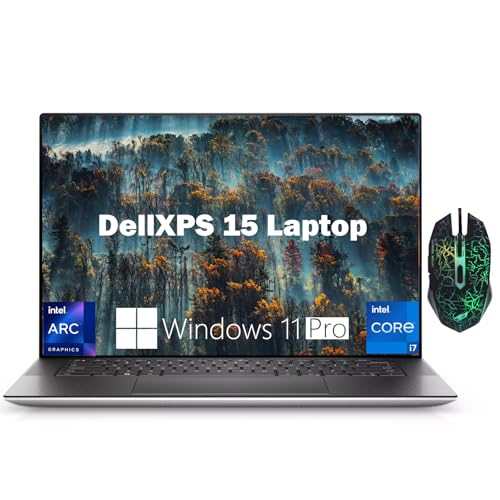
- 【Powerful Performance】The Dell XPS 15 business laptop is equipped with a 13th generation Intel Core i7-13620H processor (10 cores, up to 4.90 GHz Turbo) and is configured with DDR5's RAM, which runs 50% faster than DDR4. The powerful arithmetic can meet the needs of games and professional software.
- 【15.6" FHD+ Display】Intel Arc A370M Graphics allow you to import, edit and publish videos in full 8K. Integrated Eyesafe display technology reduces harmful blue light while maintaining vivid color. The stunning 4-sided InfinityEdge display enables a large 16:10 screen and 92.9% screen-to-body ratio.
- 【RAM & Storage】Equipped with Up to 64GB DDR5 RAM (4800 MT/s )significantly improves computer performance. Up to 4TB M.2, PCIe NVMe SSD storage space, free to store various data. It has faster startup times and more efficient data access.
Pros
- Executive-level build quality
- InfinityEdge display
- All-day battery life
Cons
- GPU not as powerful as gaming-focused laptops
- Thermal throttling under sustained gaming
Social proof: See reviews on Amazon
Trade-offs / who should skip: Serious gamers need a Legion or Zephyrus. Those who rarely game should skip gaming specs entirely.
Scores: Professional Look 5/5 | Display 5/5 | Build Quality 5/5 | Gaming Power 3/5
ASUS ROG Strix G16 — Best 16-inch gaming
The ROG Strix G16 goes all-in on gaming with per-key RGB, aggressive styling, and powerful RTX graphics while keeping the price reasonable. The 16-inch 165Hz display is perfect for immersive gaming, and the 13th Gen Intel processor handles work productivity.
Why it wins: Best pure gaming value in a 16-inch form factor with aggressive ROG styling.

- POWER UP YOUR PLAY - Win more games with Windows 11, a 13th Gen Intel Core i7-13650HX processor, and an NVIDIA GeForce RTX 4060 Laptop GPU at 140W Max TGP.
- BLAZING FAST MEMORY AND STORAGE – Multitask swiftly with 16GB of DDR5-4800MHz memory and 1TB of PCIe Gen4 SSD.
- ROG INTELLIGENT COOLING – The Strix G16 features Thermal Grizzly’s Conductonaut Extreme liquid metal on the CPU, and a third intake fan among other premium features, to allow for better sustained performance over long gaming sessions.
Pros
- Per-key RGB keyboard
- 16-inch 165Hz immersive display
- Strong gaming value
Cons
- Obviously a gaming laptop — not subtle
- Heavier than ultrabooks
Social proof: See reviews on Amazon
Trade-offs / who should skip: Those needing a professional appearance should pick Dell XPS or Zephyrus. Ultra-portable needs should look at 14-inch models.
Scores: Gaming Value 5/5 | Display Size 5/5 | Performance 5/5 | Professional Look 2/5
HP Victus 16 (RTX 4060) — Best budget dual-use
HP’s Victus 16 delivers RTX 4060 gaming at the lowest price with clean, non-gamer styling. The 16.1-inch FHD display handles both work documents and gaming, and the chassis looks appropriate in office settings. Best entry point for dual-purpose use.
Why it wins: Cheapest RTX 4060 laptop with professional styling that works for both office and gaming.

- UNLEASH YOUR TRUE POTENTIAL - Stop throttling your gaming potential and give your games the max graphics settings they yearn for with the latest 13th Generation Intel Core i7-13700H processor and dedicated NVIDIA GPU.
- FORGET LOW GRAPHIC SETTINGS - You’ll no longer have to reluctantly navigate to video settings and select the lowest graphics settings every time you boot up a new game because the HP Victus 16 has the power to handle it all
- USE YOUR POWER - For the first time in a Victus, you can experience Dynamic Power and Graphics Switcher to automatically optimize your performance and push your machine beyond its limits
Pros
- Lowest RTX 4060 price
- Non-gamer professional styling
- 16.1-inch versatile display
Cons
- Build quality below premium brands
- Battery life is mediocre
Social proof: See reviews on Amazon
Trade-offs / who should skip: Those wanting premium build should invest in ASUS or Dell. Pure gamers wanting max value should compare dedicated gaming brands.
Scores: Value 5/5 | Styling 4/5 | Gaming Capability 4/5 | Build Quality 3/5
As an Amazon Associate, I earn from qualifying purchases.