
Best Laptops for College Students
As an Amazon Associate I earn from qualifying purchases. Some links may earn us a commission at no extra cost to you.
A student laptop has to be light, tough enough for a backpack, and last through classes without hunting for an outlet. My #1 deciding factor here is battery life (hours)—because “fast” doesn’t matter much if you’re tethered to a wall.
How I researched
I compared recent roundups, deep dives, and spec sheets, prioritized realistic battery life, weight/portability, and keyboard/trackpad quality, checked campus-friendly basics (webcam, Wi-Fi, USB-C charging), noted availability/EOL risk, and weighed performance vs. long-term ownership costs.
Top picks
Apple MacBook Air 13 (M4, 2025) — Best for most students (battery + longevity)
A quiet, ultraportable laptop that’s strong for everyday school work and still feels fast years later.
Why it wins: excellent battery life and low-fuss reliability for notes, research, and creative projects.

- SPEED OF LIGHTNESS — MacBook Air with the M4 chip lets you blaze through work and play. With Apple Intelligence,* up to 18 hours of battery life,* and an incredibly portable design, you can take on anything, anywhere.
- SUPERCHARGED BY M4 — The Apple M4 chip brings even more speed and fluidity to everything you do, like working between multiple apps, editing videos, or playing graphically demanding games.
- BUILT FOR APPLE INTELLIGENCE — Apple Intelligence is the personal intelligence system that helps you write, express yourself, and get things done effortlessly. With groundbreaking privacy protections, it gives you peace of mind that no one else can access your data — not even Apple.*
Pros
- Long battery life for campus days
- Silent (fanless) and lightweight for backpacks
- Strong trackpad + great standby sleep behavior
Cons
- Only USB-C ports (plan a small hub)
- Upgrades can get pricey later (buy enough RAM/storage upfront)
See reviews on Amazon.
Who should skip: students who must run Windows-only exam/proctoring software or niche engineering tools.
Scores: Performance 4.5/5 • Battery Life 5/5 • Ease of Use 5/5 • Value 4/5
Dell XPS 13 (9340) — Best premium Windows pick for commuting
A sleek 13-inch Windows laptop for students who want a high-end screen/keyboard feel in a small bag.
Why it wins: very portable, with strong performance options if you multitask hard.
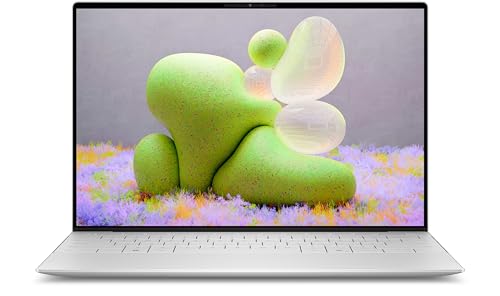
- [ Latest And Greatest ] Released in 2024 The XPS 9340 Laptop is DELL's latest release in the 13" XPS family. It includes a 1 year warranty with on-site Service and comes with all the latest technology including DDR4 Memory clocked at a whopping 3200MHz anda 15th generation INTEL 16-core Processor. The cores on the Core Ultra 7-155H processor allows for exceptional multitasking. To save power and prolong battery life the processor will run @ Ghz under low use but will boost to 4.8 GHz under h
- [ Display & Graphics ] This XPS 9340 Laptop comes with a 13.4" Non-Touch Screen with (1920x1200) resolution for stunningly clear visuals and a an integrated graphics card built into the INTEL Core Ultra 7-155H processor which will use the computer's 32GB of RAM for the graphics memory.
- [ High Speed RAM And Enormous Space ] The 32GB DDR4 RAM Running @ 3200MHz will let you smoothly run multiple applications and browser tabs all at once and a 1TB (1000GB) PCIe NVMe M.2 Solid State Drive will provide fast startup, data transfers, and large file storage!
Pros
- Compact and light for daily carry
- Strong performance options for multitasking
- Premium build and display choices
Cons
- Configs vary a lot (double-check ports/display before buying)
- Premium design can mean pricier repairs
See reviews on Amazon.
Who should skip: anyone who needs lots of built-in ports (HDMI/USB-A).
Scores: Performance 4/5 • Battery Life 4/5 • Ease of Use 4/5 • Value 3.5/5
Lenovo Yoga 7 2-in-1 14 — Best for note-takers (2-in-1 flexibility)
A 360° 2-in-1 that can replace a basic tablet for reading, annotating PDFs, and handwritten notes.
Why it wins: the “one device” combo—laptop for essays, tablet mode for reading and markups.
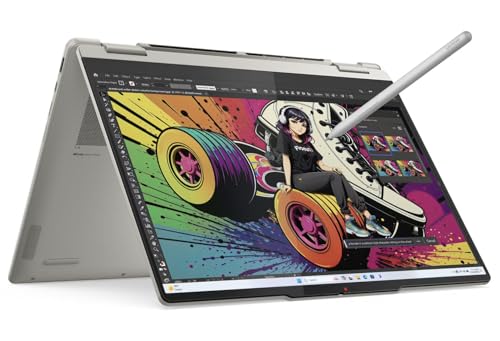
- Unopened retail packaging, sold as configured by Lenovo. One Year Courier or Carry-in Lenovo Warranty. Add up to 5 years of coverage when you register your computer with Lenovo.
- This 2-in-1 laptop is perfect for creators, offering a stunning 14" OLED touchscreen with vibrant colors and deep contrast, making it ideal for design and multimedia tasks. Its powerful AMD processor and ample storage ensure smooth multitasking and fast performance, while the 5MP IR camera with privacy features adds convenience and security. Users praise its sleek design and vibrant display; the performance is also highly appreciated. While tailored for creators, its versatility and premium features make it a great choice for anyone seeking a high-quality, adaptable device.
Pros
- Tablet/tent/laptop modes for lectures and dorms
- Great “one device” option for reading + writing
- Usually strong value compared to buying laptop + tablet separately
Cons
- Heavier than clamshell laptops (2-in-1 tax)
- Stylus may be optional (verify your bundle)
See reviews on Amazon.
Who should skip: students who never use touch/pen—save weight and money with a standard laptop.
Scores: Performance 4/5 • Battery Life 4/5 • Ease of Use 4.5/5 • Value 4/5
Microsoft Surface Laptop Go 3 — Best small-and-light Windows for writing
A compact Windows laptop that’s easy to carry and great for essays, web research, and Office apps.
Why it wins: super portable and straightforward for day-to-day student workloads.

- The perfect everyday laptop – Ultra-portable at under 2.5 pounds with a vibrant 12.4” touchscreen for work or play, wherever you are.
- Colors you crave – Available in Platinum, Sage, Sandstone, and Ice Blue, all in a durable, cool metal finish [3].
- Get your work done effortlessly – Stream all the latest releases, and run your favorite day-to-day apps, now with faster performance and up to 16GB RAM and 256GB storage [4].
Pros
- Very portable for tight desks and backpacks
- Comfortable keyboard size for writing
- Simple, clean Windows experience for school
Cons
- Not ideal for heavy video editing/3D work
- Port selection is basic (you may want a USB-C adapter)
See reviews on Amazon.
Who should skip: engineering/CS students doing sustained heavy compiling or GPU work.
Scores: Performance 3.5/5 • Battery Life 4/5 • Ease of Use 4.5/5 • Value 4/5
Acer Chromebook Plus 515 — Best budget pick for Google Docs + long writing sessions
A 15.6-inch Chromebook with a bigger screen for reading slides, writing papers, and managing lots of tabs.
Why it wins: excellent “school basics” value if you live in the browser.
No products found.
Pros
- Big display for split-screen studying
- Fast boot + low-maintenance ChromeOS
- Great for Google Workspace-heavy schools
Cons
- Not for Windows/macOS-only apps
- Bigger footprint (less ideal for tiny lecture desks)
See reviews on Amazon.
Who should skip: anyone who needs Adobe desktop apps or specific Windows software.
Scores: Performance 3.5/5 • Battery Life 4/5 • Ease of Use 4.5/5 • Value 5/5
Quick compare
- Best overall: MacBook Air 13 (M4)
- Best premium Windows: Dell XPS 13 (9340)
- Best for handwriting notes: Lenovo Yoga 7 2-in-1
- Best tiny Windows: Surface Laptop Go 3
- Best budget for Docs: Acer Chromebook Plus 515
FAQs
What specs should a student aim for?
For most students: 16GB RAM (or more) and 512GB storage if you keep lots of files locally. If you mostly use cloud storage, 256GB can work.
Is a Chromebook enough for college?
Yes—if your school uses browser-based tools (Google Workspace, Canvas, web apps). Skip it if you need Windows/macOS desktop apps or specialty software.
Do I need a dedicated GPU?
Only if you’re doing serious 3D, engineering simulation, or heavy video work. For general student life, integrated graphics is fine.
How important is warranty?
More than most people think—backpack life is rough. If you’re accident-prone, consider an extended protection plan from the brand or retailer.
As an Amazon Associate, I earn from qualifying purchases.