
Best Laptop Screen Extenders
As an Amazon Associate I earn from qualifying purchases. Some links may earn us a commission at no extra cost to you.
Want more screen space without carrying a full monitor? Laptop “screen extenders” clamp or magnet onto your lid to add one (or two) extra displays. What matters most: fitment (laptop size/thickness and hinge strength), brightness/visibility, total weight on the lid, port requirements (USB-C DP Alt Mode vs. HDMI + driver), and warranty.
How I researched
I compared late-2025 maker spec sheets, manuals, and expert deep dives, prioritized fitment/weight, brightness, and OS/port compatibility (especially Mac M1/M2/M3 quirks), and noted warranty policies and any driver needs. I weighed panel quality and ergonomics against setup friction and long-term ownership (mounting hardware, cable clutter, and support).
Top picks
Xebec Tri-Screen 2 — Best overall triple-screen for most 13–15″ laptops
A proven dual-panel add-on with sharp 10.1″ 1920×1200 IPS screens and simple cabling.
Why it wins: Balanced specs, broad OS compatibility, and better documentation/support than most.

- SEAMLESS COMPATIBILITY: This versatile portable travel monitor for laptop with 10.1" portable screens is compatible with Mac, PC, Chrome, and Linux, making it an ideal laptop monitor extender for any operating system with no hassle ** CHECK BELOW IF YOU NEED THE XEBEC ADAPTER FOR USE **
- INSTANT TRI-SCREEN SETUP: Expand your workspace with the portable screen extenders to create a triple monitor setup, instantly, to enhance productivity anywhere
- ULTIMATE PORTABILITY: Designed as a compact and foldable triple monitor for laptops, this lightweight screen extender transforms your device into a multi-screen workstation
Pros
-
Crisp 16:10 WUXGA panels (work-friendly)
-
Clean cabling with USB-C DP Alt Mode
-
Solid docs, parts, and accessories
-
Works with Macs via DisplayLink path
Cons
-
Adds weight on the lid
-
DisplayLink install needed on some Macs
-
Brightness not published; office-bright only
Social proof
Widely used by mobile professionals; see reviews on Amazon.
Trade-offs / Who should skip
If you need extra-bright panels for outdoor use, look elsewhere. If you never want drivers on Mac, pick a single-screen USB-C extender.
Scores: Performance 4.5/5 · Portability 4/5 · Ease of Use 4/5 · Value 4.5/5
SideTrak Swivel 14″ — Best single-screen extender for travel
One bright 14″ FHD display on a patented swivel hinge; light, simple, and sturdy.
Why it wins: Lowest setup friction and weight in a clean, attach-and-go design.
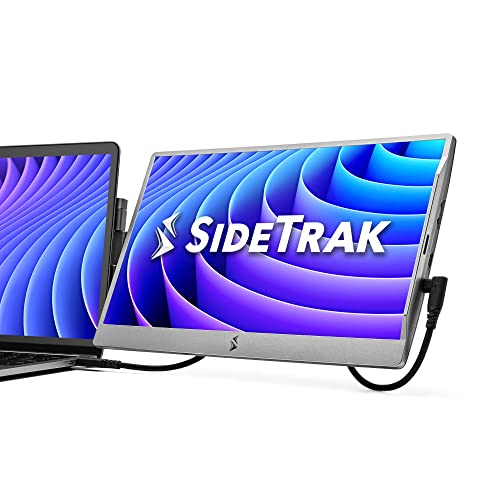
- Patented 360° Swivel Hinge for Easy Viewing - The patented 360° swivel hinge allows you to adjust the portable monitor to your preferred angle for comfortable viewing. Rotate it 270° for easy screen sharing and collaboration during meetings, making your dual monitor setup versatile and productive.
- Dual Screen Laptop with Aesthetic Design - Transform your laptop into a dual monitor setup with this laptop screen extender. Its sleek, dark gray design ensures a cohesive look with any laptop, adding both functionality and style to your workspace.
- Device-Safe Magnetic Attachment - The screen extender portable laptop securely attaches to your laptop with a device-safe magnet, eliminating the need for extra desktop space and simplifying travel. The small mounting plate ensures a sleek, lightweight design, maintaining your laptop's slim aesthetic without adding bulk or cumbersome attachments.
Pros
-
Light and compact; easy daily use
-
360° swivel for quick sharing
-
USB-C or HDMI flexibility
-
Kickstand doubles as desk stand
Cons
-
Single screen only
-
~250 nits: fine indoors
-
No official color-gamut claims
Social proof
Consistently positive for portability; see ratings & reviews on Amazon.
Trade-offs / Who should skip
If you need two extra displays or max workspace, pick Xebec/Mobile Pixels.
Scores: Performance 4/5 · Portability 4.5/5 · Ease of Use 4.5/5 · Value 4/5
Mobile Pixels TRIO Max (14.1″) — Best triple-screen for 14–16″ laptops
Two sliding 14.1″ 1080p panels; great for larger laptops that can carry extra weight.
Why it wins: Bigger screens, refined mechanics, and broad platform support.
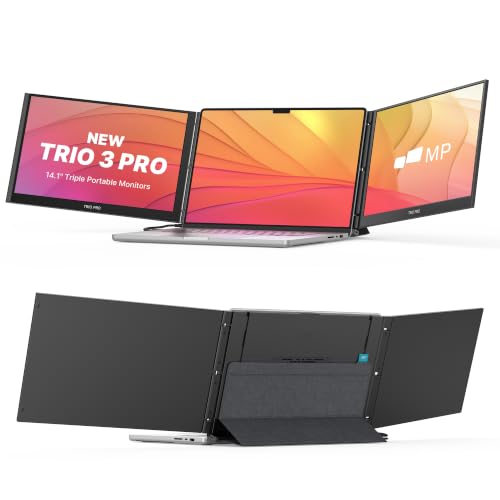
- ★Extend Your Vision by 80% Screen-to-Body Ratio Screen★:A larger 14.1'' Full HD laptop monitor enhances extensive view with a maximum screen-to-body ratio of up to 80%, which is best fit for 15'' to 17'' laptops; It features slim ultra-portable design, lightweighted and compact to carry around. SINGLE trio max display mounts for dual monitor, TWO trio max for full triple monitor experience.
- ★Plug and Play, One Cable Setup,Backward Charging★: So EASY to install and use with just one cable. NO DRIVER required when connect USB type-C ports. This mobile monitor connects both USB A and USB C .No limitation to a single USB-C port, plugging in the power cord to the back charging USB-C power port on laptop screen extender, it supplies Trio max with external power and will charge connected USB-C device. Compatible with Microsoft Windows, macOS, Chrome OS, and Linux.
- ★Display on Multiple Devices, 270° Flexible Viewing Angle★:Other than laptops, Trio max works with your smartphone and tablets if you have an Android. It will transform into a chrome OS laptop alike setup once the smart device is connected. Your android mobile device will become the mouse or the keyboard that easily works with the Trio screen.Rotate the portable monitor 0 to 270° for your meetings, presentations and any Occasions.
Pros
-
Larger 14.1″ panels boost usability
-
Refined sliding/kickstand mechanics
-
Works with Windows, macOS, ChromeOS
-
Anti-glare helps in bright rooms
Cons
-
Heavier on the lid than 10–12″ kits
-
Often needs drivers on Mac
-
Cable routing needs care
Trade-offs / Who should skip
If your laptop is under 3 lb or very thin, SideTrak or Xebec may feel better balanced.
Scores: Performance 4.5/5 · Portability 3.5/5 · Ease of Use 4/5 · Value 4/5
FOPO 15.6″ Triple Monitor — Best for big laptops (15.6–17.3″)
A wide 15.6″-per-side, dual-panel kit sized for larger workstations.
Why it wins: One of the few mainstream picks purpose-built for 15.6–17.3″ laptops.
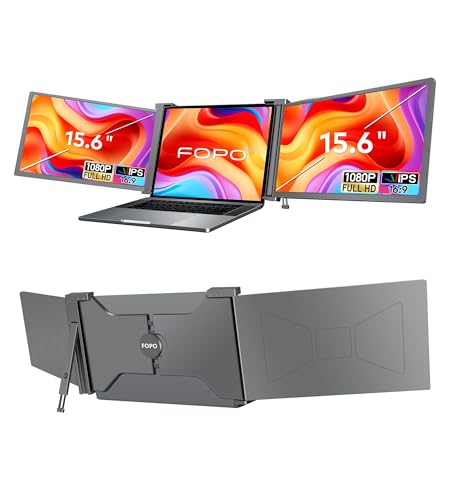
- Stunning Visuals: Elevate your productivity with the15.6" large laptop monitor extender. Experience ultimate multitasking and vibrant visuals with multiple screens. Attachable Portable Monitor for 15.6-17.3" laptops, it expands screen real estate for optimized efficiency. Enjoy crisp FHD 1080P and 72% NTSC display, vivid colors, and wide viewing angles. Perfect for professionals, students, and anyone seeking enhanced productivity and immersive visuals.
- Universal Compatibility: This dual monitor offers broad compatibility, allowing it to work with a range of devices including Windows, MacOS (only for M1 Pro and M1 Max), Android, Switch, and Xbox, among others. Effortlessly connect the external monitor screen to your preferred device and enjoy an extended display with ease. Experience the versatility and flexibility of connecting to various platforms and devices. (Note: Please ensure compatibility and check laptop size before making a purchase.)
- Effortless Plug and Play: Enjoy seamless connectivity with laptop screen extender for triple monitor display. It's a plug and play device, requiring no complex setup or installation. Simply connect the laptop screen extender to your laptop's USB-C or HDMI ports, and you're good to go. The package includes all the necessary cables - 2* USB-C to USB-C, 2* Mini HDMI to HDMI, and 2* USB-C to USB-A, along with a power adapter. Experience instant dual screen extender productivity without the need for extra drivers or software.
Pros
-
Big 15.6″ panels for roomy layouts
-
IPS viewing angles help sharing
-
HDMI or USB-C flexibility
-
Optional extended warranty (registration)
Cons
-
Heavy for the lid; best on sturdy laptops
-
Mac triple-display caveats
-
Travel footprint is larger
Trade-offs / Who should skip
Ultralight laptops or frequent flyers will prefer SideTrak or Xebec.
Scores: Performance 4/5 · Portability 3/5 · Ease of Use 3.5/5 · Value 4/5
OFIYAA P2 (14″) — Best budget-minded dual-panel option
A value-oriented two-screen kit with 14″ 1080p panels and wide OS support.
Why it wins: Affordable way to try dual screens with USB-C or HDMI power/video.

- 🧡Multi-Function - The Fagomfer P2 laptop extra monitor can adjust brightness, contrast, and other parameters independently. Equipped with 4 speakers. You can upgrade your monitor in an immersive way with 4 cables, it's so simple and portable! Best for 13-16'' laptops. This is not only helpful for the office but also a good companion for playing games.
- 🧡Latest & Versatile - The USB-A/USB-C is most versatile laptop connection port, so we designed product with USB-A/USB-C/HDMI port to be compatible with many different models of laptops. (Please make sure your laptop has 2USB-C ports or 1UBS-C port and at least 1HDMI port. Type-C must support both power supply and video transmission)
- 🧡Plug and Play, Versatile Compatibility - Full 210° rotation to save space. Equipped with 2 USB-A to USB-C, 2 HDMI, 2 USB-C cables. The portable screen extender provides an amazing experience for professionals,players,entrepreneurs,programmers,etc. Compatible with Windows, Mac, Linux, Chrome, also work with Type C phones that support full-featured output.🔺Note: M1 chip does not support any expansion screens, especially MacBook Pro 2020.
Pros
-
Good value for dual screens
-
USB-C DP or HDMI flexibility
-
Works across Windows/macOS/ChromeOS
-
Simple “plug and work” on many PCs
Cons
-
Mac M1 external-display limits apply
-
Heavier than single-screen options
-
Brightness not clearly published
Trade-offs / Who should skip
If you’re on a Mac and want zero drivers, SideTrak is simpler.
Scores: Performance 3.5/5 · Portability 3.5/5 · Ease of Use 3.5/5 · Value 4.5/5
Quick compare
-
Xebec Tri-Screen 2 — Best overall: dual 10.1″ WUXGA IPS; broad fit; Mac adapter path; moderate weight. Trade-off: drivers on some Macs; brightness not published.
-
SideTrak Swivel 14″ — Best single-screen: light, simple, swivels; ~250 nits; easy travel. Trade-off: one screen only.
-
Mobile Pixels TRIO Max — Best for 14–16″: larger 14.1″ panels; refined mechanics. Trade-off: heavier; Mac drivers.
-
FOPO 15.6″ Triple — Best for 15.6–17.3″: big panels for big laptops. Trade-off: heft; Mac caveats.
-
OFIYAA P2 — Best budget dual: wide compatibility claims; flexible ports. Trade-off: unclear brightness; check Mac limits.
Buying guide
Fitment & weight. Check your laptop’s screen size, thickness, and lid rigidity. Bigger kits (14–15.6″) can stress ultra-thin lids; aim ≤2 lb added weight for ultraportables.
Ports & drivers.
-
USB-C with DP Alt Mode = cleanest cabling on Windows/most PCs.
-
Mac M-series: base models often need a DisplayLink driver/adapter to run more than one external display. If you refuse drivers, pick a single-screen USB-C extender.
Brightness & panels. Most sit around ~250 nits; fine for offices, not outdoors. IPS panels give better off-axis viewing. Single-screen models are usually lighter and easier on thin lids.
Warranty & support. Expect roughly a 1-year limited warranty, sometimes with registration extensions. UL/ETL safety certifications for these specific kits couldn’t be verified.
FAQs
Q: Will these work with my MacBook Air/Pro?
A: Single-screen extenders over USB-C generally work. For two extra screens, most base-chip M-series Macs need the DisplayLink driver/adapter path, while Pro/Max chips support more externals natively. Check your exact chip and OS.
Q: Do I need to stick metal plates on my laptop?
A: Many use low-profile magnetic plates (SideTrak) or clamp housings (Xebec/Mobile Pixels). They’re removable; follow the maker’s instructions to avoid lid damage.
Q: Can I game on these?
A: They’re 60 Hz productivity panels with ~250-nit brightness—fine for dashboards, IDEs, and docs, not tuned for gaming color/latency.
Q: How much power do they draw?
A: Plan for roughly 4–10 W per screen. If your battery drains quickly, power the extender from a wall adapter or hub with pass-through charging.
As an Amazon Associate, I earn from qualifying purchases.