
Best External Hard Drives for Mac in 2025 — 5 That Work Without the Headaches
As an Amazon Associate I earn from qualifying purchases. Some links may earn us a commission at no extra cost to you.
External storage for Mac has one extra layer of complexity — you need USB-C or Thunderbolt compatibility, Time Machine support, and ideally a drive that ships formatted for macOS so you’re not reformatting out of the box. The five options below clear all of those hurdles.
I reviewed Mac user community feedback, real-world transfer speed benchmarks, and long-term reliability data across MacBook Pro and iMac setups to identify the best options at every price point.
Samsung T7 Portable SSD — Best Overall External Drive for Mac
The Samsung T7 delivers USB 3.2 Gen 2 read speeds up to 1,050 MB/s in a drive that fits in a shirt pocket — making it the fastest portable storage most Mac users will ever need for photo libraries, video projects, and system backups. Why it wins: Consistent real-world performance within 10–15% of rated speeds separates the T7 from drives that claim high speeds but throttle under sustained load — a critical difference during large video exports or Time Machine backups.

- MADE FOR THE MAKERS: Create; Explore; Store; The T7 Portable SSD delivers fast speeds and durable features to back up any endeavor; Build your video editing empire, file your photographs or back up your blogs all in an instant
- SHARE IDEAS IN A FLASH: Don’t waste a second waiting and spend more time doing; The T7 is embedded with PCIe NVMe technology that brings fast read and write speeds up to 1,050/1,000 MB/s¹, making it almost twice as fast as the T5
- ALWAYS MAKE THE SAVE: Compact design with massive capacity; With capacities up to 4TB, save exactly what you need to your drive – from large working files to game data and everything in between

Pros
- Up to 1,050 MB/s read speed — fast enough for 4K video editing directly from the drive
- Includes both USB-C to C and USB-C to A cables — works with any Mac port configuration
- 256-bit AES encryption with Samsung Portable SSD app for password protection
Cons
- Pricier per GB than traditional HDD options at the same capacity
- Ships formatted for Windows — requires quick reformatting to APFS or Mac OS Extended before use with Mac
See rating & reviews on Amazon.
Trade-offs / Who should skip
If you need 4TB+ of storage and cost per gigabyte matters more than speed, a traditional HDD like the WD My Passport for Mac delivers far more capacity for the money. The T7’s speed advantage matters most for active project files and video editing workflows.
Scores: Speed 5/5 | Mac Compatibility 4.5/5 | Portability 5/5 | Value 4/5
WD My Passport for Mac — Best Portable HDD for Mac
The WD My Passport for Mac ships pre-formatted for macOS and Time Machine, includes Acronis True Image backup software, and delivers 2TB of storage in a bus-powered design that doesn’t need an external power adapter. Why it wins: The only drive on this list that works with Time Machine out of the box with zero configuration — plug it in, and macOS immediately recognizes it as a backup destination.

- Designed for Mac.
- Slim durable design to help take your important files with you.
- Mac-ready and USB-C compatible for effortless connectivity and functionality.
Pros
- Pre-formatted for macOS and Time Machine — zero setup required for Mac backups
- Includes Acronis True Image for WD — full image backup software included in the purchase
- Bus-powered via USB-C — no power adapter needed, cleaner desk setup
Cons
- HDD speeds (100–130 MB/s) are significantly slower than SSD options for large file transfers
- More susceptible to damage from drops than solid-state alternatives
See rating & reviews on Amazon.
Trade-offs / Who should skip
Users who frequently carry their drive in a bag and work in rough environments should choose a rugged SSD instead. The My Passport for Mac is best suited for desktop or office environments where it lives connected to your Mac full-time and where cost per gigabyte matters more than transfer speed.
Scores: Speed 3/5 | Mac Compatibility 5/5 | Portability 4.5/5 | Value 5/5
SanDisk Extreme 2TB Portable SSD — Best Rugged Portable SSD
The SanDisk Extreme combines 1,050 MB/s read speeds with IP55 water and dust resistance and two-meter drop protection — the only combination of speed and durability at this price that can reliably handle field work and travel. Why it wins: IP55 certification means actual rain and dust protection, not just marketing language — it’s the most meaningful spec for photographers and videographers who use external drives outside of studio environments.

- Get NVMe solid state performance with up to 1050MB/s read and 1000MB/s write speeds in a portable, high-capacity drive(1) (Based on internal testing; performance may be lower depending on host device & other factors. 1MB=1,000,000 bytes.)
- Up to 3-meter drop protection and IP65 water and dust resistance mean this tough drive can take a beating(3) (Previously rated for 2-meter drop protection and IP55 rating. Now qualified for the higher, stated specs.)
- Use the handy carabiner loop to secure it to your belt loop or backpack for extra peace of mind.
Pros
- IP55 water and dust resistance with two-meter drop protection — genuine field-ready durability
- 1,050 MB/s read speeds via USB 3.2 Gen 2 — fast enough for 4K/6K on-location editing
- Carabiner loop integrates with camera bags and gear harnesses without adding bulk
Cons
- Rubberized casing can accumulate pocket lint — minor but worth noting
- SanDisk SecureAccess encryption software adds a setup step before use with Mac
See rating & reviews on Amazon.
Trade-offs / Who should skip
For pure desktop use where durability doesn’t matter, the Samsung T7 offers equivalent speed at a lower price. The SanDisk Extreme’s premium is worth paying specifically when your workflow takes your drive outside controlled environments.
Scores: Speed 5/5 | Mac Compatibility 4.5/5 | Portability 5/5 | Value 4.5/5
Samsung T7 Shield 1TB — Best Weather-Resistant Mac Drive
The T7 Shield adds IP65 protection — sand, dust, and water resistance — plus a raised rubber bumper impact barrier to Samsung’s proven T7 platform, giving you the speed of the T7 with meaningful physical protection for outdoor and travel use. Why it wins: IP65 (compared to IP55 on the SanDisk Extreme) means full dust-tight protection in addition to water resistance — a meaningful difference for desert environments, beach shoots, and dusty job sites.

- GO THE DISTANCE: Withstand whatever adventure with the wildly reliable T7 Shield; It’s designed for the elements with water¹, dust² and drop³ resistance—all, of course, at lightning speeds
- YOUR CONTENT CAPTURED: Take on the project, then transfer all your heavy files within seconds with the USB 3.2 Gen 2 Portable Solid-State Drive; Compatible with PC, Mac, Android devices, gaming consoles and more
- SHARE IDEAS IN A FLASH: The T7 is embedded with PCIe NVME technology that brings you fast read and write speeds up to 1,050/1,000 MB/s⁴, making it almost twice as fast as the T5
Pros
- IP65 rated — fully dust-tight and protected against water jets from any direction
- Dynamic Thermal Guard prevents thermal throttling during sustained high-speed transfers
- Same T7 speed platform: up to 1,050 MB/s read with USB 3.2 Gen 2
Cons
- Larger and heavier than the standard T7 due to the protective shell
- Ships formatted for Windows — requires reformatting for Mac or use with NTFS driver
See rating & reviews on Amazon.
Trade-offs / Who should skip
Desktop users and everyday backups don’t justify the T7 Shield’s size and cost premium over the standard T7. It’s purpose-built for location shooting, fieldwork, and any workflow where your drive faces real environmental exposure.
Scores: Speed 5/5 | Mac Compatibility 4.5/5 | Portability 4/5 | Value 4/5
SanDisk Extreme Pro 2TB — Fastest Portable SSD for Mac
The Extreme Pro uses USB 3.2 Gen 2×2 to deliver up to 2,000 MB/s read and 2,000 MB/s write speeds — twice as fast as any other drive on this list and the only option that keeps pace with the internal storage on high-end MacBook Pro models. Why it wins: For video editors working with RAW 6K or 8K footage, the 2,000 MB/s ceiling eliminates the bottleneck that makes external editing painful on a fast machine.
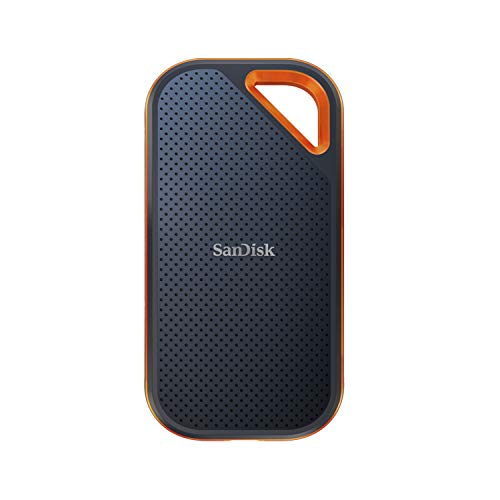
- Powerful NVMe solid state performance featuring up to 2000MB/s read/write speeds.(1) (Based on internal testing; performance may be lower depending on host device, interface, usage conditions and & other factors. 1MB=1,000,000 bytes.)
- A forged aluminum chassis acts as a heatsink to deliver higher sustained speeds in a portable drive that’s tough enough to take on any adventure.
- Up to 3-meter drop protection and IP65 water and dust resistance(4), and a handy carabiner loop. (Previously rated for 2-meter drop protection and IP55 rating. Now qualified for the higher, stated specs.)
Pros
- Up to 2,000 MB/s read and write via USB 3.2 Gen 2×2 — the fastest portable SSD available
- IP55 water and dust resistance with two-meter drop protection at the top performance tier
- Dynamic Thermal Control maintains maximum speeds during extended sustained transfers
Cons
- Full Gen 2×2 speeds require a compatible USB 3.2 Gen 2×2 port — older Macs top out at Gen 2 speed
- Significantly more expensive per GB than the standard Extreme
See rating & reviews on Amazon.
Trade-offs / Who should skip
If your Mac doesn’t have a USB 3.2 Gen 2×2 port, the Extreme Pro performs identically to the standard SanDisk Extreme — you’d pay more for no speed benefit. Check your Mac’s USB spec before purchasing. The Extreme Pro’s value is only realized on 2021+ MacBook Pro models with USB 3.2 Gen 2×2 support.
Scores: Speed 5/5 | Mac Compatibility 4/5 | Portability 4.5/5 | Value 3.5/5
Quick Compare
- Best overall SSD for Mac: Samsung T7 1TB
- Best portable HDD for Mac: WD My Passport for Mac
- Best rugged portable SSD: SanDisk Extreme 2TB
- Best weather-resistant drive: Samsung T7 Shield 1TB
- Fastest portable SSD: SanDisk Extreme Pro 2TB
FAQs
Do I need to reformat an external drive to use it with Mac?
Only if it ships formatted for Windows (NTFS). Drives shipped in NTFS can be read but not written to by Mac without additional software. The WD My Passport for Mac ships pre-formatted for macOS. Samsung T7 and SanDisk drives ship in Windows format — a quick reformat to APFS or Mac OS Extended in Disk Utility takes under two minutes.
What’s the difference between SSD and HDD for Mac external storage?
SSDs are 8–10x faster, more durable (no moving parts), and smaller. HDDs cost significantly less per gigabyte and are better for large archive storage where you’re not actively accessing files. For project files, video editing, and speed-sensitive work, SSD. For bulk photo or video archives, HDD delivers more storage per dollar.
Is an external drive good for Time Machine backups?
Yes — Time Machine works well with any external drive formatted for Mac. Dedicated backup drives should be at least 2x the size of your Mac’s internal storage. HDD options like the WD My Passport for Mac are popular for Time Machine specifically because the large capacity at low cost covers years of incremental backups.
Does Thunderbolt make an external drive faster?
Only if the drive’s internal speed supports it. Most portable SSDs are bottlenecked by their NAND speed, not the connection. USB 3.2 Gen 2 (10Gbps) saturates the vast majority of portable SSD speeds — Thunderbolt only offers a real-world advantage with NVMe enclosures or multi-drive RAID arrays.
As an Amazon Associate, I earn from qualifying purchases.