
Best External Hard Drives for Backup, Gaming & Everyday Use
As an Amazon Associate I earn from qualifying purchases. Some links may earn us a commission at no extra cost to you.
If you’re shopping for an external drive, the big questions are simple: how much space do you actually need, how fast do you need it to be, and will it survive being tossed in a bag every day? On top of that, you want something reliable with a decent warranty, not a mystery-brand brick.
Top picks
WD 5TB My Passport Portable External Hard Drive — Best for most people
If you just want a reliable, roomy portable drive for backups and general storage, this 5TB My Passport hits the sweet spot for capacity, size, and warranty.
Why it wins: It gives you laptop-friendly portability plus a full 5TB of space, with WD software and a 3-year limited warranty, at much lower cost per terabyte than an SSD.
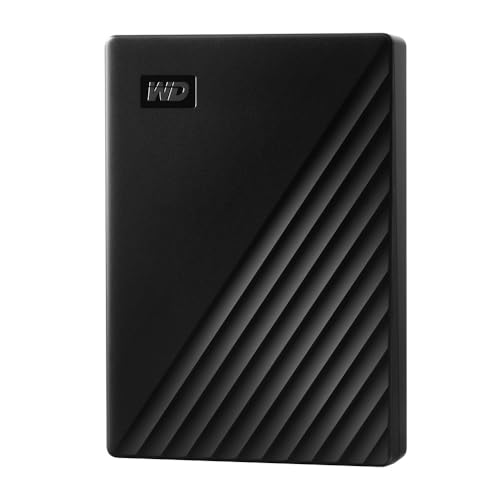
- Slim durable design to help take your important files with you
- Back up smarter with included device management software[2] with defense against ransomware
- Help secure your important files with password protection and hardware encryption
Pros
-
5TB in a genuinely pocketable 2.5-inch form factor
-
USB 3.x (USB-A) with optional USB-C adapter support
-
WD backup and password protection software available
-
3-year limited warranty from Western Digital
Cons
-
Slower than SSDs for huge file transfers
-
Plastic shell; not officially drop-rated
-
No physical encryption switch on the drive
Social proof
Tech reviewers often recommend My Passport as a dependable everyday backup drive that balances portability and capacity. See rating and reviews on Amazon for long-term user experiences.
Trade-offs / Who should skip
This is a classic spinning hard drive. It’s perfect for Time Machine/Windows backups, photo libraries, Steam libraries you don’t play constantly, and moving big folders around occasionally. If you regularly edit 4K video or need to shuttle huge projects quickly, you’ll be happier with one of the SSD picks below — this is more “big and reliable” than “blazing fast.”
Scores: Performance 3.5/5 · Speed 3/5 · Ease of Use 4.5/5 · Value 4.5/5
Samsung T7 Portable SSD 2TB — Best fast portable SSD
The Samsung T7 is a super-popular portable SSD because it’s tiny, fast, and works with laptops, desktops, consoles, and many phones/tablets via USB-C.
Why it wins: Sequential speeds up to around 1,050MB/s read and 1,000MB/s write over USB 3.2 Gen 2 make it way faster than any HDD, in a metal shell that slides into any pocket.

- External high-speed storage in compact pocket format and capacity up to 2 TB
- Up to 9.5 times faster than external hard drives with read/write speeds of up to 1050 MB/s or 1000 MB/s thanks to USB 3.2 Gen.2
- Slim and elegant : compact and Ideal-quality aluminium housing, available in metallic red, indigo blue or titanium grey
Pros
-
Up to ~1,050MB/s read, 1,000MB/s write (very snappy)
-
Slim metal body; easy to carry with a laptop
-
Includes USB-C to C and C to A cables
-
Shock-resistant design with thermal control
Cons
-
Not water/dust-rated like rugged drives
-
Easy to misplace small cables
-
Higher cost per gigabyte than HDDs
Social proof
Many creators, students, and gamers use the T7 as their “everywhere” external SSD because it balances speed, size, and reliability. Check reviews on Amazon to see real-world use with different systems and consoles.
Trade-offs / Who should skip
Pick the T7 if you move big files a lot — video projects, Lightroom catalogs, Steam/Epic libraries you actively play from, or heavy school projects. If you mainly want a once-a-week backup archive that sits on a shelf, the extra speed may not be worth the higher cost per TB; a big HDD will be cheaper for cold storage.
Scores: Performance 4.5/5 · Speed 4.5/5 · Ease of Use 4.5/5 · Value 4/5
SanDisk Extreme Portable SSD V2 2TB — Best rugged portable SSD
The SanDisk Extreme Portable SSD V2 is built for being thrown in a backpack. It combines NVMe SSD speed with serious drop and weather protection, plus a handy carabiner loop.
Why it wins: You get NVMe-class performance (around 1,050MB/s) in a drive with IP65 water/dust resistance and up to 3-meter drop protection, which is ideal for travel, field work, and school bags.

- Get NVMe solid state performance with up to 1050MB/s read and 1000MB/s write speeds in a portable, high-capacity drive(1) (Based on internal testing; performance may be lower depending on host device & other factors. 1MB=1,000,000 bytes.)
- Up to 3-meter drop protection and IP65 water and dust resistance mean this tough drive can take a beating(3) (Previously rated for 2-meter drop protection and IP55 rating. Now qualified for the higher, stated specs.)
- Use the handy carabiner loop to secure it to your belt loop or backpack for extra peace of mind.

Pros
-
Fast NVMe-based SSD with ~1,000MB/s writes
-
IP65 water and dust resistance for outdoor use
-
Up to three-meter drop protection from rugged shell
-
Compact, light, with built-in loop for clipping on
Cons
-
Rubberized shell can pick up pocket lint
-
USB-C only; older USB-A ports need an adapter
-
Performance limited by USB 3.2, not Thunderbolt
Social proof
It’s one of the most widely used portable SSDs among travel photographers and creators who need something tough enough for camera bags and on-location shoots. See reviews on Amazon for stories about drops, rain, and real-world abuse.
Trade-offs / Who should skip
This is perfect if you’re on the go a lot — school, travel, filming outside, studio hops, etc. If you never leave your desk and just want fast storage next to a desktop PC, the ruggedness is less critical; you might consider a plain T7 or a desktop-oriented HDD instead.
Scores: Performance 4.5/5 · Speed 4.5/5 · Ease of Use 4/5 · Value 4/5
Seagate Expansion Desktop 16TB — Best for massive backups at home
If you need to back up multiple PCs, a huge photo/video archive, or lots of project drives, the Seagate Expansion Desktop line is classic “set it next to your computer and forget it” storage. The 16TB version is ideal for truly big libraries.
Why it wins: Huge capacities up to 16TB in a plug-and-play USB 3.0 desktop drive — no need to fuss with enclosures or DIY shucking.

- Easy-to-use desktop hard drive—simply plug in the power adapter and USB cable
- Fast file transfers with USB 3.0
- Drag-and-drop file saving right out of the box
Pros
-
Massive 16TB capacity option for large archives
-
Simple USB 3.0 plug-and-play desktop drive
-
Excellent cost per terabyte for long-term backups
-
Seagate utilities available for basic management
Cons
-
Requires external power; not bus-powered
-
3.5-inch desktop drive; not meant for travel
-
Typically shorter warranty than some premium drives
Social proof
This series is popular for large Time Machine backups, PC image backups, Plex libraries, and photo/video archives. Check the reviews on Amazon to see how people are using it in home offices and media setups.
Trade-offs / Who should skip
This is not a portable drive. It’s best parked next to a desktop, router, or NAS for scheduled backups and big archives. If you want something for a backpack or to plug into a console in different rooms, pick one of the 2.5-inch options (My Passport or WD_BLACK P10) or one of the SSDs.
Scores: Performance 3.5/5 · Speed 3/5 · Ease of Use 4/5 · Value 4.5/5
WD_BLACK 5TB P10 Game Drive — Best for console & PC game libraries
The WD_BLACK P10 is designed for gamers who just want more space for their libraries on Xbox, PlayStation, or PC, without getting into more complex NVMe docks.
Why it wins: Up to 5TB of storage in a rugged-looking, console-friendly enclosure, with a gaming-focused design and a 3-year limited warranty.

- Up to 6TB[1] that can hold up to 150 games[3], so that you can save old favorites and still have room for new titles.
- Portable form factor with sleek metal top covering that provides fast access to your growing game library
- Speeds up to 130MB/s[2] to push your console or PC to new levels
Pros
-
Up to 5TB to expand console or PC libraries
-
USB 3.x compatibility with most systems
-
2.5-inch form factor; bus-powered via USB
-
3-year limited WD_BLACK warranty
Cons
-
HDD speeds; slower load times than SSDs
-
Textured shell can scuff in messy bags
-
Best for older or less demanding titles
Social proof
Gaming outlets and buyer reviews consistently recommend the P10 as a simple, reliable library expander that works across platforms. See what other gamers say on Amazon about load times and compatibility with your specific system.
Trade-offs / Who should skip
Use this if you want cheap, big storage for last-gen titles, indie games, or PS4/Xbox One libraries on newer consoles. For running PS5/Xbox Series X|S titles directly, the consoles still require internal or NVMe-style storage — you can store them here but you’ll have to copy them back before playing.
Scores: Performance 3.5/5 · Speed 3/5 · Ease of Use 4.5/5 · Value 4/5
Quick compare
-
WD My Passport 5TB — Best for most people: Compact 2.5-inch HDD with 5TB and backup software; slower than SSDs but great value per TB.
-
Samsung T7 2TB — Best for fast portable SSD: Great all-round speed and portability for school, work, and gaming; not ruggedized for heavy outdoor abuse.
-
SanDisk Extreme Portable SSD V2 2TB — Best rugged portable SSD: Fast NVMe SSD with IP65 + 3m drop protection; more expensive than non-rugged drives.
-
Seagate Expansion Desktop 16TB — Best for massive backups: Huge desktop-class HDD for time-machine-style backups and archives; needs its own power brick and isn’t portable.
-
WD_BLACK P10 5TB — Best for console & PC libraries: Gamer-branded 2.5-inch HDD that works across platforms; HDD speeds limit load-time gains on newer consoles.
FAQs
Q: Do I need an SSD or is a hard drive enough?
A: If your main goal is cheap, big backup space, a hard drive (like WD My Passport or Seagate Expansion) is totally fine. If you want to edit video, run games directly, or move huge folders constantly, the speed jump from an SSD like Samsung T7 or SanDisk Extreme will feel instantly noticeable.
Q: Can I use the same drive with Windows, macOS, and consoles?
A: Physically, yes — they all use USB. The main issue is formatting. Windows likes NTFS, macOS likes APFS or exFAT, and consoles each have their own format. If you want real cross-platform sharing, format as exFAT on a computer and avoid letting consoles re-format it — or keep separate drives for consoles and everyday computer use.
Q: Are external drives safe for long-term storage?
A: Modern drives are pretty reliable, but no drive lasts forever. For personal use, the best protection is having multiple copies (for example: one external HDD at home + cloud backup + maybe a second drive for irreplaceable photos).
Q: How often should I replace an external drive?
A: There’s no strict rule, but if a drive is older than 4–5 years, heavily used, or starts making unusual noises or disconnecting randomly, treat that as a warning. Replace it before it fails and keep your important data copied elsewhere.
As an Amazon Associate, I earn from qualifying purchases.