
Best Cheap Printers (That Won’t Drive You Nuts)
As an Amazon Associate I earn from qualifying purchases. Some links may earn us a commission at no extra cost to you.
If you’re trying to keep costs down, the trick is matching the right low-cost printer to your use case. For pure text, a basic mono laser is usually cheaper to run; for occasional color handouts, a simple inkjet AIO works; and if ink costs scare you, a small refillable-tank model wins on ownership costs.
How I researched
I compared late-2025 printer tests and deep dives, prioritized page cost and reliability, checked platform quirks (HP+/Instant Ink, driver support, refill ecosystems), and noted which models are still current in the U.S. I weighed text/photo quality, ppm/IPM speeds, duplexing, tank/cartridge availability, and warranty terms from manufacturer sources.
Top picks
Brother HL-L2350DW — Best for cheap, fast text (mono laser)
A no-frills, compact mono laser that’s quick, reliable, and easy to live with.
Why it wins: Fast duplex text, robust driver support, and low fuss at a low entry price.
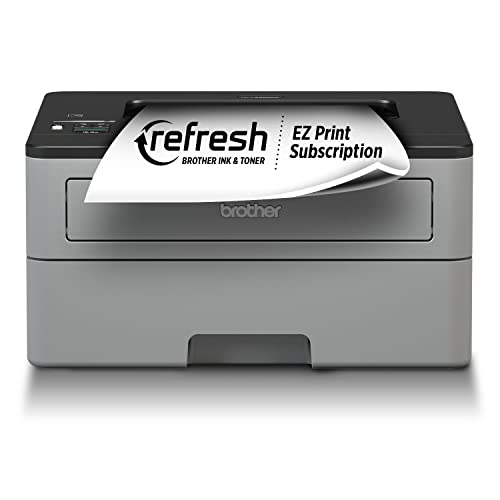
- Fast print speeds up to 32ppm (Based on one-sided printing. Change from default setting required.)
- Print wirelessly from mobile devices (Requires connection to a wireless network)
- Automatic duplex (2-sided) printing
Pros
-
Crisp text; great for forms & drafts
-
Auto duplex saves paper
-
Compact; 250-sheet tray is handy
-
Typically cheaper to run than inkjets
Cons
-
No color—text only
-
No scanner/copier
-
No Ethernet port
Social proof
Commonly praised for reliability and simplicity—see rating & reviews on Amazon.
Trade-offs / Who should skip
Skip if you need color or scanning. Consider a color AIO below instead.
Scores: Performance 4.5/5 · Text speed 4.5/5 · Ease of Use 4/5 · Value 4.5/5
HP DeskJet 2755e — Best super-cheap color all-in-one (home)
Entry-level color printing with scan/copy for homework, forms, and light craft prints.
Why it wins: Very low upfront cost with decent photo quality for the price.
No products found.
Pros
-
Color prints look nice for the money
-
Simple app-based setup
-
Scanner is handy for school forms
-
Very compact footprint
Cons
-
Not ideal for heavy printing
-
No borderless 4×6
-
Ink costs add up without a plan
Social proof
Widely purchased budget AIO—see rating & reviews on Amazon.
Trade-offs / Who should skip
Great for light monthly use. If you print a lot of color, jump to EcoTank for lower running costs.
Scores: Performance 3.5/5 · Photo quality 3.5/5 · Ease of Use 4/5 · Value 4/5
Canon PIXMA MG3620 — Best cheap photo-leaning color prints (casual)
A longtime budget favorite for nicer-looking color pages and photo projects.
Why it wins: Canon’s dye inks produce punchy graphics; auto duplex at this price is a plus.

- Wireless 3-in-1 (print | copy | scan)
- Easily print and scan photos and documents directly from your mobile devices.
- 9.9 / 5.7 ipm print speed
Pros
-
Vibrant color and photo output
-
Auto duplex printing
-
Simple Wi-Fi setup
-
Compact all-in-one
Cons
-
Slower color pages
-
No ADF for multi-page scans
-
Cartridge yields are modest
Social proof
Popular low-cost Canon—see rating & reviews on Amazon.
Trade-offs / Who should skip
If you print lots of color pages monthly, EcoTank will be cheaper to run long-term.
Scores: Performance 3.5/5 · Photo quality 4/5 · Ease of Use 3.5/5 · Value 4/5
HP LaserJet M110w — Best ultra-small laser (dorms/apartments)
The “it fits anywhere” mono laser for tight spaces and quick text jobs.
Why it wins: It’s one of HP’s smallest lasers with quick text output and wireless printing.

- FROM AMERICA'S MOST TRUSTED PRINTER BRAND – Perfect for small teams printing professional-quality black & white documents and reports. Perfect for 1-3 people
- WORLD'S SMALLEST LASER IN ITS CLASS – Precision laser printing that fits anywhere
- FAST PRINT SPEEDS – Up to 21 black-and-white pages per minute single-sided

Pros
-
Very compact, light, simple
-
Clean, sharp B/W text
-
Quick first page for short jobs
-
Easy wireless setup
Cons
-
No duplex printing
-
No scanner/copier
-
Small starter toner
Social proof
Praise centers on tiny size and easy setup—see rating & reviews on Amazon.
Trade-offs / Who should skip
If you need duplex or bigger trays, the Brother HL-L2350DW is better.
Scores: Performance 4/5 · Text speed 4/5 · Ease of Use 4.5/5 · Value 4/5
Epson EcoTank ET-2800 — Best cheapest-to-run color (refillable tank)
Skip cartridges entirely; pay more upfront, far less per page over time.
Why it wins: Cartridge-free tanks drastically cut running costs for regular color printing.

- INNOVATIVE CARTRIDGE-FREE PRINTING — High-capacity ink tanks mean no more dealing with lots of tiny ink cartridges; Epson’s exclusive EcoFit ink bottles make filling easy
- LESS FREQUENT INK REPLACEMENT — Replacement ink bottles don't have to be changed nearly as often as ink cartridges¹; Printer, scanner and copier lets you print up to 4,500 pages black/7,500 color², equivalent to about 90 individual cartridges³
- COLOR PRINTING — Up to 2 years of ink in the box⁴ (and with every replacement ink set) for fewer out-of-ink frustrations with this all-in-one printer
Pros
-
Extremely low cost per page
-
Ink bottles last a long time
-
Good everyday color quality
-
Simple flatbed scanner
Cons
-
Higher upfront cost
-
Slower than office-class models
-
No ADF for stacks
Social proof
Well-liked for saving money on ink—see rating & reviews on Amazon.
Trade-offs / Who should skip
Worth it if you print monthly in color; overkill for rare printing—get a cheap laser instead.
Scores: Performance 3.5/5 · Ink economy 5/5 · Ease of Use 4/5 · Value 4.5/5
Quick compare
-
Brother HL-L2350DW — Best for cheap text: Fast duplex mono; no scanner.
-
HP DeskJet 2755e — Best super-cheap AIO: Color + scan/copy; ink can add up.
-
Canon PIXMA MG3620 — Best casual photos: Nicer color; slower; no ADF.
-
HP LaserJet M110w — Best ultra-small laser: Tiny and quick; no duplex.
-
Epson EcoTank ET-2800 — Best low running cost: Refillable tanks; slower but super cheap per page.
Buying guide
Start with what you print most.
-
Mostly text? A mono laser is cheapest and least fussy (Brother HL-L2350DW).
-
Occasional color? A budget inkjet AIO is fine (HP 2755e, Canon MG3620). Expect higher ink costs unless you use a subscription or print lightly.
-
Lots of color pages/photos? A refillable tank like EcoTank ET-2800 slashes page cost.
Must-have features on a budget
-
Auto duplex: Saves paper (Brother HL-L2350DW, Canon MG3620).
-
Scanner/ADF: If you frequently scan multi-page docs, pick an AIO with an ADF (none of the ultra-cheap picks include one—consider stepping up within Brother/Canon lines).
-
Warranty & support: HP 2755e commonly offers 1-year standard (2 years with HP+ activation); Brother HL series typically 1-year limited; Epson ET-2800 often includes a 2-year limited with registration. Verify details at setup.
Hidden costs to watch
-
Cartridge yield & subscription terms: Budget inkjets can get expensive per page—subscription plans help if your monthly volume fits.
-
Starter toner/ink: Entry models often ship with low-yield starters; plan your first refill accordingly.
-
Platform locks: HP+ requires cloud activation and ties supplies/service; make sure you’re comfortable with that before enabling.
FAQs
Q: Laser or inkjet—what’s cheaper?
A: For mostly text, a basic mono laser tends to be cheaper and more reliable over time. For color, refillable-tank inkjets (EcoTank/MegaTank/Smart Tank) offer the lowest running cost if you print regularly.
Q: Do I need HP+ on the 2755e?
A: No, but activating HP+ can extend the warranty to 2 years. Read the on-box terms during setup to decide.
Q: Can these print double-sided automatically?
A: HL-L2350DW and MG3620 support auto duplex; M110w and ET-2800 do not.
As an Amazon Associate, I earn from qualifying purchases.