
Best budget mini PCs
As an Amazon Associate, I earn from qualifying purchases. Some links may earn us a commission at no extra cost to you.
A “budget” mini PC is usually about getting the right CPU class for your workload without overpaying for flashy extras. I’m prioritizing CPU tier (real-world speed for the money) because it’s the biggest difference-maker for everything from schoolwork to light gaming.
Top picks
Beelink SER5 MAX (Ryzen 7 6800U) — Best overall budget performance
If I want the most “PC for the money” in a small box, this CPU class is a sweet spot: strong everyday speed and a notably better integrated GPU than older budget chips. Why it wins: best all-around performance tier without jumping to truly pricey mini PCs.
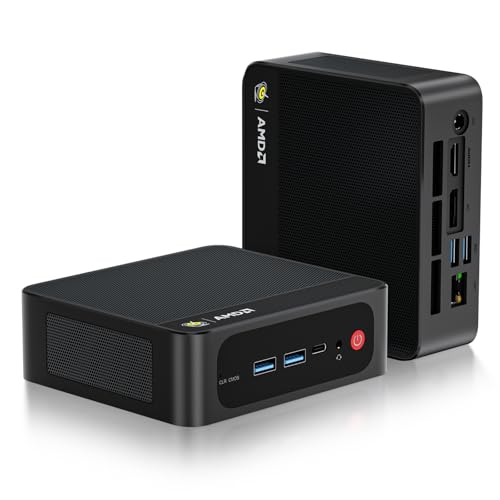
- 🔥AMD's New 6000 Generation - Mini computer is powered by AMD Ryzen 7 6800U processor, which is based on TSMC's 6nm process technology, has 8 cores/16 threads, running up to 4.7GHz at 28W TDP. Ryzen 6000 Series is equipped with Zen3+ architecture. Booting up the system, large apps, and light games is fast on Beelink 6800U. Perfect for home and office use.
- 🔥Small but Powerful Mini PC - The latest Beelink SER5 MAX is equipped with AMD Radeon 680M 12Core (2200MHz), the IPC is increased by over 15% compared with the previous generation of Zen2 Series. The performance is better than i5-1235U, i5-1240P and 5700U according to 3DMark Test result. Games recommendations: LOL, DOTA2, CSGO, etc.
- 🔥Larger + Faster + Expandable Capacity - SER5 Max mini pc comes with 24GB LPDDR5 RAM(2 x 12GB, 6300MHz). 500GB M.2 PCIe4.0 X4 2280 SSD(upgradeable to max 8TB,single chanel max up to 4TB), reading speed up to 5000mb/s and writing speed up to 3500mb/s. Powerful loading and processing capabilities for a smoother experience.
Pros
-
Strong CPU tier for multitasking + creative basics
-
Better iGPU tier than older Ryzen U-series options
-
Good “one box does most things” pick
Cons
-
Can be more than you need for basic office tasks
-
Fan noise varies by load and settings
Trade-offs / Who should skip (failure cases)
-
Skip if you only need browsing/schoolwork—an Intel N100 class box is cheaper and fine.
-
Skip if you want serious AAA gaming—this is still integrated graphics.
Scores: Performance 5/5 • CPU tier 5/5 • Ease of Use 4/5 • Value 4/5
Beelink SER5 (Ryzen 5 5500U) — Best “cheap but capable” everyday mini PC
This is the kind of mini PC I’d pick for homework, office apps, streaming, and light multitasking without paying for higher-end graphics. Why it wins: great entry price-to-performance for general use.

- 🔥【Faster & Better AMD Processor】The Beelink SER5 Mini PC is powered by AMD Ryzen 5 5500U (6C/12T, L3 cache 8MB). The base frequency is 2.1GHz / the dynamic frequency can reach 4.0GHz. Features revolutionary 7nm technology, and MAX 15W TDP for a next-generation multi-tasking experience that takes processing speeds. It is widely used for AAA gaming, image editing(CAD, PS, Pr, Ai), office software, creative design, programming, and HTPC/Zoom meetings/Skype, etc.
- 🔥【4K UHD & Dual Screen Display】The Mini Computer is equipped with AMD Radeon Graphics 7 Core 1800MHz, supports 4k video playback and web surfing, and can be connected to a projector for home theater and a variety of entertainment. Dual 4K@60Hz screen display output via HDMI & DP, which enable you to multi-task easily, and enough to meet your various needs. The FPS is up to 60FPS, and you can play LOL, DOTA, OW, PUBG, CS:GO and other online games.
- 🔥【Capacity can be freely expanded】What sets this small PC apart from other micro PCs is that it has empty expansion bays that can be added. Beelink Mini PC has a Dual channel 16GB SO-DIMM DDR4 upgradeable to max 64GB(2 x 32GB), 480GB M.2 NVMe 2280 SSD (supports up to 2TB), In addition, Mini PC supports the expansion of 2.5in 7mm HDD/SSD up to 2TB(not included).VESA mounting also frees you from a cluttered desktop. It is a convenient way to hide a mini-PC behind a monitor or TV.
Pros
-
Solid everyday speed for the money
-
Usually plenty for school + office + streaming
-
Often a good “first mini PC” choice
Cons
-
Integrated graphics are limited for modern games
-
CPU tier is older than the newest budget performers
Trade-offs / Who should skip (failure cases)
-
Skip if you want to play esports at high FPS—look at a newer iGPU tier like 6800U/7840HS class.
-
Skip if you run heavy creative apps daily.
Scores: Performance 4/5 • CPU tier 4/5 • Ease of Use 4/5 • Value 5/5
GMKtec NucBox (Ryzen 7 5700U) — Best budget multitasking on a sensible midrange CPU
If I want smoother multitasking than the cheapest chips (lots of tabs, school + Discord + streaming), this CPU class is a reliable step up. Why it wins: strong multi-core “busy day” feel in the budget zone.

- 【Office Gaming Mini PC】GMKtec Nucbox M5 Pro Series is equipped with the powerful AMD Ryzen 7 5700U processor, 8 Cores/16 Threads, Boost up to 4.50GHz, Based on the ZEN 3+ architecture, preinstalled with Wins 11 pro, this small but powerful mini pc delivers satisfying results in productivity, office work, and gaming.
- 【32GB DDR4 RAM & 1TB PCIe SSD】Installed with DDR4 32GB RAM Dual Channel (2x8GB), the Nucbox M5 Pro mini pc support expansion to 64GB RAM. Featured with 1TB M.2 2280 PCIe 3.0 SSD, support dual slot expansion to 4TB SSD. (Upgrades not included)
- 【DUAL LAN 2.5G RJ45】Fast Network Speeds: Enjoy up to 2500Mbps data transmission speed without worrying about lagging. Ideal for working, gaming, and surfing the internet. Great for Untangle, Pfsense or as a server office PC
Pros
-
Good multitasking for the price tier
-
Nice middle ground between ultra-budget and premium
-
Great for “family PC” shared workloads
Cons
-
Older iGPU tier for gaming
-
Different configurations exist—double-check the exact RAM/SSD
Trade-offs / Who should skip (failure cases)
-
Skip if gaming is your main goal—aim for newer integrated graphics tiers.
-
Skip if you want the quietest possible box—fan tuning matters.
Scores: Performance 4/5 • CPU tier 4/5 • Ease of Use 4/5 • Value 4/5
GMKtec NucBox M5 Ultra (Ryzen 7 7730U) — Best budget “newer everyday” pick
This is the kind of pick I like for people who want a more current-feeling system than older budget staples, without paying for top-end iGPU monsters. Why it wins: fresh-feeling general performance for home + school + light creator tasks.

- Office Gaming Mini PC - UPGRADED GMKtec Nucbox M5 Ultra Series is equipped with the powerful AMD Ryzen 7 7730U processor, 8 Cores/16 Threads, Base 2.00GHz (Power Saving Quiet Mode) with Turbo Boost up to 4.50GHz (Performance Mode) in BIOS settings, Based on the ZEN 3+ architecture, this small but powerful mini pc delivers satisfying results in productivity, office work, and gaming. 35% Performance increase over AMD Ryzen 5 7430U/ Ryzen 7 5700U, 5600U, 5560U, 5500U.
- 16GB DDR4 RAM & 512GB PCIe SSD - Installed with DDR4 16GB RAM Dual Channel (2x8GB), the Nucbox M5 Ultra mini pc support expansion to 64GB RAM. Featured with 1TB M.2 2280 PCIe 3.0 SSD, support dual slot expansion to 8TB SSD. (Upgrades not included)
- DUAL NIC LAN 2.5G RJ45 - Fast Network Speeds: Enjoy up to 2500Mbps data transmission speed without worrying about lagging. Ideal for working, gaming, and surfing the internet. Great for Untangle, Pfsense or as a server office PC.
Pros
-
Strong everyday responsiveness for many users
-
Good for light editing and heavier multitasking
-
Typically a nice port selection for desk setups
Cons
-
Still not “real gaming PC” territory
-
Variant confusion happens—confirm exact specs on your page
Trade-offs / Who should skip (failure cases)
-
Skip if you only do basic tasks—save money with N100.
-
Skip if you want the best integrated graphics possible—look higher.
Scores: Performance 4/5 • CPU tier 4/5 • Ease of Use 4/5 • Value 4/5
KINGDEL Fanless Mini PC (Intel N100) — Best ultra-budget, silent PC for basics
If I want silent operation for web, docs, YouTube, and light schoolwork, N100-class boxes can be the best bargain. Why it wins: fanless + low power + “good enough” speed for simple use.

- 【PROCESSOR】Mini Desktop Computer is powered by the latest 12th Gen Alder Lake-N100 Processor (4C/4T, 6MB Cache, up to 3.4GHz , 6 W TDP). Excellent CPU Performance can easily control various complex work procedures.
- 【RAM & SSD】Mini PC comes with built-in Single-channel 16GB DDR4 RAM (Max 3200MHz) and 512GB M.2 SSD. Thanks to the large capacity, you can switch between more applications and store more favorite documents or movies.
- 【PROCESSOR GRAPHICS】The Mini Business PC comes with UHD Graphics 730; 300 MHz Graphics Base Frequency; 750 MHz Graphics Burst Frequency;Supports 4K 60Hz triple screen display via HD&DP.
Pros
-
Fanless (silent) for bedrooms/study spaces
-
Great for browsing, office apps, streaming
-
Typically very power-efficient
Cons
-
Not for heavy multitasking or creative workloads
-
Not for gaming beyond very light titles
Trade-offs / Who should skip (failure cases)
-
Skip if you keep 40+ tabs and apps open—go Ryzen 5/7 class.
-
Skip if you plan to game—integrated graphics here are basic.
Scores: Performance 3/5 • CPU tier 3/5 • Ease of Use 5/5 • Value 5/5
Quick compare
-
Best overall budget performance: Beelink SER5 MAX (6800U)
-
Best cheap everyday: Beelink SER5 (5500U)
-
Best multitasking value: GMKtec 5700U
-
Best “newer everyday” midrange: GMKtec 7730U
-
Best silent basics box: KINGDEL fanless N100
Buying guide
1) Match CPU tier to what you actually do
-
Intel N100: schoolwork, browsing, streaming, light apps
-
Ryzen 5 5500U / Ryzen 7 5700U / Ryzen 7 7730U: better multitasking, light creator work
-
Ryzen 7 6800U and up: best “budget” tier if you want stronger integrated graphics too
2) Don’t get trapped by low RAM/storage configs
For Windows mini PCs, I generally treat 16GB RAM + 512GB SSD as the comfortable starting point. If a listing shows less, make sure it’s upgradeable (and that you’re okay upgrading).
3) Ports and display support matter
Count what you need: monitor(s), Ethernet, USB-A, USB-C. If you plan dual monitors, confirm the exact outputs on your chosen variant.
4) Budget mini PCs: spec verification is part of the deal
Many models have multiple near-identical variants on Amazon. Before you buy, I’d verify on the product page: CPU model, RAM/SSD size, Wi-Fi version, and what’s included (power brick, mount, etc.).
FAQs
What’s the best budget mini PC for gaming?
If you mean light/esports gaming, a stronger integrated graphics tier (like Ryzen 7 6800U-class) tends to be the best “no dedicated GPU” budget route. For AAA gaming, you’ll usually want a desktop GPU or a mini PC designed for it.
Is an Intel N100 mini PC fast enough?
For basic use (docs, web, streaming), yes. It’s not a great choice for heavy multitasking, serious editing, or gaming.
Should I buy a mini PC or a laptop?
If you already have a monitor/keyboard/mouse, a mini PC can be a better value and easier to upgrade. If you need portability, a laptop wins.
As an Amazon Associate, I earn from qualifying purchases.