
Best Budget Gaming Mice Under $40 — 5 That Don’t Feel Like Budget Gear
As an Amazon Associate I earn from qualifying purchases. Some links may earn us a commission at no extra cost to you.
You don’t need to spend $150 on a gaming mouse to get accurate tracking and fast clicks. The budget category has matured significantly — the five mice below all have optical sensors that outperform what “pro” mice had five years ago, at a fraction of the price.
I reviewed competitive player entry-level gear recommendations, sensor testing data from mouse review databases, and long-term durability reports to identify the best options under $40.
Logitech G203 Lightsync — Best Budget Gaming Mouse Overall
The G203 uses a gaming-grade 8,000 DPI sensor, six programmable buttons, and Logitech’s signature build quality in a mouse that costs less than most controllers. Why it wins: Logitech’s build consistency at this price is unmatched — the G203 delivers a click feel and sensor behavior that’s genuinely difficult to distinguish from mice three times the price in controlled testing.

- Step up to gaming grade with 8,000 DPI optical sensor with zero filtering and smoothing for improved control and precision over standard computer mice with G203 wired mouse
- Customize G203 RGB gaming mouse lighting via Logitech G HUB with colors, presets, or your own designs; sync with other LIGHTSYNC gear, react to screen color shifts, or flash to the beat for an immersive experience
- The six-button mouse design offers comfort and control; with Logitech G HUB, assign commands, controls, or key binds to customize and simplify your gameplay experience

Pros
- Gaming-grade 8,000 DPI sensor — the same sensor accuracy standard Logitech uses in premium models
- 85g lightweight design with RGB Lightsync customization via G Hub software
- 6 programmable buttons with on-board memory for profile storage across computers
Cons
- Rubber scroll wheel feels less premium than braided or textured alternatives
- Right-handed ergonomic shape — not suited for left-handed players
See rating & reviews on Amazon.
Trade-offs / Who should skip
Left-handed players should look at the SteelSeries Rival 3 or Corsair Harpoon’s ambidextrous-friendly options. The G203 is the safest first gaming mouse recommendation for right-handed players who want Logitech reliability at the lowest price the brand offers.
Scores: Sensor Accuracy 4.5/5 | Click Feel 4.5/5 | Build Quality 5/5 | Value 5/5
Razer DeathAdder Essential — Best Ergonomic Budget Mouse
The DeathAdder Essential carries the core ergonomic geometry of Razer’s most celebrated mouse family at entry-level pricing — 6,400 DPI optical sensor, 5 Hyperesponse buttons, and the right-handed sculpt that’s made the DeathAdder one of the longest-running gaming mouse lineages in the industry. Why it wins: No other budget gaming mouse offers this combination of ergonomic fit quality and brand lineage at the DeathAdder Essential’s price point.

- HIGH-PRECISION 6,400 DPI OPTICAL SENSOR — Offers on-the-fly sensitivity adjustment through dedicated DPI buttons (reprogrammable) for gaming and creative work
- DURABLE MECHANICAL SWITCHES — Supports up to 10 million clicks
- RIDGED, RUBBERIZED SCROLL WHEEL FOR MAXIMUM ACCURACY — Small, tactile bumps increases grip and allows for more controlled scrolling in high-stakes gaming situations
Pros
- DeathAdder ergonomic shape — the most copied right-handed gaming mouse form factor for a reason
- 5 Hyperesponse buttons rated for 10 million clicks — reliable over years of daily use
- Rubber side grips prevent slipping during intense sessions without adding weight
Cons
- 6,400 DPI maximum is lower than competing budget options — sufficient for most players but not top-spec
- No RGB lighting — single-color green Razer logo only
See rating & reviews on Amazon.
Trade-offs / Who should skip
Players who want RGB lighting will be disappointed by the DeathAdder Essential’s limited lighting options. The Logitech G203 Lightsync offers much more RGB customization at a similar price. The DeathAdder Essential is for players who specifically want the ergonomic fit over aesthetics.
Scores: Sensor Accuracy 4/5 | Click Feel 4.5/5 | Build Quality 4.5/5 | Value 4.5/5
Corsair Harpoon Pro RGB — Best Build Quality Under $40
The Harpoon Pro RGB uses a 12,000 DPI PixArt optical sensor — the highest DPI ceiling of any mouse on this list — with 6 programmable buttons, CORSAIR iCUE software integration, and a contoured grip that works across hand sizes. Why it wins: The 12,000 DPI PixArt sensor in the Harpoon Pro outperforms the sensors in every budget competitor here in raw tracking specification, while the iCUE software gives you profile management that usually costs three times the price to access.
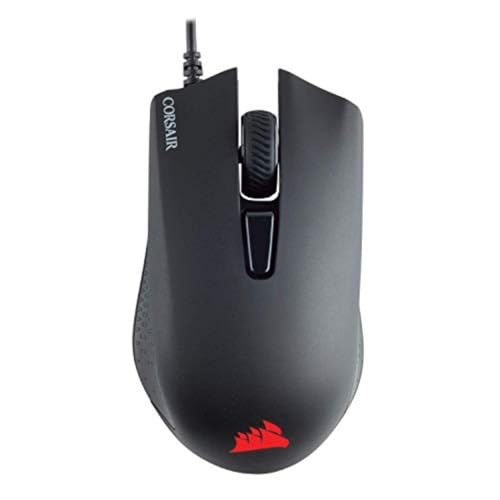
- Incredibly lightweight at just 85 grams so that you can play even longer
- Contoured shape and rubber side grips let you play in Lasting comfort with a confident grip
- Ready to game right out of the box—just plug in through a USB port and start taking down the competition
Pros
- 12,000 DPI PixArt optical sensor — highest DPI specification at this price point
- iCUE software integration for profiles, RGB, and DPI customization across Corsair devices
- 6 programmable buttons in a contoured 99g design that fits medium to large hands
Cons
- Slightly heavier than Logitech G203 and Razer Essential at 99g
- Cabled design uses a standard braided cable rather than a paracord or flexible alternative
See rating & reviews on Amazon.
Trade-offs / Who should skip
Players with small hands may find the Harpoon Pro’s 99g weight and larger ergonomic form a poor fit. The G203 and DeathAdder Essential run lighter and offer a more compact profile. The Harpoon Pro is best for medium to large hand sizes who want the highest sensor spec available at this price.
Scores: Sensor Accuracy 5/5 | Click Feel 4/5 | Build Quality 4.5/5 | Value 4.5/5
SteelSeries Rival 3 — Best Lightweight Budget Option
The Rival 3 delivers an 8,500 DPI TrueMove Core optical sensor, 6 programmable buttons, and three-zone RGB illumination in a 77g design — making it the lightest and most versatile budget option for players who want a symmetrical shape that works for both left and right hands. Why it wins: SteelSeries’ build quality at the Rival 3’s price is genuinely competitive with mice at 2-3x the cost, and the symmetrical form factor expands its appeal to players who can’t use right-handed ergonomic designs.

- Hyper durable materials – Engineered with high-grade polymer for durability
- 60 million click mechanical switches – To feel crisp from the first click to the last
- TrueMove Core optical gaming sensor – True 1-to-1 tracking 8500 CPI, 300 IPS, 35g acceleration
Pros
- 77g lightweight symmetrical design — works for both right and left-handed players
- 8,500 DPI TrueMove Core sensor with 300 IPS tracking accuracy
- Three-zone RGB customization via SteelSeries Engine software
Cons
- Scroll wheel click is less crisp than Logitech’s comparable price range
- Symmetrical shape lacks the ergonomic palm support of the DeathAdder Essential
See rating & reviews on Amazon.
Trade-offs / Who should skip
If you have large hands and prefer an ergonomic shape, the DeathAdder Essential or Harpoon Pro will feel more natural. The Rival 3 is the best pick for left-handed players and players who use a fingertip or claw grip that doesn’t rely on palm support.
Scores: Sensor Accuracy 4.5/5 | Click Feel 4/5 | Build Quality 4.5/5 | Value 5/5
Redragon M711 Cobra — Best Under $25
The Redragon M711 Cobra fits a 10,000 DPI sensor, 7 programmable buttons, and full RGB lighting into a price that competes with wired earbuds. Why it wins: For first-time PC gaming setups or shared family computers, the M711 Cobra’s feature count per dollar is unmatched — you get mouse specifications that would have cost $60–80 five years ago at a price that makes it essentially disposable if it fails.
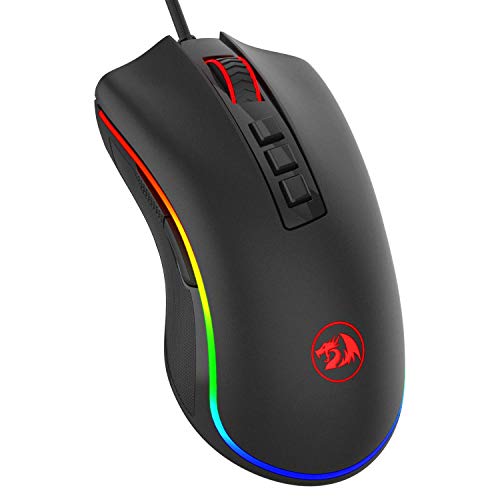
- 5 DPI Options & Customized Function – 5 adjustable DPI levels (500, 1000, 2000, 3000, 5000) meet your multiple needs, either for daily work or gaming. DPI can be adjusted freely by ±100 from 100 to 10000, taking advantage of on-the-fly DPI switching to instantly match mouse speed to gameplay demands. Besides, the Mouse Point Speed setting in the software also allows you to mildly change the movement speed of the mouse to achieve the right fit mode for yourself.
- 7 Programmable Buttons & 16.8-million Lighting “Breathing” RGB – 7 (7 out of 9) programmable buttons enable superior productivity and efficiency to meet all your gaming needs. 5 memory profiles each with a dedicated light color for quick identification and 16-Million Color backlight 'breathing' RGB LED gives out ambient light and set you in a unique gaming atmosphere.
- Professional Programming Software – Adopted the latest professional gaming chip AVAGO to capture fast and accurate movement for precise control; 5 adjustable DPI settings-500/1000/2000/3000/5000, quickly adjustable for different gaming scenarios; 5000 FPS, 100IPS Maximum Tracking Speed, 20G acceleration.
Pros
- 10,000 DPI adjustable sensor with 7 programmable buttons — the best spec-per-dollar of any budget option
- Braided cable and textured side grips at a price point where most competitors cut both corners
- Full RGB zone lighting with 16.8 million color options via Redragon software
Cons
- Sensor tracking at extreme speeds is less consistent than Logitech or Razer at comparable DPI settings
- Software interface is less polished than Logitech G Hub or Corsair iCUE
See rating & reviews on Amazon.
Trade-offs / Who should skip
Competitive players who play at high sensitivity will notice tracking inconsistencies at extreme DPI settings — the G203 or Rival 3 will serve that use case better. The Redragon M711 Cobra is the right choice for casual gamers and first builds where budget is the primary constraint.
Scores: Sensor Accuracy 3.5/5 | Click Feel 3.5/5 | Build Quality 4/5 | Value 5/5
Quick Compare
- Best overall budget gaming mouse: Logitech G203 Lightsync
- Best ergonomic budget mouse: Razer DeathAdder Essential
- Best sensor spec under $40: Corsair Harpoon Pro RGB
- Best for left-handed or symmetrical grip: SteelSeries Rival 3
- Best under $25: Redragon M711 Cobra
FAQs
Is a budget gaming mouse good enough for competitive play?
Yes — all five mice on this list use optical sensors that are accurate enough for competitive play at any level below professional esports. The difference between a $30 and a $150 gaming mouse is sensor precision at extreme tracking speeds, wireless capability, and switch click latency — none of which significantly impact casual or intermediate competitive play.
What DPI should I set my gaming mouse to?
Most competitive players use 400–1,600 DPI with moderate in-game sensitivity. High DPI doesn’t mean better accuracy — it means the cursor moves faster per inch of movement. Start at 800 DPI and adjust based on your desk space and play style. All mice on this list let you customize DPI in 200–400 DPI increments.
Does a gaming mouse work better on a mouse pad?
Yes — optical sensors perform more consistently on mouse pad surfaces compared to bare desks, particularly for tracking and lift-off distance. A $10–15 cloth mouse pad improves gaming mouse performance more noticeably than upgrading from a $30 to a $60 gaming mouse.
How long do budget gaming mice last?
Logitech and Razer budget mice are rated for 5–10 million clicks on their primary buttons, which translates to 2–5 years of daily use. Redragon’s budget tier runs closer to 3–5 million clicks. The cable is usually the first failure point — a budget gaming mouse on a quality mouse pad can last 3+ years before performance degrades noticeably.
As an Amazon Associate, I earn from qualifying purchases.