
Best 5K Screen Monitors Today
As an Amazon Associate I earn from qualifying purchases. Some links may earn us a commission at no extra cost to you.
5K is where text finally looks “print sharp” and timelines, code, or photo grids stop feeling cramped. What really matters isn’t just the resolution, but how each monitor handles it: scaling on Mac and Windows, color accuracy, brightness and reflections, ports (USB-C/Thunderbolt), and whether you want a classic 27-inch panel or a wide command-center-style screen.
Top picks
Dell UltraSharp U4025QW — Best for ultrawide 5K productivity
A 40-inch curved 5K2K “single-monitor command center” that’s perfect if you live in timelines, spreadsheets, and multiple apps at once.
Why it wins: Dell’s IPS Black panel, 120Hz refresh, and Thunderbolt 4 hub make it one of the most complete 5K2K productivity monitors available right now.

- LED Monitor offers maximum productivity with added dependability
- USB Type-C allows powerful and efficient transfer of data with maximum productivity
- 39.7" viewable screen size provides a lively viewing experience
Pros
-
Huge 40″ 5K2K canvas replaces dual 27″ setups
-
IPS Black panel offers deeper blacks than typical IPS monitors
-
120Hz refresh keeps scrolling and animations feeling very smooth
-
Built-in TB4 hub, KVM, and generous USB port selection
Cons
-
Massive 40″ size demands a deep, wide desk
-
Not ideal for competitive gaming; response time is only okay
-
High-end features mean it costs more than most ultrawides
Social proof
Lab reviews currently place the U4025QW near the top of the 5K/5K2K category for productivity, with strong praise for its sharp 5120×2160 panel, color accuracy, and docking features. Owner reviews on Amazon mostly echo the same points: huge, sharp, very color-accurate, and surprisingly convenient as a one-cable laptop dock. See reviews on Amazon.
Trade-offs / Who should skip
This is the right pick if your day is mostly multitasking: video timelines, DAWs, code + browser side by side, or huge data dashboards. The 21:9 aspect ratio and gentle curve are awesome for that, but some games and older apps won’t use the full width gracefully. If you only have a small desk, or you just want a simple 27-inch screen for school or casual use, this is overkill—look at the ASUS ProArt or KTC instead.
Scores: Performance 5/5 · Color & Contrast 4.5/5 · Ease of Use 4.5/5 · Value 4/5
Apple Studio Display — Best for Mac-first creative workflows
The Studio Display is the “feels like an iMac” option: a 27-inch 5K Retina panel tuned for macOS, plus built-in camera, mics, and speakers.
Why it wins: If you live entirely in the Apple world and want everything—P3 color, super-sharp text, webcam, speakers, and a single cable—this is the easiest, most polished pick.

- Immersive 27-inch 5K Retina display with 600 nits of brightness, support for one billion colors, and P3 wide color*
- 12MP Ultra Wide camera with Center Stage for more engaging video calls
- Studio-quality three-mic array for crystal-clear calls and voice recordings
Pros
-
Mac-optimized 5K Retina panel with razor-sharp text at 218 PPI
-
Excellent P3 color coverage and presets for design and photo work
-
Built-in 12MP webcam, mics, and six-speaker system for calls
-
Single Thunderbolt 3 cable handles video plus up to 96W charging
Cons
-
Limited to 60Hz; not ideal if you value high refresh
-
Best with macOS; Windows scaling and camera controls are limited
-
No HDR support; SDR-only despite the high brightness
Social proof
Reviewers consistently highlight the Studio Display’s outstanding text clarity and factory color accuracy in sRGB and P3 modes, especially in macOS workflows. At the same time, both pro reviewers and Amazon buyers note that it’s pricey and limited to 60 Hz, so the value really depends on how all-in you are on Apple. See reviews on Amazon.
Trade-offs / Who should skip
Pick this if you own a modern Mac and want a display that behaves like a native Apple device—reference modes, True Tone, camera, audio, and sleep/wake all feel integrated. If you’re on Windows, though, scaling and camera features are more awkward, and you’ll probably get better value and flexibility from the ASUS ProArt, Samsung ViewFinity S9, or KTC.
Scores: Performance 4.5/5 · Color & Contrast 4.5/5 · Ease of Use 4.5/5 · Value 3.5/5
ASUS ProArt Display PA27JCV — Best for cross-platform creators
A 27-inch 5K ProArt panel built for editors, designers, and photographers who bounce between Mac and Windows.
Why it wins: It combines true-5K sharpness with wide-gamut, factory-calibrated color, strong brightness, and excellent anti-glare—without locking you into the Apple ecosystem.
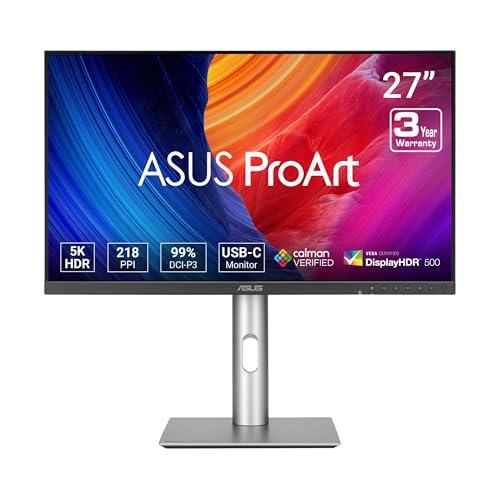
- High-Resolution 5K Display: 27-inch 5K (5120 x 2880) LED-backlit HDR display with 178 wide-view IPS panel
- Wide Color Gamut Coverage: 99% DCI-P3 and 100% sRGB wide color gamut for vibrant and accurate color reproduction
- Calman Verified Color Accuracy: Factory pre-calibrated to Delta E<2 color accuracy for professional-grade precision

Pros
-
True 5K 27″ panel with 218 PPI and 60Hz refresh
-
Factory-calibrated wide gamut for accurate design and color work
-
LuxPixel matte coating cuts reflections while keeping text very sharp
-
USB-C with 96W power plus KVM and multi-port USB hub
Cons
-
Still only 60Hz; dual-mode gaming options are limited
-
No built-in webcam; you’ll need a separate camera
-
Ergonomic stand is solid, but footprint isn’t tiny
Social proof
This ProArt model shows up in reviews as one of the sharpest, brightest 27-inch 5K panels, especially recommended for bright rooms and color-critical work thanks to its coating and gamut coverage. Owner feedback generally praises the color accuracy out of the box and the one-cable USB-C workflow. See reviews on Amazon.
Trade-offs / Who should skip
Choose this if you want “near-reference” color and 5K sharpness without Apple hardware, or if you regularly plug in both Windows laptops and Macs. If you want built-in speakers and webcam, or you care more about Smart TV features and game streaming, the Samsung S9 is better. If you just need 5K text sharpness as cheaply as possible, the KTC H27P3 is the more budget-friendly play.
Scores: Performance 4.5/5 · Color & Contrast 5/5 · Ease of Use 4.5/5 · Value 4.5/5
Samsung ViewFinity S9 (LS27C900PANXZA) — Best 5K monitor + Smart TV combo
A 27-inch 5K screen that doubles as a Smart TV, AirPlay receiver, and cloud-gaming hub, with a matte finish that many people prefer over glossy glass.
Why it wins: If you want a 5K display that can be a work monitor by day and a streaming/gaming screen by night, the ViewFinity S9 is uniquely versatile.

- 5K RESOLUTION: 5K provides more pixels than 4K, with 218 PPI for incredible detail; 99% DCI-P3 delivers color saturation to bring your ideas to vibrant life, and factory-calibrated color accuracy (ΔE < 2) delivers true color representation*
- MATTE DISPLAY: Matte Display drastically reduces light reflections without obscuring your view; Intelligent Eye Care automatically optimizes brightness, reduces blue light, and eliminates screen flickering, so you can keep your eyes on the prize
- SMART CALIBRATION: With Smart Calibration and a phone, screen can be customized; Choose between DCI-P3 or sRGB color space and set preferences, color temperature, luminance and gamma settings without extra tools or complex procedures**
Pros
-
5K IPS panel with 218 PPI and wide DCI-P3 gamut
-
Matte finish with good reflection handling in bright, windowed rooms
-
Smart TV apps, AirPlay, and Gaming Hub built into monitor
-
Included 4K webcam and height-adjustable stand simplify desk setups
Cons
-
Smart-TV features add complexity; some users may never use them
-
Thunderbolt 4 compatibility is best with newer Apple silicon Macs
-
Stand lacks full pivot; portrait mode isn’t supported
Social proof
Pro reviewers highlight its strong color performance, good factory calibration, and genuinely useful Smart features. Amazon reviewers tend to love the matte coating and the “all-in-one” feel (monitor + TV + webcam), while a few mention firmware and app quirks. See reviews on Amazon.
Trade-offs / Who should skip
This is perfect if your desk is also your TV space and you like the idea of plugging in a MacBook with Thunderbolt 4, then flipping straight into Netflix or cloud gaming with no extra box. If you just want a no-nonsense, color-accurate 5K editing screen, the ASUS ProArt is simpler and more focused. And if you never use Smart TV features, you’re paying for extras you might ignore.
Scores: Performance 4.5/5 · Color & Contrast 4.5/5 · Ease of Use 4/5 · Value 4/5
KTC H27P3 — Best budget 27-inch 5K monitor
A surprisingly affordable 27-inch 5K IPS panel with a clever dual-mode trick: full 5K for work, or 1440p at 120Hz for smoother gaming.
Why it wins: It delivers true-5K sharpness, wide color, and a modern USB-C setup for much less than most big-brand 5K monitors—without feeling like a cheap panel.
No products found.
Pros
-
Sharp 27″ 5K panel with HDR400 support for extra punch
-
Dual-mode: 5K 60Hz for work or 1440p 120Hz for play
-
65W USB-C plus HDMI and DisplayPort cover most laptops
-
Wide color coverage and calibration at an entry-level 5K price
Cons
-
Stand only tilts; plan on a VESA arm for ergonomics
-
No built-in speakers; you’ll want external audio
-
HDR is basic; think SDR-plus rather than cinema-level HDR
Social proof
Recent coverage from major tech sites frames the H27P3 as an unusually strong value 5K panel, praising its text clarity, dual-mode 5K/1440p design, and color performance relative to cost. Amazon buyers mostly echo that sentiment, with common compliments around sharpness and USB-C simplicity. See reviews on Amazon.
Trade-offs / Who should skip
Grab this if you want 5K sharpness for Mac or Windows without paying Apple or Dell money, and you’re okay adding speakers and possibly a monitor arm. If you’re a color-critical pro who wants absolute uniformity and long-term support from a bigger brand, the ASUS ProArt or Apple Studio Display are safer bets.
Scores: Performance 4/5 · Color & Contrast 4/5 · Ease of Use 3.5/5 · Value 5/5
Quick compare
-
Dell U4025QW — Best for ultrawide productivity: 40″ 5K2K curved canvas with 120Hz and a loaded TB4 hub; amazing for multitasking, but huge and pricey.
-
Apple Studio Display — Best for Mac-first workflows: 27″ 5K Retina with elite P3 color, speakers, and webcam; perfect for Macs, less flexible for Windows.
-
ASUS ProArt PA27JCV — Best for cross-platform creators: 27″ 5K, wide-gamut, calibrated panel with great anti-glare and USB-C/KVM; no built-in camera or speakers.
-
Samsung ViewFinity S9 — Best 5K + Smart TV hybrid: 27″ 5K matte screen plus AirPlay, Smart TV apps, and Gaming Hub; brilliant all-rounder if you’ll use the smart features.
-
KTC H27P3 — Best budget 5K: 27″ 5K with 5K/60 and 1440p/120 modes, 65W USB-C, and wide color; basic stand and HDR, but fantastic value.
FAQs
Q: Is 5K really that much better than 4K on a 27-inch monitor?
A: Yes, especially for text-heavy work. A 27″ 4K screen has noticeably lower pixel density than a 27″ 5K panel. That extra density lines up perfectly with 200% scaling on both macOS and modern Windows, so you get razor-sharp UI elements and fonts with less aliasing, which you can see clearly when you’re reading or coding for hours.
Q: Will my GPU struggle to drive 5K?
A: For normal desktop use, browsing, school work, or even light content creation, most recent integrated and mid-range GPUs handle a single 5K panel fine. The main hit is if you also want high-refresh gaming at high settings—5K60 is a heavy load in games. In that case, a monitor like the KTC H27P3 with a 1440p/120Hz mode lets you drop resolution for smoother gameplay while keeping 5K available for work.
Q: Is a 40″ 5K2K ultrawide too big for a home desk?
A: It depends on your desk depth. Dell’s U4025QW is almost 37″ wide and really wants around 28–32″ of viewing distance. If your desk is shallow, you may feel like you’re “inside” the screen and constantly moving your head; in that case, I’d stick to a 27″ 5K or consider rearranging your desk so the monitor can sit farther back.
Q: I mostly do schoolwork, light photo editing, and streaming. Is 5K overkill?
A: It’s nice rather than necessary for that workload. 5K makes reading and small UI elements more comfortable and your photos look cleaner, but a good 4K monitor already looks great. If you’re buying something to last many years and you already know you care about sharp text and color, a KTC H27P3 or ASUS ProArt can be a solid “buy once, cry once” option. If budget is tight, though, a good 4K display might be smarter and you can upgrade later.
As an Amazon Associate, I earn from qualifying purchases.