
Best Sticker Printers for Small Businesses
As an Amazon Associate, I earn from qualifying purchases. Some links may earn us a commission at no extra cost to you.
The right sticker printer depends on what your business actually makes. Full-sheet sellers need flexible color printing, while shops shipping products may care more about labels and fast thermal output. Portable color printers also work well for packaging accents and small branded inserts.
Top Sticker Printers
1. Liene PixCut S1 — Best All-in-One Sticker Printer
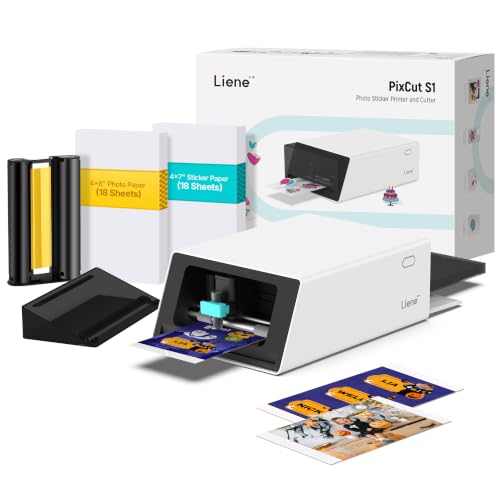
- All-in-One Convenience - Print and Cut in One Step. Say goodbye to the hassle of using separate machines. The PixCut S1 seamlessly integrates high-resolution photo printing and precise die cutting into one streamlined device. With just a few clicks on the user-friendly app, you can edit, print, and cut directly from your smartphone via Bluetooth. Create stickers in just 2 minutes! This all-in-one solution saves you time and effort, making your creative projects more enjoyable and efficient.
- AI Image Extraction & Precision Cutting - Unleash your creativity with the AI image extraction feature that automatically recognizes and extracts subjects from your photos. Then watch as the high-precision cutting system, guided by the same AI technology, perfectly follows every edge with pinpoint accuracy. This seamless AI-to-cut workflow ensures flawless results every time. Turn any moment into custom stickers with professional edges in minutes - just masterpieces made simple.
- High-Resolution Prints - Vivid and True-to-Life Colors. Utilizing thermal dye-sublimation technology, the PixCut S1 delivers stunning 300 dpi high-resolution prints with 16.7 million colors. Whether you're printing photos, stickers, or labels, you can expect vibrant, true-to-life color effects that make your creations stand out. Every detail is captured with precision, providing professional-quality results every time.
The Liene PixCut S1 is the most purpose-built option here for businesses that want to print and cut stickers in one workflow.
Why it wins: It combines 300 DPI dye-sublimation color printing with automatic cutting, making it useful for custom stickers, labels, packaging accents, and craft products.
Pros
- Prints and cuts in one machine
- Full-color output
- 300 DPI printing
- Precise automatic cutting
Cons
- Less flexible for large full sticker sheets
- Requires dedicated media
Who should buy it: Small businesses that want a dedicated sticker-making machine rather than separate printing and cutting equipment.
2. Epson EcoTank ET-2800 — Best for Full-Sheet Sticker Projects

- ECOTANK TECHNOLOGY — This Epson EcoTank ET-2800 wireless all-in-one printer features cartridge-free printing with refillable ink tanks; Delivering up to 4,500 black and 7,500 color pages per ink bottle set for home use
- WIRELESS CONNECTIVITY — Connect seamlessly to your home network with Wi-Fi capability; Allowing you to print, scan and copy from multiple devices including computers, laptops and smartphones throughout your home office
- ALL-IN-ONE FUNCTIONALITY — Combines color printing, flatbed scanning and copying in one compact inkjet printer, making it the multifunction printer scanner for basic home and office needs

The Epson ET-2800 is a practical choice for printable sticker paper and vinyl projects where full-page output matters.
Why it wins: Its refillable ink tanks make more sense for frequent printing than constantly replacing small cartridges, while the standard printer format works well with a separate cutting machine.
Pros
- Full-sheet printing
- Refillable ink tanks
- Useful for frequent production
- Also works as a general home printer
Cons
- No built-in sticker cutting
- Not aimed specifically at premium photo output
Who should buy it: Beginners and small shops producing sticker sheets before cutting them separately.
3. MANGOSLAB Nemonic Label Printer — Best Portable Business Label Printer

- EFFICIENT LABELING SOLUTION. Enhance your business organization with the MANGOSLAB Nemonic wireless portable printer. This thermal shipping label printer can print labels ranging from 1 to 4 inches and provides a professional and adaptable solution for small businesses.
- VERSATILE CONNECTIVITY. Facilitate seamless integration into your workflow with both Bluetooth and USB connectivity options. Compatible with mobile devices (Android/iOS) and PCs (Windows/Mac), this portable mini printer ensures flexibility and adaptability across various platforms.
- USER-FRIENDLY MOBILE APP. The Nemonic app offers diverse templates and fonts, integrating smoothly with MS Office files. Its scan-and-print function eliminates handwritten memos to enhance efficiency in various settings. This label sticker printer simplifies your label creation process effortlessly.
The MANGOSLAB Nemonic is a compact option for businesses that want quick thermal labels without running a full-size desktop printer.
Why it wins: It uses inkless thermal printing and Bluetooth connectivity in a portable format designed around labels and small-business use.
Pros
- Inkless thermal printing
- Bluetooth connectivity
- Compact and portable
- Useful for business labels
- No ink cartridges to replace
Cons
- Monochrome output
- Not intended for colorful sticker art
- Less suitable than Rollo for high-volume 4-by-6 shipping labels
Who should buy it: Small businesses that want a compact wireless printer for everyday labels without dedicating much desk space.
4. Canon SELPHY CP1500 — Best for Small Glossy Prints
The Canon SELPHY CP1500 makes sense for sellers who want compact glossy photo-style output for inserts, small creative products, or decorative packaging pieces.
Pros
- Compact desktop design
- Good for glossy mini prints
- Simple photo-printing workflow
Cons
- Not a full-sheet sticker printer
- Media costs add up with frequent production
Who should buy it: Sellers who mainly want small photo-style prints and packaging extras rather than large sticker sheets.
5. Rollo Wireless Shipping Label Printer — Best for Shipping Labels

- WIRELESS WIFI SHIPPING: Rollo wireless utilizes AirPrint to print labels directly from iPhone, iPad, and Mac or via Wi-Fi for Android, Windows, Chromebook and Linux without Bluetooth or drivers; Simply connect to Wi-Fi and print or connect via USB
- ROLLO SHIP MANAGER APP: Our complimentary shipping app provides a streamlined and cost efficient way to mail packages; Connect any ecommerce platform and gain access to exclusive shipping rates without paying for another shipping platform like ShipStation or ShippingEasy
- HIGH SPEED: Stop buying ink and toner and start printing with advanced direct thermal technology at a speed of 150mm/s or one 4x6 label per second; Labels come out clear and visible for easy reading and scanning because of our high resolution 203 DPI print head
The Rollo is the business-focused choice for shops that mainly need 4-by-6-inch adhesive shipping labels.
Why it wins: It uses direct thermal printing, so there is no ink or toner, and it works across common computers and mobile devices.
Pros
- Built for 4-by-6 shipping labels
- No ink or toner
- Fast thermal printing
- Useful for ecommerce fulfillment
Cons
- Monochrome only
- Not intended for decorative stickers
Who should buy it: Businesses that ship enough orders to justify a dedicated shipping-label printer.
6. HP Sprocket 2×3 — Best Portable Color Sticker Printer
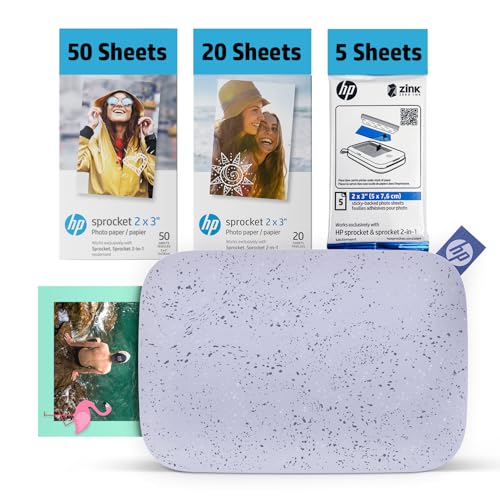
- PRINT PHOTOS ON DEMAND HP Sprocket 2nd Edition Printer Prints 2”x 3” Photographs from Your Smartphone or Social Media. For iOS 10-Plus & Android 5-Plus, Bluetooth 5.6
- UNIQUE FILTERS, FRAMES & FLAIR Customize Your Snaps with Cool Editing Tools on the Free HP App. Apply Stickers, Borders & Emojis, Share Albums.
- ZINK ZERO INK Printing technology eliminates the need for ink, toners, or cartridges. It produces vivid, full-color Zink prints on adhesive-backed photo paper that is smudge-proof, water-resistant, and tear-resistant.
The HP Sprocket is the portable choice for small businesses that want color adhesive prints without a full-size printer.
Why it wins: The bundle prints 2-by-3-inch color ZINK sticky-back photos from a phone over Bluetooth and includes 75 sheets, making it useful for packaging accents, branded inserts, thank-you stickers, and small decorative products.
Pros
- Full-color sticky-back prints
- Portable Bluetooth design
- 75-sheet bundle
- No traditional ink cartridges
- Easy phone-based workflow
Cons
- Limited to 2-by-3-inch output
- Not economical for large sticker batches
- No automatic cutting
Who should buy it: Small shops that want portable color adhesive prints for packaging and small branded extras.
Quick Comparison
- Best overall: Liene PixCut S1
- Best full-sheet option: Epson EcoTank ET-2800
- Best portable business labels: MANGOSLAB Nemonic
- Best small glossy prints: Canon SELPHY CP1500
- Best shipping printer: Rollo Wireless
- Best portable color stickers: HP Sprocket 2×3
Final Verdict
The Liene PixCut S1 is the strongest overall option when you want sticker printing and cutting in one machine. The Epson EcoTank ET-2800 is better for traditional full-sheet projects.
Choose the MANGOSLAB Nemonic for compact everyday business labels or the Rollo for dedicated shipping labels. The HP Sprocket 2×3 is the best portable option for small color adhesive prints and packaging extras.
As an Amazon Associate, I earn from qualifying purchases.