
Best Budget Prebuilt Gaming PCs (Starter to Sweet Spot)
As an Amazon Associate, I earn from qualifying purchases. Some links may earn us a commission at no extra cost to you.
Top picks
CyberPowerPC Gamer Master (RTX 4060 config) — Best overall budget 1080p gaming
If you can land a true RTX 4060 prebuilt in your budget range, this is usually the cleanest “just start gaming” choice for modern titles at 1080p.
Why it wins: strong 1080p performance headroom without getting weird parts.

- System: AMD Ryzen 5 7600 3.8GHz 6+12 Cores | AMD A620 Chipset | 16GB DDR5 | 500GB PCIe Gen4 NVMe SSD | Genuine Windows 11 Home 64-bit
- Graphics: NVIDIA GeForce RTX 4060 8GB Video Card | 1x HDMI | 2x DisplayPort
- Connectivity: 6 x USB 3.1 | 2 x USB 2.0 | 1x RJ-45 Network Ethernet 10/100/1000 | 802.11AC Wi-Fi | Audio: 7.1 Channel | Keyboard and mouse
Pros
-
Strong 1080p performance for modern games
-
Good baseline for future GPU upgrades
-
Typically, a sensible parts mix (CPU/RAM/SSD)
Cons
-
Storage can be modest on some configs
-
Fans can be noticeable under load
Trade-offs / who should skip
-
If you mainly play esports titles and want the cheapest workable rig, an RTX 3050 class system can make more sense.
Scores: Performance 5/5 • 1080p GPU tier (primary metric) 5/5 • Ease of use 4/5 • Value 4/5
Skytech Gaming Nebula (RX 7600 config) — Best value alternative to RTX 4060
RX 7600 prebuilts are often a great budget sweet spot for 1080p, especially if you’re okay skipping NVIDIA-only features.
Why it wins: excellent frames-per-dollar in the “real gaming PC” tier.
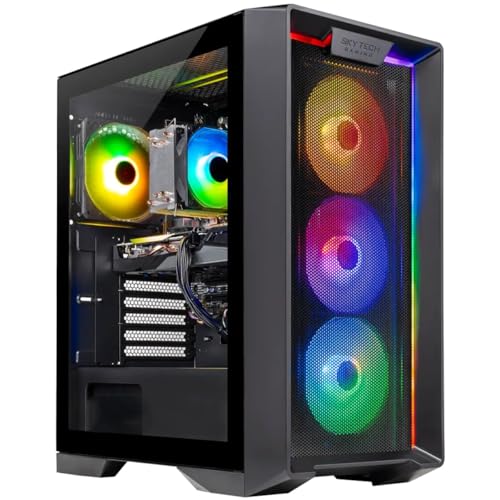
- AMD Ryzen 5 5500 3.6GHz (4.2GHz Turbo Boost) CPU Processor | 1TB NVMe M.2 SSD – Up to 30x Faster Than Traditional HDD | High-Performance Air Cooler
- AMD Radeon RX 7600 8GB GDDR6 Graphics Card (Brand may vary) | 16GB DDR4 RAM 3200 Gaming Memory with Heat Spreader | Windows 11 Home 64-bit
- WI-FI 5 802.11ac | No Bloatware | Graphic output options include 1 x HDMI, and 1 x Display Port Promised, Additional Ports may vary | USB Ports Including 2.0, 3.0, and 3.2 Gen1 Ports | HD Audio & Mic | Free Gaming Keyboard & Mouse
Pros
-
Strong 1080p performance for the money
-
Good fit for fast-paced shooters
-
Often a straightforward, upgrade-friendly build
Cons
-
Ray tracing is less of a focus at this tier
-
Some games favor NVIDIA features
Trade-offs / who should skip
-
If you care about NVIDIA-specific extras (like DLSS in lots of games), pick an RTX 4060 model instead.
Scores: Performance 4/5 • 1080p GPU tier 4/5 • Ease of use 4/5 • Value 5/5
Periphio Firestorm (RX 7600 config) — Best for “room to grow” on a budget
This is a good pick when you want a budget rig that won’t feel boxed in for upgrades.
Why it wins: a balanced platform that’s easy to build on.
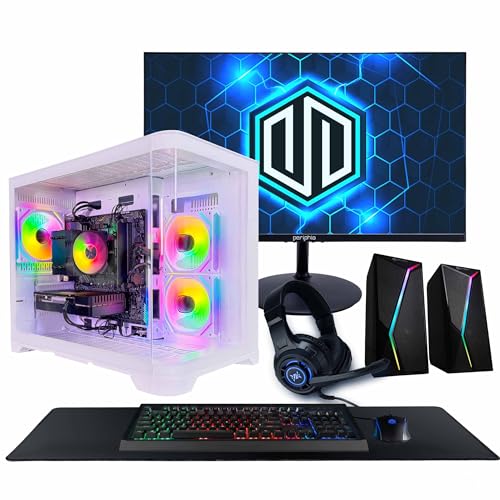
- AFFORDABLE 1080p GAMING PERFORMANCE -Powered by the AMD Radeon RX 6500 XT 4GB graphics card and AMD Ryzen 5 5500 processor, this gaming PC delivers smooth 1080p gameplay in popular titles like Fortnite, Minecraft, Rocket League, Roblox, Valorant, Apex Legends, and more.
- FAST HARDWARE FOR GAMING & EVERYDAY USE - Featuring a 6-Core AMD Ryzen 5 5500 processor, 16GB DDR4 memory, and a fast 1TB SSD, this gaming desktop boots quickly, loads games faster, and provides plenty of storage for your growing game library.
- BUILT TO UPGRADE & GROW - Designed with future upgrades in mind, this gaming computer includes a 650W power supply, support for full-size graphics cards, additional storage expansion, and room for advanced cooling solutions as your gaming needs evolve.
Pros
-
Solid 1080p GPU class
-
Good foundation for later upgrades
-
Often, a “no-nonsense” gaming tower layout
Cons
-
Configuration details can vary by listing
-
Extra tuning may be needed for quiet operation
Trade-offs / who should skip
-
If you want the absolute simplest out-of-the-box setup, go with a high-volume prebuilt line like CyberPowerPC.
Scores: Performance 4/5 • 1080p GPU tier 4/5 • Ease of use 4/5 • Value 4/5
AVGPC Max (RTX 3050 config) — Best ultra-budget “starter” gaming desktop
RTX 3050 class prebuilts are the entry point I’d consider if your budget is tight and you’re mainly playing esports/older titles.
Why it wins: a workable starter GPU tier for 1080p when settings are managed.
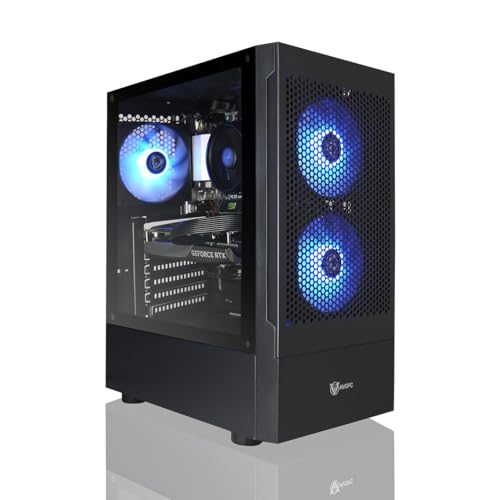
- This computer can run plenty of games smoothly, thanks to its efficient processor and optimized graphics, making it a great choice for casual and light gaming.
- System build : Intel Core i3 10105F, GeForce RTX 3050 GPU, 16GB DDR4 RAM, 1TB M.2 NVMe SSD,
- Assembled and supported in the USA by experienced gamers, with lifetime customer support included.
Pros
-
Usually cheaper than 4060/7600 rigs
-
Fine for esports and lighter games
-
Good stepping stone for a future GPU upgrade
Cons
-
Modern AAA games may need lower settings
-
Less “future-proof” than the 4060/7600 class
Trade-offs / who should skip
-
If you want high settings in new games, skip this tier and jump to RTX 4060 / RX 7600.
Scores: Performance 3/5 • 1080p GPU tier 3/5 • Ease of use 4/5 • Value 4/5
BOSGAME M4 Neo Mini PC (Radeon 780M iGPU) — Best tiny PC for esports + portability
A mini PC with a strong integrated GPU can be a smart budget pick if you play lighter titles, want something compact, or need a dual-use “school + gaming” box.
Why it wins: small footprint and good esports capability without a full tower.

- Powerful Mini Gaming PC: BOSGAME mini pc M4 Neo features the 4nm Zen4 architecture AMD Ryzen 7 7840HS (Up to 5.1GHz, 8C/16T, 16MB Cache), paired with the powerful integrated gpu AMD Radeon 780M that supporting AV1 decode/encode and DirectX 12 it handles AAA gaming, 8K video editing, and image design multitasking. Use its' Oculink port to connect our BOSGAME eGPU achieve tower pc gaming performance in a compact form factor
- 32GB DDR5 RAM & 1TB SSD, Expandable: The M4 Neo Mini PC is equipped with 32GB DDR5 4800MHz dual-channel memory (16GB x 2) and a 1TB PCIe 4.0x4 NVMe SSD, delivering seamless performance for heavy-duty applications or large game libraries. It includes an additional M.2 NVMe PCIe 4.0 x4 slot, allowing easy storage upgrades to 4TB to meet growing needs. Perfect for gaming, multitasking, or content creation.
- Mini PC with Oculink Port: Features an Oculink Port supporting PCIe 4.0 with 40Gbps transfer speeds, enabling eGPU connections for enhanced graphics and NVMe SSD RAID arrays for faster data access. The direct PCIe connection minimizes latency, ensuring stable performance for gaming, video editing, or multitasking.
Pros
-
Extremely compact and easy to place
-
Great for esports/lighter games at tuned settings
-
Low hassle for dorm/desk setups
Cons
-
Not a true AAA high-settings machine
-
Limited GPU upgrade path compared to towers
Trade-offs / who should skip
-
If you want a “real” AAA gaming desktop experience, choose a tower with RTX 4060 or RX 7600.
Scores: Performance 3/5 • 1080p GPU tier 2/5 • Ease of use 5/5 • Value 4/5
Quick compare
-
Best overall: CyberPowerPC RTX 4060 — B0CBL8KMSN
-
Best value: Skytech RX 7600 — B0FNMLG2TF
-
Best “room to grow”: Periphio RX 7600 — B0C7LX151Z
-
Best starter: AVGPC RTX 3050 — B0DMCKSYGS
-
Best mini: BOSGAME 780M iGPU — B0CZKZQT5T
Buying guide
1) Choose your GPU tier first
-
RTX 4060 / RX 7600: my recommended budget “sweet spot” for 1080p.
-
RTX 3050: starter tier for esports and lighter gaming.
-
780M iGPU mini PCs: best for portability and lighter gaming, not AAA max settings.
2) Minimum “don’t regret it” specs to look for
-
16GB RAM (or easy upgrade to it)
-
NVMe SSD (even if it’s not huge)
-
A case/motherboard that makes RAM + storage upgrades easy
3) Avoid common budget traps
-
“Big RAM” marketing paired with a weak GPU
-
No-name power supplies with unclear specs
-
Oddball listing variants—always confirm the exact CPU/GPU/RAM/storage in the configuration you’re buying
FAQs
What’s the best budget GPU for 1080p gaming?
In budget prebuilts, I’d aim for RTX 4060 or RX 7600 first. They’re the most likely to feel “next-gen enough” for a couple of years.
Is an RTX 3050 gaming PC worth it?
Yes, if your budget is tight and you mainly play esports/older games, just keep expectations realistic for new AAA titles.
Should I buy a mini PC instead of a tower?
Choose a mini PC if you need portability and mainly play lighter games. Choose a tower if you want better AAA performance and upgrade paths.
As an Amazon Associate, I earn from qualifying purchases.