
5 Best Streaming Devices — 4K HDR Players That Replace Your Cable Box
As an Amazon Associate I earn from qualifying purchases. Some links may earn us a commission at no extra cost to you.
The right streaming device determines how fast your apps load, how reliably your 4K content streams, and how smoothly you move between Netflix, Disney+, and everything else you pay for. Stick-form devices plug directly into your TV’s HDMI port and disappear; streaming boxes connect via cable and deliver more processing power for demanding tasks like Plex, upscaling, and local media. The five below cover every use case from budget-conscious streaming sticks to premium 4K media servers.
Amazon Fire TV Stick 4K Max — Best Overall Streaming Stick
The Fire TV Stick 4K Max (3rd gen) adds Wi-Fi 6E support, a 40% more powerful processor than the previous generation, and Ambient Display mode to Amazon’s best-selling streaming stick, delivering the fastest stick-form 4K streaming experience at its price point. Why it wins: Wi-Fi 6E is the differentiator — on a supported router, the 4K Max connects on the 6GHz band that no competing streaming stick accesses, eliminating the buffering and dropped connections that plague crowded 2.4GHz and 5GHz networks in apartments and multi-device households.
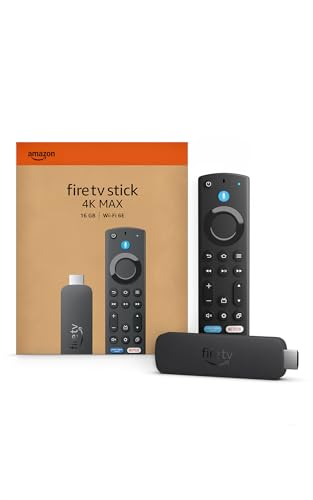
- The newest Fire TV experience (2026) – Our biggest update to Fire TV has a new, modern design that gets you to your entertainment fast. Browse dedicated content categories, pin more of your favorite apps, and get personalized recommendations from Alexa+. Spend less time scrolling, and more time watching.
- Elevate your entertainment experience with a powerful processor for lightning-fast app starts and fluid navigation.
- Play Xbox games – Stream Call of Duty: Black Ops 7, Hogwarts Legacy, Outer Worlds 2, Ninja Gaiden 4, and hundreds of games on your Fire TV Stick 4K Max with Xbox Game Pass via cloud gaming. Xbox Game Pass subscription and compatible controller required. Each sold separately.

Pros
- Wi-Fi 6E connects on the uncrowded 6GHz band — eliminates buffering on supported routers where competing sticks experience congestion
- 40% faster processor than previous 4K Max — noticeably snappier app launches and smoother interface navigation
- Alexa voice remote with live TV button and hands-free Alexa — full smart home control without reaching for a separate device
Cons
- Interface promotes Amazon Prime content more prominently than other services — requires deliberate navigation to stay in non-Amazon apps
- Wi-Fi 6E advantage only applies if your router also supports the 6GHz band — no benefit on older routers
See rating & reviews on Amazon.
Trade-offs / Who should skip
Users who dislike Amazon’s interface prioritization of Prime content should choose the Roku Streaming Stick 4K instead — Roku’s algorithm-neutral search shows all services equally. The Fire TV Stick 4K Max is the right choice for Prime Video subscribers, Alexa smart home users, and anyone with a Wi-Fi 6E router who wants the fastest possible stick-form streaming.
Scores: Interface Quality 4/5 | App Selection 4.5/5 | Remote Quality 5/5 | Value 5/5
Roku Streaming Stick 4K — Best for App Selection and Neutral Search
Roku’s Streaming Stick 4K delivers the largest app library of any streaming platform — over 500,000 movies and TV episodes across thousands of channels — with a universal search that finds content across every service without favoring any one provider, plus a voice remote with private listening via the headphone jack. Why it wins: Roku’s algorithm-neutral universal search is the only one on this list that treats every streaming service equally — when you search “Succession,” Roku shows you where to find it for free, cheapest, or on a service you already subscribe to without burying alternatives in favor of a proprietary platform.
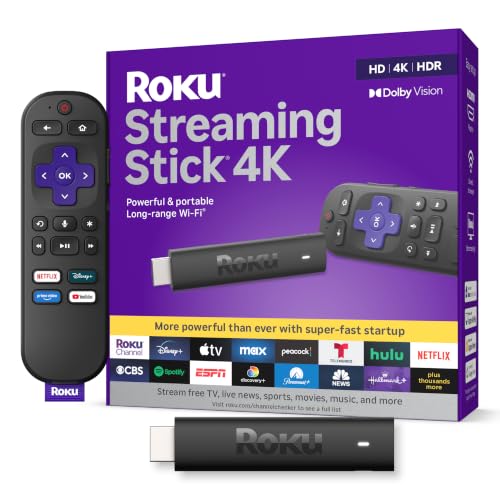
- Stunning 4K and Dolby Vision streaming made simple: With America’s number 1 TV streaming platform,* exploring popular apps—plus tons of free movies, shows, and live TV—is as easy as it is fun. *Based on hours streamed—Hypothesis Group
- Breathtaking picture quality: Stunningly sharp 4K picture brings out rich detail in your entertainment with four times the resolution of HD. Watch as colors pop off your screen and enjoy lifelike clarity with Dolby Vision and HDR10+.
- Seamless streaming for any room: With Roku Streaming Stick 4K, watch your favorite entertainment on any TV in the house, even in rooms farther from your router thanks to the long-range Wi-Fi receiver.
Pros
- Largest app library of any streaming platform — more channels and niche services than Fire TV, Apple TV, or Google TV
- Algorithm-neutral universal search shows content across all services equally — no proprietary platform favoritism
- Private listening headphone jack on the remote — watch late-night TV without disturbing others
Cons
- No Wi-Fi 6E support — limited to Wi-Fi 5 (802.11ac) compared to the Fire TV Stick 4K Max
- Roku OS lacks the visual polish of Apple TV and Google TV interfaces for media library browsing
See rating & reviews on Amazon.
Trade-offs / Who should skip
Power users who want Android app sideloading or the Google ecosystem should choose the Google TV Streamer. The Roku Streaming Stick 4K is the right choice for users who want the most straightforward, unbiased streaming experience with access to the widest possible catalog of services.
Scores: Interface Quality 4/5 | App Selection 5/5 | Remote Quality 4.5/5 | Value 5/5
Apple TV 4K (3rd Generation) — Best Premium Streaming Box
The Apple TV 4K (3rd gen) uses Apple’s A15 Bionic chip — the same processor in the iPhone 13 — to deliver the fastest interface response of any streaming device, a Thread and Matter smart home hub, AirPlay for wireless content from any Apple device, and Dolby Vision plus Dolby Atmos support across all compatible content. Why it wins: The A15 Bionic is measurably faster than any other streaming device processor, and that speed is immediately noticeable in daily use — apps open instantly, 4K content starts in under a second, and the interface never stutters — making it the premium choice for users who find the hesitation on other devices genuinely frustrating.
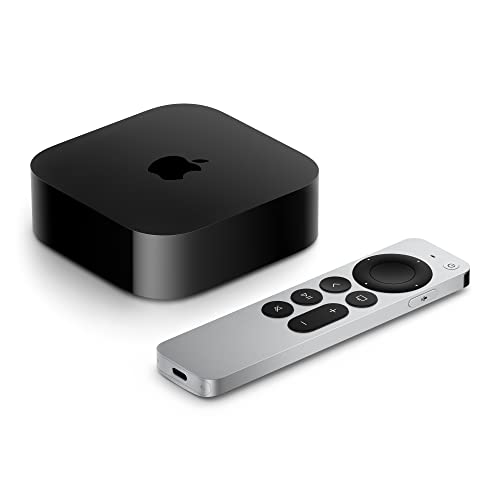
- 4K Dolby Vision and HDR10+ for vivid picture quality
- Dolby Atmos for three-dimensional, theater-like sound
- Incredible power with the A15 Bionic chip
Pros
- A15 Bionic chip delivers the fastest interface performance of any streaming device — apps open instantly, no stutter
- Thread and Matter smart home hub built in — controls HomeKit devices without a separate hub
- AirPlay lets you stream from iPhone, iPad, or Mac directly to the TV without cables or extra apps
Cons
- Highest price on this list — costs significantly more than Roku or Fire TV alternatives for streaming-only use
- Full value requires existing Apple device ownership — AirPlay, Handoff, and Siri integration are limited without an iPhone or Mac
See rating & reviews on Amazon.
Trade-offs / Who should skip
Non-Apple ecosystem users who don’t own an iPhone or Mac won’t benefit from AirPlay or Handoff integration and should choose the Fire TV Stick 4K Max or Google TV Streamer instead. The Apple TV 4K is the right choice for households with multiple Apple devices who want a premium hub that connects the TV to their smart home.
Scores: Interface Quality 5/5 | App Selection 4/5 | Remote Quality 4.5/5 | Value 3/5
Google TV Streamer 4K — Best for Google Ecosystem and Smart Home
Google’s TV Streamer 4K (2024) replaces the Chromecast with Google TV, adding 32GB of internal storage, a USB-C port, an Ethernet port, and Matter plus Thread smart home controller support — upgrading from a dongle to a full-featured streaming box while maintaining Google TV’s excellent content discovery and Android app ecosystem. Why it wins: The Thread and Matter smart home controller built into the TV Streamer turns your TV into the central hub for your entire smart home — no separate hub required — while Google’s content discovery engine surfaces personalized recommendations across every connected service better than any competing interface.

- The Google TV Streamer (4K) delivers your favorite entertainment quickly, easily, and personalized to you[1,2]
- HDMI 2.1 cable required (sold separately)
- See movies and TV shows from all your services right from your home screen[2]; and find new things to watch with tailored recommendations for everyone in your home based on their interests and viewing habits
Pros
- Thread and Matter smart home controller built in — replaces a dedicated smart home hub for Google Home users
- 32GB internal storage and Ethernet port — more capable than any competing streaming stick at this price point
- Google TV’s content discovery shows personalized recommendations across all connected services simultaneously
Cons
- Google TV can feel cluttered with recommendations — users who want a minimal interface may prefer Roku’s simpler layout
- Full smart home hub benefit requires Google Home ecosystem devices — less useful in Apple HomeKit or Amazon Alexa setups
See rating & reviews on Amazon.
Trade-offs / Who should skip
Apple HomeKit users should choose Apple TV 4K for their smart home hub. The Google TV Streamer 4K is the right choice for Android phone users, Google Home smart home owners, and anyone who wants Matter/Thread support without purchasing a separate hub.
Scores: Interface Quality 4.5/5 | App Selection 4.5/5 | Remote Quality 4/5 | Value 4/5
NVIDIA Shield TV Pro — Best for 4K Upscaling and Plex Media Server
The NVIDIA Shield TV Pro runs on the Tegra X1+ processor with AI-powered 4K upscaling that converts 1080p and lower-resolution content to near-4K quality in real time, supports GeForce NOW game streaming for 1,440 compatible PC games, and can run as a full Plex Media Server to transcode and serve your local media collection to any device on the network. Why it wins: AI upscaling is the Shield TV Pro’s defining feature — older 1080p content, YouTube videos, and standard broadcast streams visually improve in real time using trained neural networks, which is a meaningful daily benefit for anyone watching non-4K content on a 4K display.

- The Best of the Best. SHIELD TV delivers an amazing Android TV streaming media player experience, thanks to the new NVIDIA Tegra X1+ chip. Enhance HD video in real-time to 4K for clearer, crisper visuals using next-generation AI upscaling. 2x USB 3.0 ports for storage expansion, USB cameras, keyboards, controllers, and more. Plex Media Server built-in, 3 GB RAM, and 16 GB storage.Connectivity Technology : Bluetooth 5.0
- Dolby Vision - Atmos. Bring your home theater to life with Dolby Vision HDR, and surround sound with Dolby Atmos and Dolby Digital Plus—delivering ultra-vivid picture quality and immersive audio
- Best-In-Class Design. Designed for the most demanding users and beautifully designed to be the perfect centerpiece of your entertainment center, SHIELD TV Pro levels you up to more storage space, more RAM, the expandability of 2x USB 3.0 ports, and Plex Media Server. Get the best connectivity with Gigabit Ethernet, dual-band AC Wi-Fi, and Bluetooth 5.0. The all-new remote is more advanced than ever with motion-activated, backlit buttons—including a customizable menu button. Plus, with voice control, Bluetooth, IR control for your TV, and a built-in remote control locator, you have the most advanced remote yet
Pros
- AI-powered 4K upscaling improves 1080p content to near-4K quality in real time — the best upscaling of any consumer streaming device
- Runs full Plex Media Server — transcodes and serves local media to any device without a separate NAS or PC
- GeForce NOW game streaming supports over 1,440 PC games streamed to your TV from NVIDIA’s cloud servers
Cons
- Highest price on this list — costs significantly more than stick alternatives and more than Apple TV 4K for streaming-only use
- Plex and gaming features require technical setup comfort — overkill for users who just want Netflix and YouTube
See rating & reviews on Amazon.
Trade-offs / Who should skip
Casual streamers who don’t need upscaling, Plex, or gaming should save money with the Fire TV Stick 4K Max or Roku. The NVIDIA Shield TV Pro is the right choice for home theater enthusiasts, Plex media server operators, and users who want the most powerful streaming device available for AI upscaling and cloud gaming.
Scores: Interface Quality 4/5 | App Selection 4.5/5 | Remote Quality 3.5/5 | Value 3/5
Quick Compare
- Best overall with Wi-Fi 6E: Amazon Fire TV Stick 4K Max
- Best neutral app selection and search: Roku Streaming Stick 4K
- Best premium Apple ecosystem: Apple TV 4K (3rd Gen)
- Best Google ecosystem and smart home hub: Google TV Streamer 4K
- Best for upscaling and Plex server: NVIDIA Shield TV Pro
FAQs
Do I need a streaming device if my TV is already a smart TV?
Smart TVs include built-in streaming apps, but most use slower processors and receive fewer years of software updates than dedicated streaming devices. A standalone streaming device typically delivers faster load times, more regular updates, and a better interface than the built-in OS on most TVs. If your smart TV runs slowly, freezes, or is missing apps you want, an external streaming device is a meaningful upgrade regardless of TV age.
What’s the difference between a streaming stick and a streaming box?
A streaming stick plugs directly into your TV’s HDMI port and draws power from the TV’s USB port — compact, portable, and easy to hide. A streaming box connects via HDMI cable and plugs into a wall outlet — requires more space but delivers more processing power, storage, and ports. Streaming boxes like the Apple TV 4K, Google TV Streamer, and NVIDIA Shield TV Pro handle demanding tasks like 4K upscaling, Plex transcoding, and smart home hub functions that stick-form devices can’t manage.
What streaming services does each device support?
All five devices on this list support Netflix, Disney+, HBO Max, Hulu, Amazon Prime Video, Apple TV+, YouTube, and Peacock. The main differences are in niche app availability — Roku has the largest catalog with over 6,000 channels. Apple TV has the smallest app library but covers every major service. Fire TV, Google TV, and NVIDIA Shield all support the full major streaming catalog plus Android app sideloading for services not officially listed.
Do streaming devices work with any TV?
Any TV with an HDMI port works with these devices. 4K HDR features including Dolby Vision and Dolby Atmos require a TV that supports those formats — your TV’s manual lists which HDR standards it accepts. If your TV only has USB ports and no HDMI, these devices won’t connect. All five devices on this list support HDMI-CEC, which lets the streaming device remote control basic TV functions like volume and power on most HDMI-connected TVs.
As an Amazon Associate, I earn from qualifying purchases.