
Best 34 Inch Monitors
As an Amazon Associate I earn from qualifying purchases. Some links may earn us a commission at no extra cost to you.
A 34-inch ultrawide is the sweet spot if you want way more space than 27″ without going full 49″. What really matters are panel type (OLED vs IPS vs VA), refresh rate, curve, ports (USB-C, KVM), and whether you care more about punchy HDR or long-term burn-in safety.
Top picks
Alienware AW3425DW — Best for high-end gaming (overall winner)
If you want the “no-regrets” 34″ gaming monitor right now, this is it. The AW3425DW is a 34-inch 3440×1440 QD-OLED with a 240Hz refresh rate and an aggressive 1800R curve, so games look insanely sharp and feel ultra-responsive.
Why it wins: it combines elite motion (240Hz), QD-OLED contrast, and strong HDR in one 34″ package.

- Ultrawide immersion for elite gameplay: Our expansive 34" QD-OLED monitor delivers seamless speed, and super smooth motion with intuitive function and connectivity.
- Sweeping visuals and color: Evolve your field of view with WQHD and an 1800R curve, combined with QD-OLED's incredible color range and clarity that easily immerses you in any world.
- Colorful clarity: Experience the full spectrum of color as intended with DCI-P3 99.3% color coverage and Delta E<2 color accuracy.

Pros
-
240Hz QD-OLED panel with absurdly fast response
-
Deep contrast and “true black” HDR performance
-
3440×1440 works well for both games and daily use
-
G-Sync Compatible and FreeSync for tear-free gaming
Cons
-
Not ideal if you leave static UI up all day
-
Needs brightness management in very bright rooms
-
Higher power draw at max brightness and refresh
Social proof
Independent tests regularly rank the AW3425DW among the best ultrawides overall, especially for HDR gaming and cinematic single-player titles. See reviews on Amazon for long-term impressions and desk setups.
Trade-offs / Who should skip
-
Skip it if you’re very nervous about any OLED burn-in risk and mostly run static workloads.
-
Also not ideal if you’re a pure office user in bright rooms and barely ever game—the premium HDR and 240Hz are overkill there.
Scores: Performance 5/5 · Picture quality 5/5 · Ease of Use 4/5 · Value 4/5
Alienware AW3423DWF — Best value QD-OLED for immersive HDR
The AW3423DWF is basically the “value” sibling of the AW3425DW: same 34-inch 3440×1440 QD-OLED magic, but with a 165Hz refresh instead of 240Hz and a slightly simplified feature set.
Why it wins: you get OLED contrast and HDR that crush typical IPS/VA screens, at a more approachable spec level for most builds.

- INFINITELY IMMERSIVE: Quantum Dot Display Technology enables a slim panel design and delivers a superior color performance with a higher peak luminance and greater color gamut range vs WOLED (White OLED) by taking the impressive qualities of OLED (such as true blacks & infinite contrast ratio) and enhances color performance by directly converting blue light into the primary colors of red and green through a Quantum Dot pixel layer.
- STUTTER-FREE SPEED: Experience ultra-low latency gameplay, support for HDR and cinematic color, plus smooth, tear-free gaming thanks to AMD FreeSync Premium Pro Technology and VESA AdaptiveSync Display certification.
- IMPECCABLE DESIGN: The jaw-dropping new design features a sleek QD-OLED curved 1800R panel integrated into the iconic new Legend 2.0 ID, plus customizable RGB AlienFX lighting, 360° ventilation for better heat dissipation, improved cable management and a new centralized OSD 5-Axis joystick to make adjusting your settings easier. The height adjustable stand with height markers and the tilt, swivel, and slant capabilities allow for easy viewing adjustment.
Pros
-
34″ 3440×1440 QD-OLED with 165Hz refresh
-
TrueBlack-style HDR with very deep blacks
-
FreeSync Premium Pro and VRR for smooth gameplay
-
Lower overall demand than a 240Hz OLED
Cons
-
Still overkill if you only do spreadsheets
-
OLED care required for static HUDs and UI
-
Cooling fan may be audible in very quiet rooms
Social proof
Reviewers and users often call this the OLED ultrawide “sweet spot,” thanks to its mix of contrast, HDR, and still-very-fast 165Hz refresh. See reviews on Amazon for real-world experiences with brightness, fan noise, and OLED protection features.
Trade-offs / Who should skip
-
Esports-obsessed players who push for the highest possible FPS may still prefer the AW3425DW’s 240Hz.
-
If you hate any risk of image retention, an IPS or VA model below is a safer bet.
Scores: Performance 4.5/5 · Picture quality 5/5 · Ease of Use 4/5 · Value 4.5/5
Gigabyte M34WQ — Best for mixed gaming + productivity + KVM
The Gigabyte M34WQ is a flat 34″ 3440×1440 IPS ultrawide with a 144Hz refresh rate, 1ms MPRT, and a built-in USB-C KVM. That means you can hook up, for example, a gaming PC and a laptop and switch between them with one keyboard and mouse.
Why it wins: it’s the most balanced “do-everything” 34″—great for gaming and genuinely handy for work.
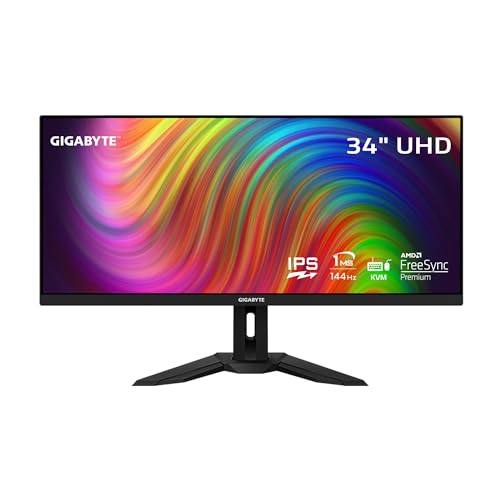
- 34” 3440x1440 IPS Display Gaming Monitor.Viewing Angle:178.0 degrees.Specific uses for product - Gaming
- 144Hz Refresh Rate, 1ms (MPRT) Response Time
- Immersive Ultrawide Aspect Ratio 21:9
Pros
-
3440×1440 IPS, 144Hz, 1ms MPRT, FreeSync
-
Built-in KVM; flip between PC and laptop easily
-
USB-C with video and data (limited power)
-
Good color coverage for media and light editing
Cons
-
USB-C power won’t fully charge most laptops
-
HDR400 is very basic; HDR is modest
-
Flat panel feels less immersive than steep curves
Social proof
Tech reviewers often highlight the M34WQ as a rare combo: a proper gaming monitor that also has KVM and USB-C for productivity. Users frequently mention how much easier it makes dual-device setups. See reviews on Amazon for reports on KVM behavior and Mac/PC compatibility.
Trade-offs / Who should skip
-
If you want perfect blacks and top-tier HDR, one of the Alienware OLEDs is significantly better.
-
If you don’t care about KVM or USB-C, a cheaper VA gaming ultrawide may give you enough performance.
Scores: Performance 4/5 · Picture quality 4/5 · Ease of Use 4.5/5 · Value 4.5/5
Dell S3422DWG — Best budget-friendly 34″ gaming monitor
The Dell S3422DWG is a 34″ 3440×1440 VA curved gaming monitor with a 144Hz refresh rate, strong native contrast, and FreeSync, without OLED-level pricing.
Why it wins: if you mainly care about immersive gaming on a big curved screen, this hits a great sweet spot for less money than OLED.

- A NEW VIEW: WQHD resolution (3440x1440) offers 34% more screen pixels than QHD giving you sharp, crystal-clear details and a panoramic view.
- SEE EVERY DETAIL: 34” 1800R curved screen with 21:9 aspect ratio and 3-sided ultra-thin bezels that envelop you with minimal distractions.
- A SMOOTHER EXPERIENCE: A 144Hz refresh rate allows fast-moving visuals to be seen with incredible clarity for faster reaction times.
Pros
-
34″ 3440×1440 VA with an 1800R curve
-
144Hz refresh with FreeSync for smooth gaming
-
High native contrast for dark scenes
-
Solid stand with height and tilt adjustment
Cons
-
VA smearing can appear in dark transitions
-
No USB-C; connectivity is more basic
-
HDR400 is limited; HDR is subtle
Social proof
Many reviews recommend the S3422DWG as a solid budget gaming ultrawide, highlighting its contrast and curve, with motion handling as the main trade-off versus IPS or OLED. See reviews on Amazon to see how people feel about ghosting and the curve in everyday use.
Trade-offs / Who should skip
-
If you’re sensitive to motion blur and ghosting, an IPS or OLED panel will feel cleaner.
-
If you need USB-C laptop docking or KVM, look at the Gigabyte M34WQ or LG 34WQ73A-B instead.
Scores: Performance 3.8/5 · Picture quality 4/5 · Ease of Use 3.8/5 · Value 4.5/5
LG 34WQ73A-B — Best 34″ for productivity, creators & USB-C docking
The LG 34WQ73A-B is a 34-inch curved 3440×1440 IPS ultrawide with HDR10, a 60Hz refresh rate, built-in KVM, and USB-C that can deliver up to 90W—enough to power most laptops from a single cable.
Why it wins: if you want a 34″ primarily for work, content creation, and clean single-cable laptop docks, this is the one that makes life easy.
No products found.
Pros
-
34″ 3440×1440 IPS; sharp for text and timelines
-
USB-C with up to 90W PD for one-cable docking
-
Built-in KVM and dual-computer tools
-
sRGB 99% coverage with HDR10 support
Cons
-
60Hz only; not aimed at competitive gaming
-
IPS contrast is weaker than VA or OLED
-
Built-in speakers and HDR are just okay
Social proof
Productivity-focused reviews frequently praise this model for its USB-C power delivery, KVM, and color coverage, calling it a great “office plus light creativity” ultrawide that’s still fine for casual gaming. See reviews on Amazon for details on how people use it with MacBooks and work laptops.
Trade-offs / Who should skip
-
If high-FPS gaming is a big priority, a 144–240Hz model above will feel far smoother.
-
If you have no need for USB-C or KVM, you might be paying for features you won’t use.
Scores: Performance 3.5/5 · Picture quality 4.2/5 · Ease of Use 4.8/5 · Value 4/5
Quick compare
-
Alienware AW3425DW — Best for pure high-end gaming: 240Hz QD-OLED, incredible HDR and motion; uses more power and costs more than IPS/VA.
-
Alienware AW3423DWF — Best for OLED value: stunning contrast and HDR at 165Hz; easier to drive than 240Hz and slightly more affordable.
-
Gigabyte M34WQ — Best for gaming + productivity: flat 144Hz IPS with KVM and USB-C; ideal if you juggle a desktop and laptop.
-
Dell S3422DWG — Best budget gamer: curved VA with strong contrast and 144Hz; fewer extras but great immersion.
-
LG 34WQ73A-B — Best for work-first setups: 60Hz IPS with 90W USB-C and KVM; perfect for single-cable laptop docking and creative work.
As an Amazon Associate, I earn from qualifying purchases.