
Best iPad Keyboards – Updated Monthly
This post contains affiliate links. Purchases made through them may earn a commission at no extra cost to you.
How I researched
-
I compared Apple’s first-party options, checked model compatibility charts, and cross-referenced long-term reviews for typing feel, trackpad quality, and durability. For third-party boards, I verified supported iPad generations, layout details (function row, backlight), and power/pairing (Smart Connector vs. Bluetooth).
Top picks
1. Apple Magic Keyboard (2024, for iPad Pro 11-inch/13-inch M4) — Best for turning iPad Pro into a laptop
This generation adds a dedicated function row, an aluminum palm rest, and a larger haptic glass trackpad. It’s the smoothest “attach and type” experience for the latest iPad Pro, with excellent cursor control and MacBook-like stability.
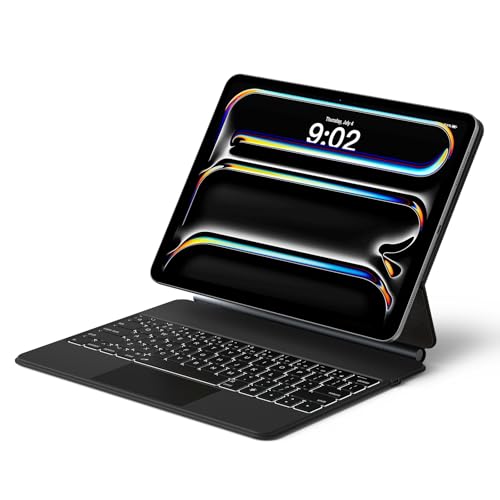
- Magnetic Floating Cantilever Design: Experience the ultimate stability with this iPad Pro 13 inch case with keyboard. The strong magnetic back panel instantly attaches to your device, while the floating cantilever stand allows smooth angle adjustments up to 130°. Perfect for finding the ideal viewing angle, this iPad Pro 13 magic-style keyboard alternative balances the center of gravity for steady usage on your lap or desk.
- Precision Multi-Touch Trackpad: Transform your tablet into a laptop. Our keyboard for iPad Pro 13 inch features a highly responsive built-in trackpad with native multi-touch gesture support. Effortlessly scroll, swipe, switch tasks, and drag files with precision. It is the essential iPad 13 Pro case with keyboard for students, designers, and professionals requiring efficient cursor control.
- Laptop-Grade Typing & Backlight: Enjoy a comfortable, quiet typing experience with the scissor-switch mechanism and perfect key travel. This iPad Pro 13 inch keyboard case includes adjustable backlighting, ensuring you can type accurately in dim environments. Whether you are writing papers in a dorm or emails on a plane, this iPad Pro 13 keyboard boosts productivity day and night.
Pros
-
Function row for brightness/volume/lock
-
Excellent glass trackpad with haptics
-
Premium build and steady lap use
-
No charging or Bluetooth pairing (Smart Connector)
Cons
-
Expensive and adds weight
-
Limited drop protection
-
Only fits 2024 iPad Pro models
Trade-offs / Who should skip -
If you want more protection, a kickstand, or a detachable keyboard, the Logitech Combo Touch suits better. Older Pro/Air owners should skip—this version doesn’t fit them.
2. Logitech Combo Touch — Best detachable keyboard case (Pro, Air, and 10th-gen)
A protective case with an adjustable kickstand plus a detachable, backlit keyboard and precision trackpad. It uses the Smart Connector on supported iPads, so there’s no charging or pairing. It’s the most versatile option if you switch often between tablet and laptop-style modes.

- Compatibility: iPad (10th gen & A16). Models: A2696, A2757, A2777, A3162, A3354, A3355, A3356
- Precision Trackpad: Edit documents, navigate apps and build presentations with unparalleled precision using a familiar multi-gesture keyboard trackpad
- Type Comfortably and Accurately: Well-spaced backlit keyboard with full row of iPadOS shortcut keys includes new Screenshot and Dictation keys to help you optimize productivity
Pros
-
Detachable keyboard; sturdy kickstand
-
Backlit keys + full iPadOS shortcut row
-
Smart Connector power (no charging)
-
Broad model support across Pro/Air/10th-gen
Cons
-
Bulkier/heavier than folio-only covers
-
Fabric exterior can scuff over time
-
Trackpad is good, not as luxe as Apple’s
3. Apple Magic Keyboard Folio (iPad 10th-gen only) — Best for 10th-gen iPad owners
Apple’s two-piece setup adds a function row and a large click-anywhere trackpad, plus a protective back with an adjustable stand. It’s the cleanest experience for the 10th-gen iPad—just snap on and type.
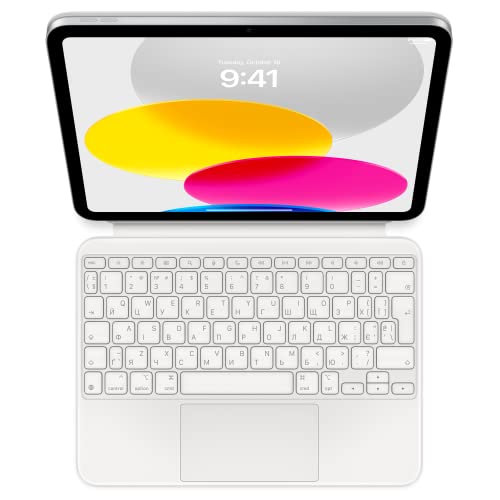
- WHY MAGIC KEYBOARD FOLIO — The perfect iPad companion, Magic Keyboard Folio features a great typing experience, a built-in trackpad to handle tasks with precision, a 14-key function row, and a two-piece design that includes a detachable keyboard and protective back panel that both attach magnetically to iPad for front and back protection. No charging or pairing required. Simply attach it and start typing.
- COMPATIBILITY — Magic Keyboard Folio works with iPad (10th generation).
- DESIGNED FOR COMFORT — Magic Keyboard Folio features a versatile two-piece design that includes a detachable keyboard and a protective back panel that attach magnetically. The large click-anywhere trackpad supports Multi‑Touch gestures and using a cursor.
Pros
-
Function row + spacious trackpad
-
Detachable keyboard with protective back
-
No charging/pairing (Smart Connector)
Cons
-
Only fits the 10th-gen iPad
-
White finish shows grime more easily
4. ZAGG Pro Keys (with/without Trackpad) — Best budget-friendly keyboard case
Spend less without giving up backlit typing or decent protection. Pro Keys models pair via Bluetooth (often two devices), and battery life is measured in months with typical use. Versions exist for many iPad sizes—double-check fit and whether you want the trackpad variant.

- Bluetooth Trackpad - Bluetooth-integrated trackpad is compatible with iPadOS and can be turned on and off.
- Detachable Keyboard and Case - The keyboard and case detach to accommodate different uses and environments.
- Backlit, Laptop-style Keys - Pro Keys have clean, precise keystrokes. Backlighting, in seven different colors, makes typing easy in low-light conditions.

Pros
-
Lower price with solid protection
-
Backlit keys; multi-device Bluetooth pairing
-
Long battery life between charges
Cons
-
Needs charging; occasional Bluetooth hiccups possible
-
Trackpad feel varies by model
Trade-offs / Who should skip -
If you never want to charge a keyboard and prioritize the best trackpad, stick with Smart-Connector options from Apple or Logitech.
5. Logitech Keys-To-Go 2 — Best ultra-portable travel keyboard (great for iPad mini)
A super-slim standalone Bluetooth keyboard with a built-in hard cover. Toss it in any bag and type anywhere. It supports multi-device pairing and uses long-lasting coin-cell batteries. There’s no trackpad and it’s not a case—pure portability.

- For any screen, any OS: Use Keys-To-Go 2 wireless keyboard on tablets and devices that use Windows, Android, and ChromeOS
- Ultra Portable Keyboard: The super slim, lightweight design of this portable Bluetooth keyboard makes it easy to pack and go—it’s the perfect companion to your tablet or other mobile device
- Keeps You Covered: Built-in cover protects the compact keyboard from damage so you can stay productive all day long
Pros
-
Featherweight; integrated cover
-
Pairs with up to three devices
-
Very long battery life (coin cells)
Cons
-
No trackpad
-
No backlighting
Trade-offs / Who should skip -
If you want couch-friendly, laptop-style use with a trackpad, go for Combo Touch. If you just need occasional typing on the go, this is the easiest to carry.
Buying guide
-
Start with compatibility. Match your exact iPad (year, size, and generation). Newer Pro models (2024) require the latest Magic Keyboard or the corresponding Combo Touch. Air and 10th-gen owners should look at their specific Combo Touch variants; 10th-gen also has Apple’s Magic Keyboard Folio. iPad mini owners are best served by a compact Bluetooth keyboard plus a stand.
-
Power and pairing. Smart Connector accessories draw power from the iPad—no charging or Bluetooth pairing. Bluetooth boards work across multiple devices (iPad, Mac, phone) but require occasional charging or battery swaps.
-
Layout & ergonomics. A function row speeds up brightness/volume/search. Backlighting helps in low light. Larger glass trackpads feel more “laptop-like.”
-
Protection vs. portability. Case-style keyboards (Combo Touch/ZAGG) protect the back and corners. The Pro-focused Magic Keyboard prioritizes typing feel over drop protection.
-
Where you’ll use it. If you type in your lap a lot, a rigid hinge/clamshell helps. If you draw or watch video, a kickstand with a detachable keyboard is more flexible.
FAQs
Q: Smart Connector vs. Bluetooth — which should I choose?
A: Smart Connector if you value reliability and never want to charge a keyboard. Bluetooth if you want multi-device pairing or plan to use the keyboard with a phone or computer too.
Q: Do I need a trackpad?
A: If you use your iPad like a laptop, yes—the cursor in iPadOS is excellent with Apple/Logitech trackpads. If you only type notes and don’t need precision pointing, a keyboard-only option is fine.
Q: What’s best for iPad mini?
A: There’s no first-party keyboard case. Pair a lightweight Bluetooth keyboard (like Keys-To-Go 2) with a portable stand.
Q: Will the 2024 Magic Keyboard work with older iPad Pros or iPad Air?
A: No. It’s designed for the 2024 iPad Pro sizes. For other models, choose the model-specific Logitech Combo Touch.
Q: I want a desktop-class typing feel.
A: Consider a low-profile mechanical like the Keychron K3-series (or similar). You’ll need a separate stand and a mouse/trackpad, but ergonomics can be better for long sessions.
As an Amazon Associate, I earn from qualifying purchases.