
5 Gaming Mice That Pro Players Actually Use — And Why They Work
As an Amazon Associate I earn from qualifying purchases. Some links may earn us a commission at no extra cost to you.
A gaming mouse isn’t about DPI numbers — it’s about sensor accuracy, click latency, and fit in your hand during a three-hour session. The ones below are what competitive players actually compete with, not what gets pushed by gaming peripherals marketing.
I reviewed pro player gear data, esports equipment tracking databases, and long-term reliability reports to identify the five options that show up consistently at the top level.
Logitech G Pro X Superlight 2 — Best Wireless Gaming Mouse
The G Pro X Superlight 2 is the mouse most tournament-level players carry — it’s the lightest wireless gaming mouse Logitech has built at 60g, and LIGHTFORCE hybrid switches deliver clicks that register faster than any mechanical alternative. Why it wins: The combination of 60g weight, 44,000 DPI HERO 2 sensor, and 8kHz polling rate creates zero compromise between portability and performance — most wireless mice force a trade-off on at least one of those specs.

- Better Performance: The Logitech Superlight 2, our championship winning wireless mouse gaming is now even better; with 8 kHz polling, USB-C charging, 95-hour battery life and POWERPLAY compatibility at 60 g
- Wireless Mouse for Gaming: A pro gaming icon—now faster and more precise; it is designed in collaboration with the world’s leading esports pros and engineered to win
- Most Advanced Optical Sensor in Gaming: HERO 2 with tracking over 888 plus IPS, up to 44,000 DPI, precise sensor calibration with zero smoothing, acceleration or filtering with this gaming mouse
Pros
- 60g ultra-lightweight — same weight class as the original Superlight but with next-gen sensor and switches
- LIGHTFORCE hybrid switches register clicks in under 1ms — competitive with the fastest wired mice
- POWERPLAY compatible — charges wirelessly while in use, eliminating battery anxiety during long sessions
Cons
- Ambidextrous shape doesn’t suit all hand sizes — try before buying if possible
- Premium price point compared to budget wireless alternatives
See rating & reviews on Amazon.
Trade-offs / Who should skip
If you have large hands or prefer an ergonomic right-handed shape, the Razer Basilisk V3 Pro or DeathAdder V3 Pro will fit better. The G Pro X Superlight 2’s symmetrical profile is optimized for palm and claw grips with medium-sized hands.
Scores: Sensor Accuracy 5/5 | Click Latency 5/5 | Build Quality 5/5 | Value 4/5
Razer DeathAdder V3 Wired — Best Ergonomic Gaming Mouse
The DeathAdder V3 is the most refined version of Razer’s most successful mouse shape — it weighs just 59g, uses a Focus Pro 30K optical sensor, and features Gen-3 optical switches that eliminate the mechanical debounce delay of traditional switches. Why it wins: The ergonomic right-handed profile fits large hands better than almost any competing option at this weight class, making it the go-to for right-handed claw and fingertip grip players.

- 59G ULTRA-LIGHTWEIGHT DESIGN — Enjoy a level of speed and control favored by the world’s top players with one of the lightest ergonomic esports mice ever created
- FOCUS PRO 30K OPTICAL SENSOR — Flawless tracking performance on a wider variety of surfaces including glass—supported by intelligent functions for enhanced aim and control
- OPTICAL MOUSE SWITCHES GEN-3 — From an improved 90-million click lifecycle with zero double-clicking issues, to a blistering 0.2ms actuation with no debounce delay, the mouse has the reliability and speed built for esports
Pros
- 59g ultra-lightweight with Speedflex cable that creates near-zero drag — feels wireless
- Focus Pro 30K optical sensor with smart tracking and asymmetric cut-off
- Gen-3 optical switches eliminate debounce delay — zero input lag on click registration
Cons
- Right-handed only — left-handed players should look at Logitech’s symmetrical options
- No wireless option at this weight — wireless DeathAdder V3 Pro adds 4g and cost
See rating & reviews on Amazon.
Trade-offs / Who should skip
Left-handed players and those who prefer wireless should skip the V3 wired and look at the G Pro X Superlight 2 or Razer Basilisk V3 Pro instead. The DeathAdder V3’s wired format is actually preferred by many competitive players specifically because it eliminates battery management.
Scores: Sensor Accuracy 5/5 | Click Latency 5/5 | Build Quality 4.5/5 | Value 4.5/5
Logitech G502 X Wired — Best Feature-Rich Gaming Mouse
The G502 X is the most feature-packed mouse on this list — 13 programmable buttons, adjustable weight system, LIGHTFORCE switches, and a HERO 25K sensor — making it the best choice for MMO, MOBA, and strategy players who need more input options than a standard 5-button layout offers. Why it wins: No other gaming mouse in its class combines this level of button customization with a competition-grade sensor and LIGHTFORCE switch technology.
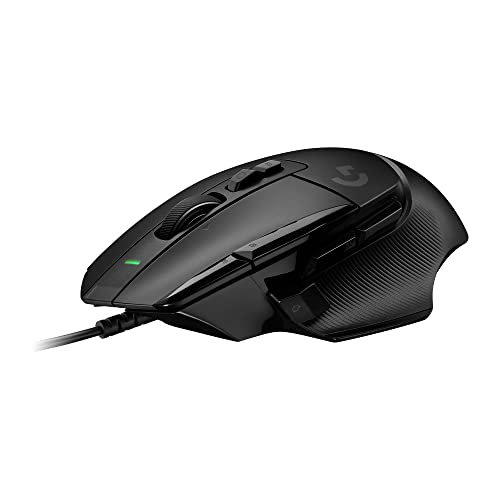
- Icon reinvented: From the legacy of Logitech's most popular G502 design, the G502 X wired gaming mouse is reimagined and redesigned with the latest innovations in gaming technology
- LIGHTFORCE switches: All-new hybrid optical-mechanical switch technology for incredible speed and reliability, as well as precise actuation with crisp response, for hours of performance gaming
- HERO 25K gaming sensor: Incredibly precise down to the sub-micron for high-precision accuracy with zero smoothing/filtering/acceleration for high gaming performance every time on the computer
Pros
- 13 programmable buttons — the most customizable layout available in a gaming mouse
- Adjustable weight system lets you tune the feel to your exact preference
- LIGHTFORCE hybrid switches with HERO 25K sensor rated for 100 million clicks
Cons
- 100g+ weight makes it one of the heavier mice on this list — not ideal for low-sens flick aiming
- Right-handed ergonomic shape only
See rating & reviews on Amazon.
Trade-offs / Who should skip
Competitive FPS and battle royale players who prefer low-sens flick aiming will find the G502 X’s weight a disadvantage. It’s the wrong tool for that playstyle. The G502 X is the right choice for deliberate, precision gameplay in complex-input genres.
Scores: Sensor Accuracy 5/5 | Click Latency 4.5/5 | Build Quality 5/5 | Value 4/5
Razer Basilisk V3 Pro — Best Wireless Ergonomic Mouse
The Basilisk V3 Pro combines Razer’s most ergonomic shape with HyperSpeed wireless, 13 programmable buttons, and a HyperScroll tilt wheel that switches between click-to-click and free-scroll modes — making it the most versatile wireless gaming mouse available for mixed gaming and productivity use. Why it wins: Three connection modes (2.4GHz, Bluetooth, wired) mean it works across every setup configuration without switching dongles or cables.
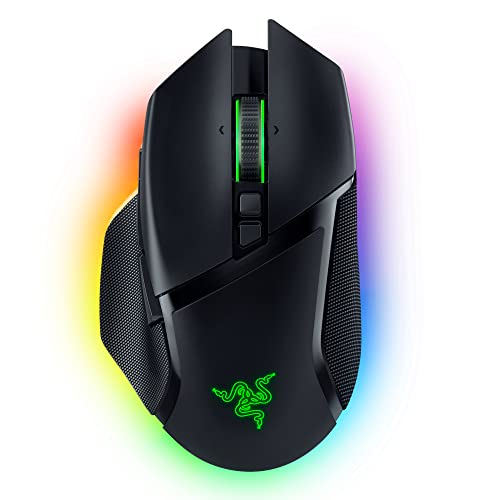
- ICONIC ERGONOMIC FORM WITH 10 1 PROGRAMMABLE BUTTONS: Favored by millions worldwide, the mouse’s signature shape perfectly supports cutting-edge ergonomics and endless customizability options
- 13-ZONE CHROMA LIGHTING WITH FULL UNDERGLOW: Customize each zone from over 16.8 million colors and countless lighting effects, and experience greater immersion as they react dynamically with over 150 Chroma-integrated games
- RAZER FOCUS PRO 30K OPTICAL SENSOR: Razer’s brand-new sensor provides flawless tracking performance on a wider variety of surfaces, including glass—supported by intelligent functions for enhanced aim and control

Pros
- HyperScroll tilt wheel switches between free-scroll and ratchet modes on the fly
- Three connection modes — 2.4GHz HyperSpeed, Bluetooth, and wired for any setup
- 13 programmable buttons with Chroma RGB and wireless charging dock compatibility
Cons
- 119g weight makes it the heaviest mouse on this list — not competitive in FPS weight class
- Higher price than comparable wireless mice without the tilt wheel feature set
See rating & reviews on Amazon.
Trade-offs / Who should skip
Pure competitive FPS players should choose the Logitech G Pro X Superlight 2 or DeathAdder V3 instead. The Basilisk V3 Pro is the right choice for players who use their mouse for gaming and productivity in equal measure and want the best wireless ergonomic option available.
Scores: Sensor Accuracy 4.5/5 | Click Latency 4.5/5 | Build Quality 5/5 | Value 4/5
SteelSeries Aerox 3 Wireless — Best Lightweight Wireless for Budget
The Aerox 3 Wireless delivers the essential specs for competitive play — a TrueMove Air 18K optical sensor, 2.4GHz and Bluetooth dual wireless, and an IP54 AquaBarrier water-resistant design — at a price point well below the G Pro X Superlight 2. Why it wins: 200-hour battery life is the longest of any wireless gaming mouse in this weight class, which eliminates the need to carry a charging cable to LAN events or on travel.

- BEAUTIFUL RGB — Radiant 3-zone PrismSync RGB shines in 16.8 million configurable colors
- ULTRA LIGHTWEIGHT — Purposefully designed holey shell reduces weight to 68g for effortless, fast gameplay
- AQUABARRIER — Mouse interiors are shielded from water splashes, dust, and dirt, technology rated IP54
Pros
- 200-hour battery life — the longest of any wireless mouse in this weight and price range
- IP54 AquaBarrier water resistance — the only gaming mouse in this category with splash protection
- Dual wireless (2.4GHz + Bluetooth) for flexible connectivity across devices
Cons
- TrueMove Air sensor, while excellent, doesn’t match the HERO 2’s tracking precision at extreme speeds
- Honeycomb shell requires periodic cleaning to remove debris from holes
See rating & reviews on Amazon.
Trade-offs / Who should skip
Players who hate cleaning their peripherals should skip the honeycomb design — the holes accumulate debris. The Aerox 3 Wireless is the best wireless value on this list for players who don’t need the G Pro X Superlight 2’s tournament-grade specifications at a lower price point.
Scores: Sensor Accuracy 4.5/5 | Click Latency 4.5/5 | Build Quality 4/5 | Value 5/5
Quick Compare
- Best wireless gaming mouse: Logitech G Pro X Superlight 2
- Best ergonomic wired mouse: Razer DeathAdder V3
- Best for MMO/MOBA with lots of buttons: Logitech G502 X
- Best wireless ergonomic mouse: Razer Basilisk V3 Pro
- Best value wireless: SteelSeries Aerox 3 Wireless
FAQs
Does DPI actually matter for gaming?
High maximum DPI is mostly a marketing number — most competitive players use 400–800 DPI with higher in-game sensitivity. What actually matters is sensor accuracy (zero acceleration and smoothing), polling rate (the speed at which position is reported), and click latency. All five mice on this list excel at what actually determines competitive performance.
Is wireless gaming mouse performance as good as wired?
Yes — modern 2.4GHz wireless gaming mice from Logitech (Lightspeed) and Razer (HyperSpeed) have input latency indistinguishable from wired in controlled testing. Bluetooth wireless is slightly slower and not recommended for competitive play, but 2.4GHz wireless has been tournament-legal at the highest levels for years.
What grip style should determine which mouse I buy?
Palm grip players benefit from ergonomic shapes like the DeathAdder V3 and Basilisk V3 Pro. Claw and fingertip grip players typically prefer lighter, more neutral shapes like the G Pro X Superlight 2 and Aerox 3. Heavy feature mice like the G502 X work best with palm grips due to weight.
How often do gaming mice need to be replaced?
Razer and Logitech rate their top switches at 60–100 million clicks, which translates to 5–10+ years of daily gaming. The failure point is usually the scroll wheel encoder or cable — wireless mice avoid cable issues entirely. Mouse pads wear faster than mice and should be replaced every 1–2 years for consistent performance.
As an Amazon Associate, I earn from qualifying purchases.