
5 Best Handheld Emulators — Every Retro Console in Your Pocket
As an Amazon Associate I earn from qualifying purchases. Some links may earn us a commission at no extra cost to you.
The handheld emulator market has matured enough that you no longer have to choose between price and performance — modern devices run PS1, N64, GBA, SNES, and even PS2 and Dreamcast at full speed without breaking $100. The five below represent the best options at each price tier and form factor, tested against the libraries that matter most.
I reviewed emulation performance benchmarks, community compatibility reports, and long-term build quality feedback from retro gaming communities to identify the options that deliver the best experience per dollar across real-world use.
Anbernic RG35XX 2024 — Best Budget Handheld Emulator
The Anbernic RG35XX 2024 uses an H700 quad-core ARM Cortex-A53 processor with 1GB LPDDR4 RAM to run GBA, SNES, NES, Game Boy Color, and arcade games flawlessly — and PS1 at playable speeds — in a form factor that fits in a shirt pocket. Why it wins: At this price tier, the RG35XX 2024’s H700 chip is a meaningful upgrade over the older A9 chip — it pushes the emulation ceiling higher while keeping the price accessible for first-time retro handheld buyers.

Pros
- H700 quad-core processor handles 16-bit era systems flawlessly and pushes into PS1 territory for most titles
- 3.5-inch IPS OCA screen at 640×480 — sharper and more vibrant than older LCD-equipped budget handhelds
- 2600mAh battery for 6–7 hours of play — enough for a full day out without needing to recharge
Cons
- N64, PSP, and Dreamcast emulation is inconsistent — works for some titles but not reliably
- No Wi-Fi on base model — online gaming and ROM downloading require a separate device
See rating & reviews on Amazon.
Trade-offs / Who should skip
Users who want reliable N64, Dreamcast, or PSP emulation should choose the Retroid Pocket 4 Pro instead. The RG35XX 2024 is the right entry point for users new to retro handhelds who primarily want GBA, SNES, and PS1 experiences at the lowest price that still performs well.
Scores: Emulation Power 3.5/5 | Screen Quality 4/5 | Build Quality 4/5 | Value 5/5
Miyoo Mini Plus — Best Pocket-Sized Handheld
The Miyoo Mini Plus runs OnionOS — one of the most polished custom operating systems in the retro handheld space — with a 3.5-inch 640×480 IPS screen, 3000mAh battery, and Wi-Fi connectivity in a form factor small enough to carry everywhere. Why it wins: OnionOS transforms the hardware into one of the most intuitive retro gaming experiences available — with automatic game saving, instant resume, and a clean interface that makes navigating a large game library effortless.
No products found.
Pros
- OnionOS provides the most polished software experience in the budget handheld category — better UI than devices costing more
- 3000mAh battery supports 7+ hours of play — among the longest battery life in this size class
- Wi-Fi support enables online multiplayer, ROM downloads, and OTA system updates from the device
Cons
- Emulation power similar to RG35XX — handles 16-bit and PS1 well but struggles with N64 and above
- D-pad and buttons feel slightly less tactile than premium alternatives — noticeable to experienced users
See rating & reviews on Amazon.
Trade-offs / Who should skip
Users who want to play demanding 3D games from N64, PSP, or Dreamcast will hit the hardware ceiling faster than with the Retroid Pocket 4 Pro. The Miyoo Mini Plus is the right choice when pocketability, battery life, and software polish matter more than maximum emulation capability.
Scores: Emulation Power 3.5/5 | Screen Quality 4.5/5 | Build Quality 4/5 | Value 5/5
Retroid Pocket 4 Pro — Best Full-Featured Handheld Emulator
The Retroid Pocket 4 Pro runs Android 13 with a MediaTek Dimensity 1100 processor — powerful enough to emulate GameCube, Wii, Dreamcast, PSP, and PS2 accurately across a wide game library — with Google Play access for Android games and cloud gaming on top of retro emulation. Why it wins: The jump from 16-bit and PS1 emulation to reliable GameCube and PS2 emulation is the most significant performance milestone in handheld emulators — the Retroid Pocket 4 Pro crosses that threshold at a price the category hasn’t seen before.

- High-Performance Computing: Equipped with a Mediatek Dimensity 1100 Octa Core CPU, featuring 4xA78 cores at 2.6Ghz, and a G77 MC9 GPU at 836Mhz, the Pocket 4 Pro offers unparalleled gaming performance. Its 8GB LPDDR4X RAM enhances this experience, ensuring smooth and responsive gameplay for even the most demanding games.
- Expansive and Flexible Storage Options: With a generous 128GB of UFS 3.1 internal storage, the Pocket 4 Pro provides ample space for an extensive game library. Additionally, the flexibility to expand storage via a Micro SD card slot ensures you never run out of room for your favourite games and media.
- Superior Display and Video Output: Boasting a 4.7” touchscreen display, this handheld offers vivid and crisp visuals for an immersive gaming experience. It also supports video output of 720P through HDMI and 1080P via USB Type-C, allowing for versatile gaming on larger screens, whether at home or on the move.
Pros
- Dimensity 1100 processor handles GameCube, Wii, PS2, and Dreamcast at playable speeds across most titles
- Android 13 with Google Play — runs Android games, streaming apps, and cloud gaming in addition to emulators
- 4.7-inch 16:9 display with 5000mAh battery — bigger screen and longer battery than smaller form-factor alternatives
Cons
- Larger form factor doesn’t fit in a pocket — requires a bag or dedicated carry case
- No games preloaded — you need to source and add your own ROM files before it works as an emulator
See rating & reviews on Amazon.
Trade-offs / Who should skip
Users who only play 16-bit and PS1 games don’t need the Retroid Pocket 4 Pro’s extra power and should save money with the RG35XX or Miyoo Mini Plus. The RP4 Pro is specifically worth the upgrade when your game library includes GameCube, PS2, or Wii titles — or when you want an Android gaming device with emulation capability as a secondary function.
Scores: Emulation Power 5/5 | Screen Quality 4.5/5 | Build Quality 4.5/5 | Value 4/5
Powkiddy RGB30 — Best Screen for Pixel Art Games
The Powkiddy RGB30 uses a 4-inch 720×720 square IPS screen — an unusual format that perfectly matches the native resolution of Game Boy, Game Boy Color, GBA, SNES, and classic arcade games without scaling distortion or black bars. Why it wins: Every other handheld uses a 16:9 or 4:3 display that requires letterboxing or stretching for 1:1 pixel-ratio retro games — the RGB30’s square format is the only design that displays those games at their true intended resolution.
No products found.
Pros
- 720×720 square IPS screen displays Game Boy, GBA, SNES, and arcade games at perfect 1:1 pixel ratio without distortion
- RK3566 processor handles 16-bit and PS1 reliably with Wi-Fi and Bluetooth for connectivity
- 4100mAh battery with up to 8 hours of play — the longest battery of any device on this list
Cons
- Square screen format creates black bars for 16:9 video content and modern aspect ratio games
- Build quality is lower than Anbernic and Retroid alternatives — buttons have less satisfying tactile feedback
See rating & reviews on Amazon.
Trade-offs / Who should skip
Users who want to watch video content or emulate PS2/GameCube titles should choose a device with a widescreen display instead. The RGB30 is purpose-built for pixel art retro gaming — the square screen is its defining advantage and only makes sense if your library is dominated by 4:3 and Game Boy era titles.
Scores: Emulation Power 3.5/5 | Screen Quality 5/5 | Build Quality 3.5/5 | Value 4.5/5
Anbernic RG35XX H — Best Horizontal Layout Handheld
The Anbernic RG35XX H uses the same H700 processor as the RG35XX 2024 but in a horizontal Game Boy Advance-inspired layout — with dual analog sticks instead of the vertical device’s single joystick, making it significantly more comfortable for 3D games and extended sessions. Why it wins: The horizontal layout with dual sticks eliminates the single biggest ergonomic complaint about vertical handhelds — thumb cramps from holding a tall device — while the H700 chip handles the same game library as the RG35XX 2024.
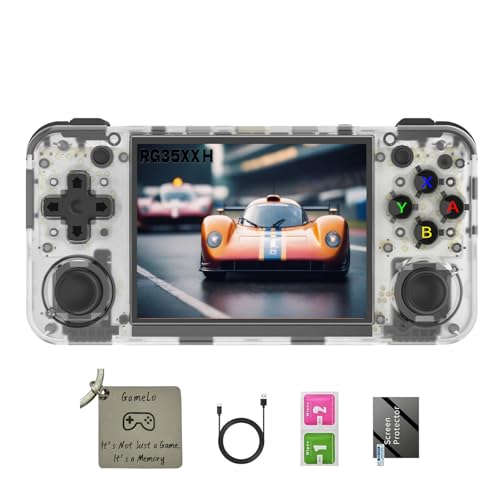
- 【3.5-inch HD creen】 3.5-inch HD Screen With Dual Joysticks, Vibration Motors, and Dual Speakers for better Fighting and Racing Gaming Experience.
- 【3300 mAh High-Capacity Battery】3300mAh High-Capacity Battery, Range of up to 8 Hours, USB Type-C Fast Charging. Enjoy Games Anytime, Anywhere.
- 【Built-in 10+ Emulators】64G TF Card built-in 10+ Emulators, Support PSP, Covering Adventure, Shooting, Action, Racing and Other types of Games.Supports 30+ Emulators, You Can Download Games For Related Emulators.
Pros
- Horizontal GBA-inspired layout — more comfortable for extended gaming sessions than vertical form factors
- Dual analog sticks vs. the single stick on the vertical RG35XX — better control for PS1 3D games
- H700 processor handles the same 16-bit and PS1 library as the vertical RG35XX 2024
Cons
- Slightly larger than the vertical RG35XX — doesn’t fit in all pockets as easily
- Same emulation ceiling as the standard RG35XX — N64 and above remains inconsistent
See rating & reviews on Amazon.
Trade-offs / Who should skip
Users who play primarily 2D games (Game Boy, SNES, NES) and prefer a vertical form factor don’t need the horizontal layout’s dual sticks. The RG35XX H is the better choice when you play PS1 3D games where analog control matters, or simply prefer the horizontal Nintendo Switch-style ergonomics over vertical handheld designs.
Scores: Emulation Power 3.5/5 | Screen Quality 4/5 | Build Quality 4/5 | Value 4.5/5
Quick Compare
- Best budget entry-level handheld: Anbernic RG35XX 2024
- Best pocket-sized device with great software: Miyoo Mini Plus
- Best for GameCube, PS2, and Android games: Retroid Pocket 4 Pro
- Best screen for pixel art games: Powkiddy RGB30
- Best horizontal layout: Anbernic RG35XX H
FAQs
Are handheld emulators legal?
The hardware and emulator software itself is legal. ROM files (game files) occupy a legally complex area — you can legally create backups of games you own, but downloading ROMs of games you don’t own is technically copyright infringement. The legal status varies by country. The devices themselves are sold legally and have legitimate uses beyond gaming.
What games can a budget handheld emulator run?
Devices with the RK3566 or H700 processor (RG35XX, Miyoo Mini Plus, Powkiddy RGB30) reliably run NES, SNES, Game Boy, GBA, Sega Genesis, PS1, and most arcade systems. N64 runs 50–70% of titles at playable speeds. PS2, GameCube, Wii, and PSP require the Retroid Pocket 4 Pro’s more powerful Dimensity 1100 processor.
Does the screen quality matter for retro games?
Yes — IPS screens with OCA bonding reduce reflection and produce more vibrant colors than TN or standard IPS panels, making a real difference for pixel art games. The Powkiddy RGB30’s 720×720 square screen is the most technically correct format for Game Boy and SNES games. Higher resolution screens also allow for pixel-perfect shader filters that make retro games look better than they did on original hardware.
What’s the difference between buying preloaded and blank handhelds?
Preloaded devices come with ROMs already installed, which is convenient but legally and ethically questionable. Blank devices require you to source and install your own ROM files. For legal and practical reasons, most enthusiasts buy blank devices and source their own libraries. The emulator software (RetroArch, Garlic OS, OnionOS) is free and open-source regardless.
As an Amazon Associate, I earn from qualifying purchases.