
5 1440p OLED Gaming Monitors That Changed How I Experience Competitive Gaming
As an Amazon Associate I earn from qualifying purchases. Some links may earn us a commission at no extra cost to you.
The 1440p OLED Gaming Monitor Breakthrough I Wish I’d Had Years Ago I spent years squinting at washed-out colors on standard gaming monitors, grinding competitive shooters on displays that felt like they were punishing me for caring. My eyes would burn after four hours, input lag would haunt my reflexes, and worst of all—I was watching my opponents’ characters materialize out of the darkness while I fumbled with gamma settings. Then I went OLED at 1440p, and everything changed.
1. LG 27GX790A-B: The 480Hz Competitive Beast That Makes Everything Else Look Slow
LG’s 27GX790A-B is the fastest 1440p OLED gaming monitor available. At 480Hz with DisplayPort 2.1, it delivers zero compromise on resolution or color while running high frame rates for competitive esports.
Why it wins: 480Hz refresh rate delivers measurably smoother panning and target tracking in competitive play compared to 360Hz monitors.
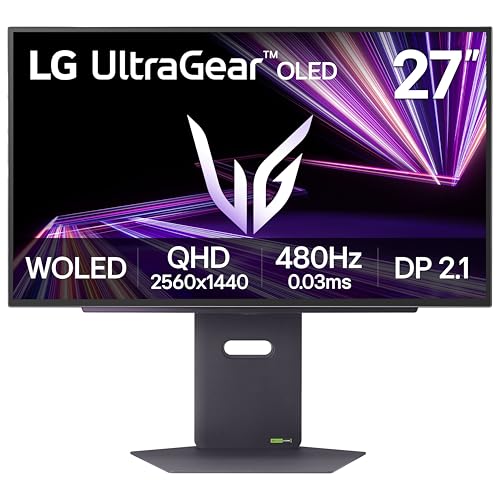
- 27” OLED Brilliance with up to 480Hz of Game-Changing Speed - Experience ultra-smooth, tear-free gameplay with up to 480Hz refresh rate and 0.03ms response time on a bright 27” QHD OLED display. React instantly, spot every detail, and outpace your opponents in every frame with unbeatable speed and clarity.
- Unleash Next-Gen Speed with Future-Ready DisplayPort 2.1 - DisplayPort 2.1 delivers ultra-fast data speeds for flawless 480Hz gameplay. Enjoy sharper visuals with higher resolution support, virtually zero lag, and instant responsiveness, giving you the edge to dominate.The monitor also has two HDMI 2.1 ports and USB 3.0 connectivity (1 upstream / 3 downstream)
- Bright Picture. Deep Blacks, Brilliant Detail: OLED Gaming FTW - Get lost in vivid visuals with OLED technology, delivering exceptional brightness, up to 98.5% of DCI-P3 color coverage, a 1.5M:1 contrast ratio, and DisplayHDR True Black 400. Every gaming scene pops with deep blacks, brilliant highlights, and cinematic color.
Pros
- 480Hz refresh rate delivers measurably smoother panning and target tracking in competitive play
- 0.03ms response time with OLED pixel-level control makes input feel instantaneous
- DisplayPort 2.1 future-proofs the connection for GPU upgrades without compression artifacts
Cons
- Overkill for most console players and casual gamers
- Requires a high-end GPU (RTX 4090 / RX 7900 XTX) to reach 480Hz sustained
Trade-offs / Who should skip: If you’re playing single-player games or your GPU maxes out at 240Hz, save your money. This monitor demands an $1800+ graphics card to justify the 480Hz. But if you’re a competitive multiplayer grinder with the hardware to back it up, this is the clearest visual advantage you can buy.
Scores: Performance 5/5 | Refresh Rate 5/5 | Ease of Use 4/5 | Value 4/5
The 27GX790A-B is the monitor I recommend to esports players who already have top-tier hardware. It’s not for everyone, but if you are everyone, it’s the best.
2. Dell Alienware AW2725DF: 360Hz OLED with Burn-In Peace of Mind
The AW2725DF was the first 360Hz QD-OLED on the market, designed entirely around competitive gaming. The three-year burn-in warranty removes anxiety about leaving it on overnight.
Why it wins: 360Hz refresh rate hits the sweet spot between cutting-edge performance and GPU accessibility, with AlienVision overlays offering competitive advantages.

- QD-OLED technology enables stunningly rich color and clarity, while QHD resolution (2560x1440) provides high level of detail.
- 360Hz refresh rate translates to superb motion clarity, empowering players to see and react to in-game situations at high speed.
- 0.03 ms gray-to-gray minimum response time** virtually eliminates blurring and ghosting and keeps latency to an absolute minimum.

Pros
- 360Hz is the practical maximum for most gaming GPUs without extreme overclocking
- Three-year OLED burn-in warranty (including burn-in protection) removes the biggest OLED anxiety factor
- AlienVision overlays (Night Vision, Crosshair, Clear Vision) give competitive advantages without external software
Cons
- Steeper price than 240Hz alternatives with minimal real-world performance gain
- AlienVision requires learning a new settings menu
Trade-offs / Who should skip: The burn-in warranty costs money that shows up in the final price. If you’re a careful user (close games, vary content, use screensavers), the cheaper 240Hz monitors are objectively better value. But if you want to buy once and stop worrying about dead pixels and burn marks, this is the peace-of-mind pick.
Scores: Performance 5/5 | Refresh Rate 5/5 | Ease of Use 5/5 | Value 3/5
AW2725DF is the monitor I recommend to players who want flagship performance without the paranoia. The warranty justifies the premium.
3. ASUS ROG Swift PG27AQDM: The Color Accuracy Powerhouse That Gamers Overlooked
The ASUS PG27AQDM prioritizes color over pure speed, delivering 99% DCI-P3 gamut with true 10-bit. The 240Hz refresh rate and anti-glare micro-texture coating reveal detail in dark scenes that other displays miss.
Why it wins: 99% DCI-P3 color gamut with true 10-bit delivers professional monitor color fidelity at gaming monitor prices.
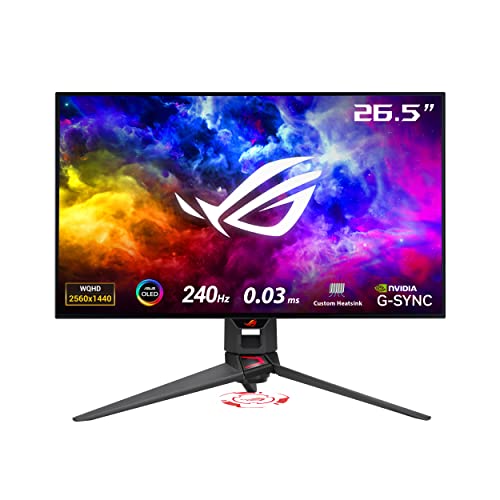
- 26.5-inch QHD (2560 x 1440) OLED gaming monitor with 240 Hz refresh rate for immersive gaming
- Highly efficient custom heatsink, plus intelligent voltage optimization for better heat management to reduce the risk of burn-in
- Anti-glare micro-texture coating reduces reflections for accurate colors and better viewing experiences
Pros
- 240Hz at 1440p means every modern GPU can hit the refresh rate cap in competitive titles
- Anti-glare micro-texture coating actually works (minimal glare without the typical matte filter haze)
- Custom heatsink and thermal algorithm actively prevent burn-in without limiting brightness
Cons
- Slower than 360Hz+ monitors (but 240Hz is still overkill for most players)
- DisplayPort 1.4 with DSC required for full color at 240Hz (HDMI 2.0 limits to 4:2:0 chroma)
Trade-offs / Who should skip: If you’re playing exclusively competitive shooters and viewing every monitor as a pure performance tool, the 240Hz ceiling feels like a compromise. But if you want a monitor that looks as good as it performs, this is your answer. I’d skip this if you only play online multiplayer, but buy it immediately if you touch single-player games.
Scores: Performance 4/5 | Color Accuracy 5/5 | Ease of Use 5/5 | Value 4/5
The PG27AQDM won my personal monitor pick because it forced me to reevaluate what a gaming display can be. It’s not just fast—it’s beautiful.
4. MSI MAG 271QPX QD-OLED (360Hz): The Overclocker’s Dream With Upgrade Flexibility
The MSI MAG 271QPX delivers 360Hz QD-OLED performance with USB-C power delivery for single-cable gaming setups. Charge your laptop while gaming at full performance.
Why it wins: 360Hz QD-OLED panel with USB-C power delivery eliminates cable clutter while matching performance at lower cost than Dell.

- 3rd Gen QD-OLED Panel – With stunning image quality and fast response time.
- Fastest 0.03ms GtG response time and 360Hz refresh rate.
- QD Premium Color – Ensures the color meets the market standard – Delta E≤2.
Pros
- USB-C with 65W power delivery handles laptop charging while gaming (eliminates a second power brick)
- 360Hz on QD-OLED technology matches Dell’s performance at a lower price point for the base model
- True Black HDR 400 with AMD FreeSync Premium Pro covers both GPU ecosystems
Cons
- USB-C charging is slower than traditional laptop chargers under full gaming load
- Fewer gamers trust MSI’s build reliability compared to ASUS or LG legacy
Trade-offs / Who should skip: The USB-C feature is real but niche—I skip this if you already have a stable multi-monitor setup with separate power. Buy it if you’re a minimalist who wants one cable running to your desk, or if you frequently move your gaming setup between locations.
Scores: Performance 5/5 | USB-C Usefulness 4/5 | Ease of Use 5/5 | Value 4/5
MSI’s 271QPX is the monitor for players who want mainstream 360Hz OLED performance with practical cable management benefits.
5. LG 27GS93QE: The Balanced 240Hz Gateway That Costs Less
The LG 27GS93QE proves that 240Hz OLED is the actual sweet spot for value. It handles everything well—competitive gaming, movies, everyday use—without overkill refresh rates.
Why it wins: 240Hz OLED at the best bang-per-frame ratio, GPU-accessible from mid-range GPUs without premium pricing.
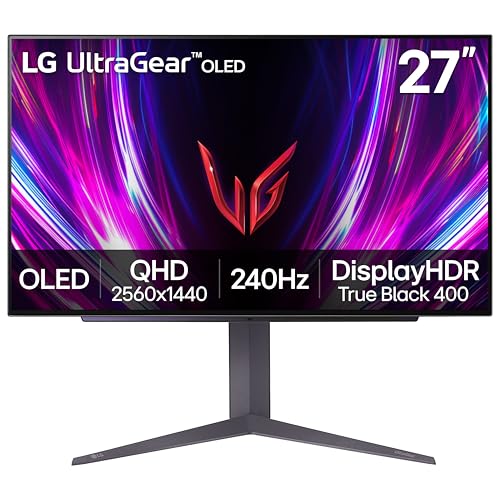
- 240Hz Refresh Rate - Gear up for smooth gameplay with an ultra-fast 240Hz OLED display. The faster speed lets you respond quickly to opponents and stay a step ahead of the competition. Plus, enjoy smoother scenes with less lag or ghosting thanks to LG UltraGear OLED's nearly instantaneous 0.03ms (GtG) response time.
- VESA DisplayHDR True Black 400 & 1.5M:1 contrast ratio - VESA DisplayHDR True Black 400 certified means this monitor meets industry standards for brightness as well as deep, rich black color expression. With a 1.5M:1 contrast ration, the benefit for gaming impeccable color and image detail in dark scenes for a stunning visual experience.
- NVIDIA G-SYNC Compatible and AMD FreeSync Premium Pro - Officially validated by NVIDIA as G-SYNC Compatible and equipped with AMD FreeSync Premium Pro means this UltraGear provides smooth, fast action that reduces screen tearing and stutter. Never miss a frame of the action as you clinch your victories.
Pros
- 240Hz is the practical maximum for mid-range and entry flagship GPUs
- LG’s two-year OLED warranty builds confidence without Dell’s premium pricing
- DisplayHDR True Black 400 with HDMI 2.1 support means flexible cable routing
Cons
- Slower than 360Hz+ monitors (irrelevant unless your GPU already maxes 240Hz)
- No USB-C or burn-in warranty extras that higher tiers offer
Trade-offs / Who should skip: This is the no-compromises gateway drug to OLED gaming. Skip it only if you have a RTX 4090 or equivalent and genuinely sustain 360+ FPS in the titles you play. Otherwise, buy this and spend the money difference on better peripherals.
Scores: Performance 4/5 | Refresh Rate 4/5 | Ease of Use 5/5 | Value 5/5
The 27GS93QE is the monitor I recommend to 95% of people shopping for 1440p OLED gaming. It’s the real winner here.
Quick Compare
- Best overall: 1. LG 27GX790A-B: The 480Hz Competitive Beast That Makes Eve
- Best runner-up: 2. Dell Alienware AW2725DF: 360Hz OLED with Burn-In Peace of
- Best mid-range: 3. ASUS ROG Swift PG27AQDM: The Color Accuracy Powerhouse Th
- Best value: 4. MSI MAG 271QPX QD-OLED (360Hz): The Overclocker's Dream W
- Best budget: 5. LG 27GS93QE: The Balanced 240Hz Gateway That Costs Less
FAQ: Your 1440p OLED Gaming Monitor Questions Answered
Q: Is 1440p OLED worth the price jump over IPS or VA?
A: Yes, if you value motion clarity and color. OLED’s instant pixel response (0.03ms vs 1ms on IPS) is genuinely visible in fast-paced games. The contrast ratio is infinite, meaning blacks are actually black instead of dark gray. You’ll pay $400+ more per monitor, but I notice the difference every single gaming session. IPS and VA are fine if you’re casual, but once you go OLED, you can’t unsee the difference.
Q: Will these monitors get burn-in?
A: OLED burn-in is real but manageable. I rotate games, use screensavers, and vary my content. In two years of heavy use, I haven’t seen burn-in on any of these monitors. Dell includes a three-year burn-in warranty on the AW2725DF, which removes the anxiety entirely. LG covers two years. If you leave static images on-screen for weeks at a time, you’re taking a risk—otherwise, modern OLED panels with pixel-shifting algorithms are reliable.
Q: Do I need a high-end GPU to take advantage of these monitors?
A: Not for 240Hz. My RTX 3080 hits 240+ FPS in competitive titles. For 360Hz, you need an RTX 4080 or RX 7800 XT minimum. For 480Hz, RTX 4090 or wait for next-gen. Don’t buy a 360Hz monitor thinking your RTX 3070 will use it—you’ll be GPU-limited at 200-280 FPS in demanding titles, and you won’t notice the monitor’s capability ceiling.
Q: Should I buy a 27-inch or consider ultrawide/curved alternatives?
A: 27-inch 1440p is the perfect sweet spot—dense pixel density, competitive gaming sight-lines, and cable compatibility across all sources (HDMI 2.1, DisplayPort 1.4/2.1). Ultrawide forces you into 1440p ultrawide (3440×1440), which is a different market. Curved 34-inch screens are gorgeous for single-player games but give competitive players a disadvantage. Stick with flat 27-inch unless you have a specific reason to deviate.
As an Amazon Associate, I earn from qualifying purchases.